
BTMETER BT-816B-2pack
BTMETER BT-816B Mini Anemometer User Manual
Model: BT-816B-2pack
Product Overview
The BTMETER BT-816B is a compact, handheld digital anemometer designed for accurately measuring wind speed, temperature, and wind chill. Its portable design and multiple measurement modes make it suitable for various applications, from outdoor activities like kayaking and drone operation to professional uses such as HVAC system testing.

Figure 1: BTMETER BT-816B Mini Anemometer (Orange variant)
What's in the Box
- 2 * BT-816B Digital Anemometer
- 2 * User Manual
Key Features
- Accurate wind speed measurement: 0.67 ~ 67.1 mph / 0.3 ~ 30 m/s (±5% of reading)
- Temperature measurement: -10℃ ~ 45℃ (±2℃)
- Wind chill indication
- Manual/Auto power off
- Multiple wind speed unit selection (m/s, Ft/min, Knots, Km/hr, Mph)
- Max/Average/Current measurement modes
- ℃/℉ temperature unit exchange
- LCD backlight for improved visibility
- Compact, one-handed design with rubber protection

Figure 2: Overview of the anemometer's key features.
Setup
1. Battery Installation
The BT-816B anemometer requires batteries for operation. Locate the battery compartment on the back of the device. Open the cover, insert the batteries according to the polarity indicators, and close the compartment securely.
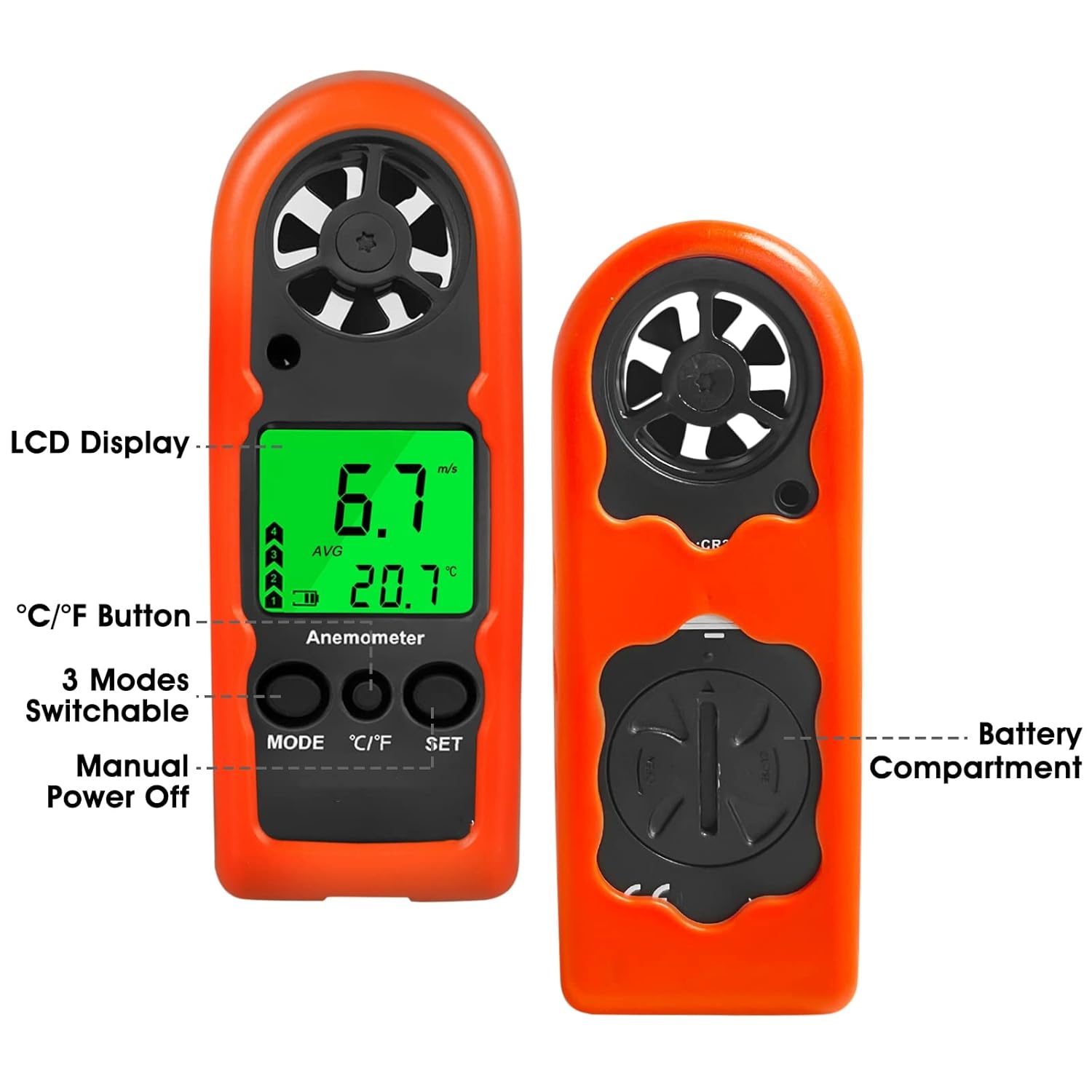
Figure 3: Rear view showing the battery compartment and front view with controls.
2. Power On/Off
To power on the device, press the MODE button for 3 seconds until the 'm/s' unit starts to blink. To turn off the unit, push the SET button.
Operating Instructions
1. Measurement Modes
The anemometer offers three measurement modes: Maximum (MAX), Average (AVG), and Real-Time (Current). Press the MODE button repeatedly to cycle through these options. The selected mode will be indicated on the LCD.

Figure 4: Illustration of the three measurement modes: MAX, Average, and Real Time.
2. Wind Speed Unit Selection
After powering on, while the 'm/s' unit is blinking, press the MODE button to select your desired wind speed unit (m/s, Ft/min, Knots, Km/hr, Mph). Confirm your selection by pressing the SET button.

Figure 5: Display showing different wind speed units and backlight status.
3. Temperature Unit Switch (℃/℉)
Press the ℃/℉ key to switch between Celsius and Fahrenheit temperature units.
4. Backlight Activation
The LCD backlight activates automatically when any key is pressed, improving visibility in low-light conditions.
5. Practical Application Examples
The BT-816B is versatile and can be used for various applications, including:
- Measuring wind speed for outdoor sports like kayaking, sailing, and paragliding.
- Assessing wind conditions for drone operation and kite flying.
- Checking air flow in HVAC systems and vents.
- General environmental monitoring.

Figure 6: Examples of the anemometer's diverse applications.
6. Instructional Video
Watch this official video for a visual guide on operating the BTMETER Mini Anemometer:
Video 1: BTMETER Mini Anemometer Handheld - Demonstrates key functions and usage scenarios.
Maintenance
1. Cleaning
Wipe the device with a soft, dry cloth. Do not use abrasive cleaners or solvents, as they may damage the casing or display. Ensure the impeller area is free from dust and debris for accurate readings.
2. Battery Replacement
When the low battery indicator appears on the display, replace the batteries promptly to ensure continuous and accurate operation. Refer to the 'Battery Installation' section for instructions.
3. Storage
Store the anemometer in a cool, dry place away from direct sunlight and extreme temperatures. If storing for an extended period, remove the batteries to prevent leakage.
Troubleshooting
| Problem | Possible Cause | Solution |
|---|---|---|
| Device does not power on | Low or dead batteries; Incorrect battery installation | Replace batteries; Ensure correct polarity |
| Inaccurate readings | Impeller obstructed; Device not held correctly; Extreme environmental conditions | Clean impeller; Ensure clear airflow to impeller; Allow device to acclimate to environment |
| LCD display is dim or blank | Low batteries; Backlight not activated | Replace batteries; Press any button to activate backlight |
Specifications
| Feature | Detail |
|---|---|
| Product Dimensions | 1.57 x 0.49 x 4.53 inches |
| Item Weight | 3.74 ounces (106 Grams) |
| Model Number | BT-816B-2pack |
| Material | Plastic |
| Manufacturer | BTMETER |
| UPC | 681381331077 |

Figure 7: Physical dimensions of the BT-816B anemometer.
Warranty and Support
BTMETER provides a 60-Day Money-Back Guarantee for any quality problems. If you encounter any issues with your product, please contact BTMETER customer support for assistance or replacement.
For more information and support, visit the official BTMETER store: BTMETER Store
Related documentsBT-816B-2pack


Ask a question about this manual
Ask about setup, troubleshooting, compatibility, parts, safety, or missing instructions. Manuals+ will review the question and use this page’s manual context to help answer it.