
Introduction
This manual provides instructions for the ALLIMITY AA59-00741A and AA59-00742A replacement remote control. This remote is designed to function as a direct replacement for various Samsung TV models, offering immediate usability without complex setup procedures. Please read this manual thoroughly to understand the remote's features and operation.
Product Overview
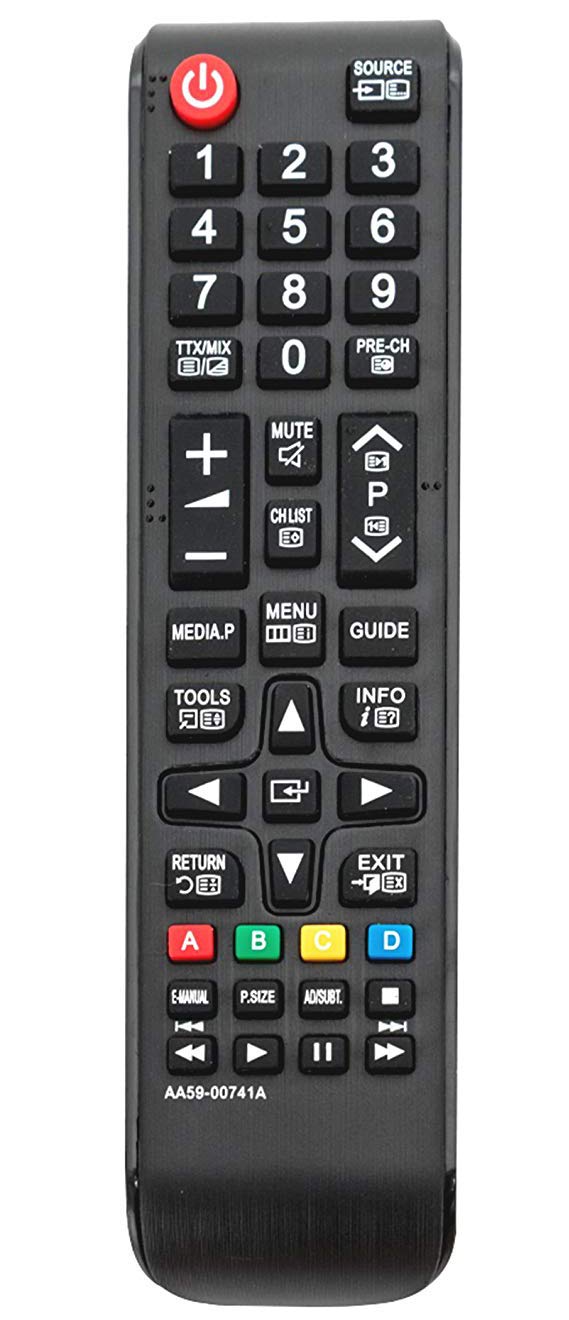
Image 1: Front view of the ALLIMITY AA59-00741A / AA59-00742A replacement remote control. The remote is black with clearly labeled buttons for power, source, numerical input, volume, channel, menu, navigation, and media playback functions.
The ALLIMITY AA59-00741A / AA59-00742A remote control features a standard layout for ease of use. Key functional areas include:
- Power Button (Red, Top Left): Turns the TV on or off.
- Source Button (Top Right): Selects input sources (HDMI, AV, etc.).
- Numeric Keypad (0-9): For direct channel input.
- Volume Up/Down (+/-): Adjusts audio volume.
- Channel Up/Down (P^/P˅): Changes TV channels.
- Mute Button: Silences the TV audio.
- Menu Button: Accesses the TV's main menu.
- Directional Pad (Up, Down, Left, Right, Enter): For navigating menus and selections.
- Return Button: Goes back to the previous screen or menu.
- Exit Button: Exits the current menu or function.
- Media Playback Controls: Play, Pause, Stop, Fast Forward, Rewind.
- Colored Buttons (A, B, C, D): For specific functions within certain TV applications or menus.
Setup
- Battery Installation:
Locate the battery compartment on the back of the remote control. Slide the battery cover downwards or outwards to open it.
Insert two (2) AAA alkaline batteries, ensuring the positive (+) and negative (-) terminals align correctly with the markings inside the compartment.
Close the battery cover by sliding it back into place until it clicks securely.
- Initial Use:
This remote control is designed to work with compatible Samsung TV models without any programming or pairing. Once batteries are installed, it is ready for immediate use.
Operating Instructions
Point the remote control directly at your Samsung TV's infrared receiver for optimal performance. Ensure there are no obstructions between the remote and the TV.
- Power On/Off: Press the Power button once.
- Changing Channels: Use the P^ (Channel Up) or P˅ (Channel Down) buttons. Alternatively, use the numeric keypad to enter a channel number directly.
- Adjusting Volume: Press the + (Volume Up) or - (Volume Down) buttons.
- Mute Audio: Press the Mute button to temporarily silence the TV. Press again to restore audio.
- Selecting Input Source: Press the Source button to cycle through available input sources (e.g., HDMI1, HDMI2, AV).
- Accessing Menus: Press the Menu button to open the TV's main menu. Use the directional pad and Enter button to navigate and select options.
- Media Playback: Use the dedicated media control buttons (Play, Pause, Stop, Rewind, Fast Forward) when watching content from a connected media device or USB.
Maintenance
- Battery Replacement: Replace batteries when the remote's response becomes sluggish or stops working. Always replace both batteries with new AAA alkaline batteries.
- Cleaning: Wipe the remote control with a soft, dry cloth. Do not use liquid cleaners or abrasive materials, as they may damage the remote.
- Storage: Store the remote in a cool, dry place away from direct sunlight and extreme temperatures. If not used for an extended period, remove the batteries to prevent leakage.
Troubleshooting
- Remote Not Responding:
Check if the batteries are inserted correctly with the correct polarity.
Replace old batteries with new AAA alkaline batteries.
Ensure there is a clear line of sight between the remote control and the TV's infrared sensor.
Verify that the remote control model (AA59-00741A / AA59-00742A) is compatible with your specific Samsung TV model.
- Intermittent Operation: This often indicates low battery power. Replace the batteries.
- Specific Buttons Not Working: Check for any physical obstructions or debris under the button. If the issue persists after cleaning and battery replacement, the remote may require replacement.
Specifications
| Feature | Detail |
|---|---|
| Brand | ALLIMITY |
| Model Numbers | AA59-00741A, AA59-00742A |
| Connectivity Technology | Infrared (IR) |
| Compatible Devices | Various Samsung TV models (refer to product description for full list) |
| Special Feature | No Programming Required |
| Battery Type | 2 x AAA Alkaline Batteries (not included) |
| Maximum Range | Approximately 10 Meters (33 feet) |
| Button Quantity | 20 |
Warranty and Support
For warranty information or technical support, please refer to the seller's policy on the purchase platform or contact the manufacturer directly. Keep your purchase receipt as proof of purchase.