
Introduction
This manual provides instructions for the ALLIMITY AH59-02298A / AH59-02299A replacement remote control. This remote is designed to be compatible with various Samsung Blu-ray player models, offering direct functionality without the need for programming.
Setup
The ALLIMITY AH59-02298A / AH59-02299A remote control requires no programming. Simply insert two AAA alkaline batteries to begin operation.
- Locate the battery compartment on the back of the remote control.
- Slide the battery compartment cover downwards and remove it.
- Insert two new AAA alkaline batteries, ensuring the positive (+) and negative (-) terminals match the diagrams inside the compartment.
- Replace the battery compartment cover by sliding it back into place until it clicks securely.
Operating Instructions
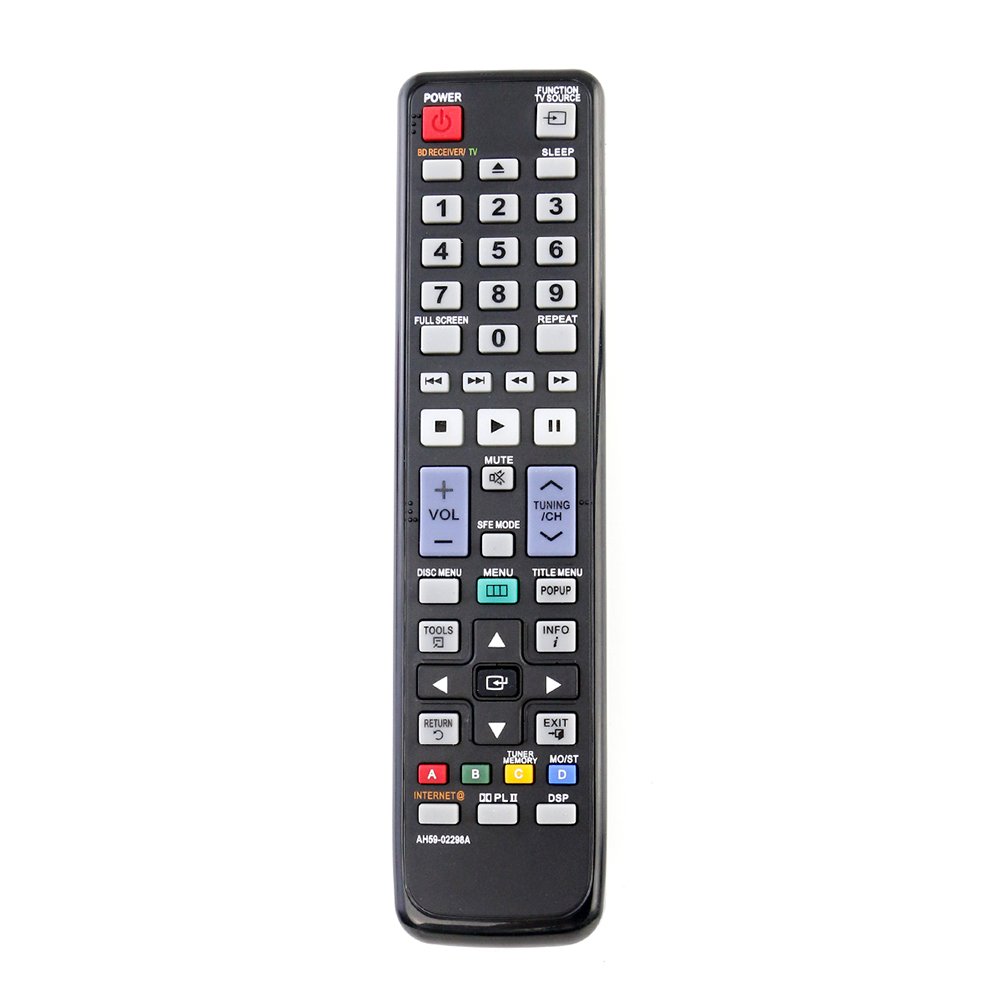
Once batteries are installed, the remote control is ready for use. Point the remote control directly at your Samsung Blu-ray player and press the desired function buttons.
- Power Button: Turns the Blu-ray player on or off.
- Navigation Buttons: Use the directional arrows (Up, Down, Left, Right) and the Enter/OK button to navigate menus.
- Playback Controls: Buttons such as Play, Pause, Stop, Fast Forward, and Rewind control media playback.
- Volume Controls: Adjust the volume of your connected audio system (if supported by the Blu-ray player's remote pass-through function).
- Function Buttons: Specific buttons for menu access, disc eject, and other player features.
Maintenance
- Battery Replacement: Replace batteries when the remote's response becomes sluggish or stops working. Always replace both batteries simultaneously with new AAA alkaline batteries.
- Cleaning: Wipe the remote control with a soft, dry cloth. Do not use liquid cleaners or abrasive materials.
- Storage: If the remote will not be used for an extended period, remove the batteries to prevent leakage and potential damage.
Troubleshooting
- Remote not responding:
- Ensure batteries are inserted correctly with the correct polarity.
- Replace old batteries with new AAA alkaline batteries.
- Check for any obstructions between the remote control and the Blu-ray player's infrared sensor.
- Ensure you are within the maximum operating range (up to 10 meters).
- Intermittent operation:
- Weak batteries may cause inconsistent performance. Replace them.
- Ensure the remote's infrared emitter is clean and unobstructed.
Specifications
| Model Name | AH59-02298A / AH59-02299A |
| Brand | ALLIMITY |
| Compatible Devices | Samsung Blu-ray Players |
| Connectivity Technology | Infrared |
| Special Feature | No Programming Required |
| Button Quantity | 20 |
| Maximum Range | 10 Meters (approx. 33 feet) |
| Battery Type | 2 x AAA Alkaline Batteries (not included) |
| Item Weight | 86 Grams (approx. 3.03 oz) |
| Item Dimensions (L x W x H) | 6" x 2" x 0.5" (approx. 15.24cm x 5.08cm x 1.27cm) |
Compatible Samsung Blu-ray Player Models
This remote control is compatible with the following Samsung Blu-ray player models:
- HTC5500
- HTC5500/NWT
- HTC5500/SAH
- HTC5500/XAA
- HTC5500/XAC
- HTC5500/XAO
- HTC5500/XAX
- HTC5500/XAZ
- HTC5500/XCH
- HTC5500/XER
- HTC5500/XFA
- HTC5500/XSA
- HTC5500/XSH
- HTC5500XAA
- HTC5530
- HTC5530/XAC
- HTC5530W
- HTC5530W/XME
- HTC5530W/XSA
- HTC5550
- HTC5550/HAC
- HTC5550/NWT
- HTC5550/XAC
- HTC5550/XER
- HTC5550/XFA
- HTC5550/XSE
- HTC5550W
- HTC5550W/MEA
- HTC5550W/STR
- HTC5550W/XAO
- HTC5550W/XFA
- HTC5550W/XME
- HTC5550W/XSA
- HTC5550W/XSH
- HTC5550W/XSS
- HTC5550W/XTC
- HTC5550W/XTR
- HTC6500
- HTC6500/XAA
- HTC6500XAA
- HTC6530
- HTC6530/XAC
- HTC6600
- HTC6600/XAA
- HTC6730W
- HTC6730W/XAA
- HTC6730W/XAC
- HTC6730WXAA
- HTC6900W
- HTC6900W/XAA
- HTC6930W
- HTC6930W/EDC
- HTC6930W/STR
- HTC6930W/XAA
- HTC6930W/XEE
- HTC6930W/XEF
- HTC6930W/XEN
- HTC6930W/XEU
- HTC6930W/XTR
- HTC6950W
- HTC6950W/MEA
- HTC6950W/XER
- HTC6950W/XFA
- HTC6950W/XSA
- HTC6950W/XSS
- HTC6950W/XTL
- HTC7530W
- HTC7530W/XAA
- HTC7550W
- HTC7550W/CHN
- HTC7550W/EDC
- HTC7550W/XEE
- HTC7550W/XEN
- HTC7550W/XSH
- HTC7550W/XTR
Warranty and Support
Specific warranty information for this product is not provided in the available documentation. For support or warranty inquiries, please refer to the retailer or manufacturer's contact information provided at the time of purchase.
