
Introduction
Welcome to your ALLIMITY replacement remote control. This manual provides instructions for setting up and operating your new remote, designed for various MAGNAVOX DVD/VCR models. This remote offers direct functionality without the need for complex programming.
Compatibility
This remote control is compatible with the following MAGNAVOX DVD/VCR models:
- DV200MW8, DV200MW8A
- MBP5210, MBP5210/F7, MBP5210F, MBP5210FF7
- MBP5220F, MBP5220F/F7
- NB887UD, NB958UD
- RZV427MG9, RZV427MG9A, ZV427MG9, ZV427MG9A
Setup
1. Battery Installation
The remote requires two (2) AAA alkaline batteries (not included).
- Locate the battery compartment on the back of the remote control.
- Slide the battery cover downwards to open.
- Insert two AAA batteries, ensuring the positive (+) and negative (-) terminals align with the markings inside the compartment.
- Slide the battery cover back into place until it clicks securely.
2. Initial Use
This replacement remote control requires no programming. Once batteries are installed, it is ready for immediate use with compatible MAGNAVOX DVD/VCR units.
Operating Instructions
This section details the functions of the buttons on your ALLIMITY remote control.
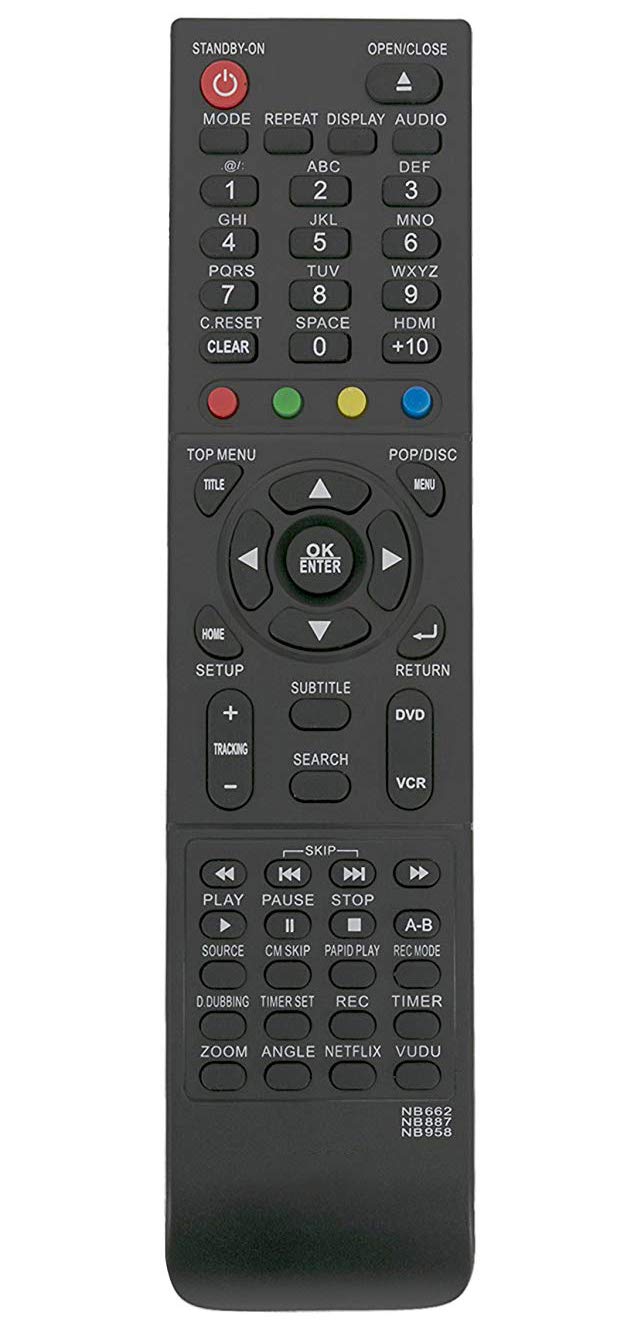
An image of the ALLIMITY replacement remote control. The remote is black with grey buttons. The top section includes power, open/close, mode, repeat, display, audio, and number buttons (0-9) with corresponding letters. Below this are colored function buttons (red, green, yellow, blue). The central section features navigation arrows, an OK/ENTER button, and menu controls like TOP MENU, TITLE, POP/DISC, MENU, HOME, SETUP, RETURN, SUBTITLE, and SEARCH. The bottom section contains playback controls including DVD/VCR selection, tracking, skip, play, pause, stop, source, CM skip, rapid play, record mode, D.dubbing, timer set, record, timer, zoom, angle, Netflix, and Vudu buttons. The model numbers NB662, NB887, NB958 are printed at the bottom right.
Top Section Controls
- STANDBY-ON (Red Power Button): Powers the device on or off.
- OPEN/CLOSE (Triangle with Line): Opens or closes the disc tray.
- MODE: Switches between different operational modes.
- REPEAT: Repeats playback of a track, chapter, or entire disc.
- DISPLAY: Shows on-screen display information.
- AUDIO: Selects audio tracks or modes.
- Number Buttons (0-9): For direct track selection, channel input, or time entry.
- C.RESET / CLEAR: Clears current input or resets settings.
- HDMI: Selects HDMI input.
- +10: Adds 10 to a number input (e.g., for track selection).
- Colored Buttons (Red, Green, Yellow, Blue): Functionality varies by device and menu context.
Navigation and Menu Controls
- TOP MENU / TITLE: Accesses the main menu or title menu of a DVD.
- POP/DISC / MENU: Accesses the pop-up menu or disc menu.
- Directional Arrows (Up, Down, Left, Right): Navigates through menus and options.
- OK / ENTER: Confirms selections or enters a menu item.
- HOME: Returns to the home screen or main menu.
- SETUP: Accesses the system setup menu.
- RETURN (Curved Arrow): Goes back to the previous screen or menu.
- SUBTITLE: Selects subtitle options.
- SEARCH: Initiates a search function.
Playback and Recording Controls
- DVD / VCR: Switches between DVD and VCR modes.
- TRACKING (+/-): Adjusts VCR tracking.
- SKIP (Double Arrows): Skips forward or backward through tracks/chapters.
- PLAY (Triangle): Starts playback.
- PAUSE (Two Vertical Bars): Pauses playback.
- STOP (Square): Stops playback.
- SOURCE: Selects input source.
- CM SKIP: Skips commercial breaks (if supported by device).
- RAPID PLAY: Initiates fast playback.
- REC MODE: Selects recording quality mode.
- D.DUBBING: Initiates dubbing from DVD to VCR or vice versa.
- TIMER SET: Sets recording timers.
- REC (Red Circle): Starts recording.
- TIMER: Accesses timer functions.
- ZOOM: Zooms in on the picture.
- ANGLE: Changes camera angle on DVDs (if available).
- NETFLIX / VUDU: Direct access buttons for streaming services (functionality depends on the connected device's capabilities).
Troubleshooting
- Remote not responding:
- Check batteries: Ensure batteries are inserted correctly and are not depleted. Replace with fresh AAA alkaline batteries if necessary.
- Obstruction: Verify there is nothing blocking the infrared path between the remote control and your MAGNAVOX DVD/VCR unit. The remote requires a clear line of sight.
- Compatibility: Confirm your device model is listed as compatible in the 'Compatibility' section of this manual.
- Specific functions not working:
- Device Mode: Ensure the correct device mode (DVD or VCR) is selected on the remote or on your MAGNAVOX unit if it has a dedicated selector.
- Device Support: Some advanced functions (e.g., NETFLIX, VUDU) may only work if your specific MAGNAVOX model supports them.
Specifications
| Product Dimensions | 6 x 2 x 0.5 inches |
| Item Weight | 1 ounce |
| Batteries Required | 2 x AAA (not included) |
| Connectivity Technology | Infrared |
| Special Feature | No Programming Required |
| Compatible Devices | MAGNAVOX DVD/VCR units (specific models listed in compatibility section) |
Support
For further assistance or inquiries regarding your ALLIMITY replacement remote control, please refer to the original documentation of your MAGNAVOX DVD/VCR unit or contact the product vendor directly.
