
Innovair WIN12H1V51
Innovair Air Conditioner Inverter Ductless Wall Mount Mini Split System User Manual
Model: WIN12H1V51
1. Introduction
Thank you for choosing the Innovair Air Conditioner Inverter Ductless Wall Mount Mini Split System. This manual provides essential information for the safe and efficient operation, installation, and maintenance of your new air conditioning unit. Please read this manual thoroughly before installation and use, and keep it for future reference.
This system is designed to provide both cooling and heating, offering a versatile solution for various indoor environments. Its inverter technology ensures high efficiency and consistent performance.

Figure 1.1: Versatile applications of the Innovair Mini Split System, suitable for server rooms, indoor gardens, garages, and commercial spaces.
Video 1.1: An overview of Innovair systems, demonstrating their application in various HVAC solutions, including maintaining optimal temperatures in diverse environments.
2. Safety Information
For your safety and to prevent damage to the unit, please observe the following precautions:
- Electrical Safety: Ensure the unit is connected to a properly grounded 230V power supply. Do not use extension cords.
- Installation: Installation must be performed by qualified personnel in accordance with all local and national electrical codes.
- Maintenance: Disconnect power before performing any maintenance or cleaning.
- Refrigerant: This unit uses R410A refrigerant. Do not attempt to service the refrigerant system yourself.
- Clearance: Maintain adequate clearance around both indoor and outdoor units for proper airflow.
- Children: Keep children away from the unit and remote control.
- Flammable Materials: Do not place flammable materials near the unit.
3. Product Overview
The Innovair Mini Split System consists of an indoor unit, an outdoor unit, and a remote control, along with an installation kit.
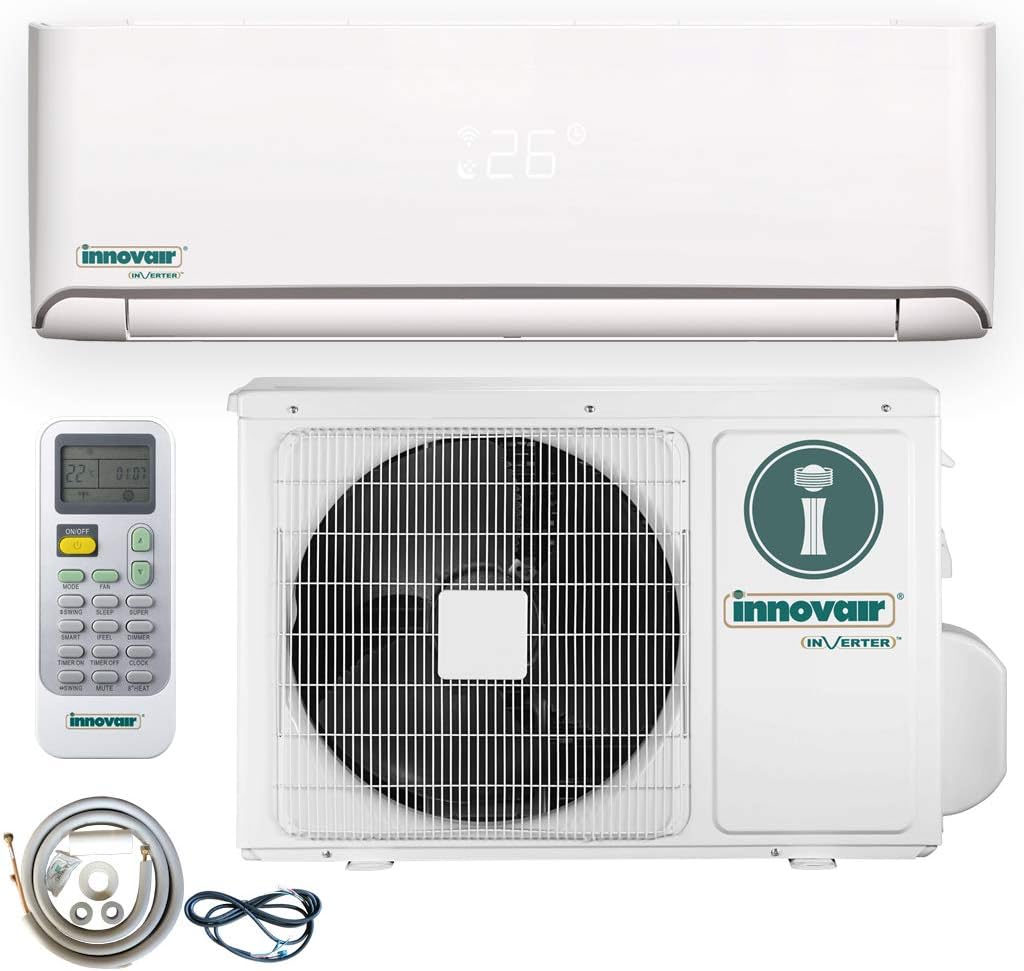
Figure 3.1: Main components of the Innovair Mini Split System, showing the indoor unit, outdoor unit, remote control, and included installation accessories.
Key Features:
- High Efficiency Inverter Technology: AHRI certified, providing energy savings.
- Multiple Operating Modes: Includes Turbo Cool, Sleep Mode, Dehumidifier, and Hyper Heat.
- Dual Functionality: Operates in both AC cooling and Heat Pump heating modes.
- Ready to Install: Comes with a 16FT installation kit and is pre-charged up to 25FT.
- Multiple Protections: Features Gold-Fin Outdoor coating for durability and a Multi-Layer Filter for improved air quality.
- WiFi Enabled: Allows for smart control via a mobile application.

Figure 3.2: The system's capability to provide both heating and cooling, adapting to different seasonal needs for year-round comfort.

Figure 3.3: Demonstration of the system's high efficiency, leading to lower electricity bills due to advanced inverter technology.

Figure 3.4: The outdoor unit's anti-freeze protection and ability to operate effectively in low temperatures, ensuring reliable performance in cold climates.
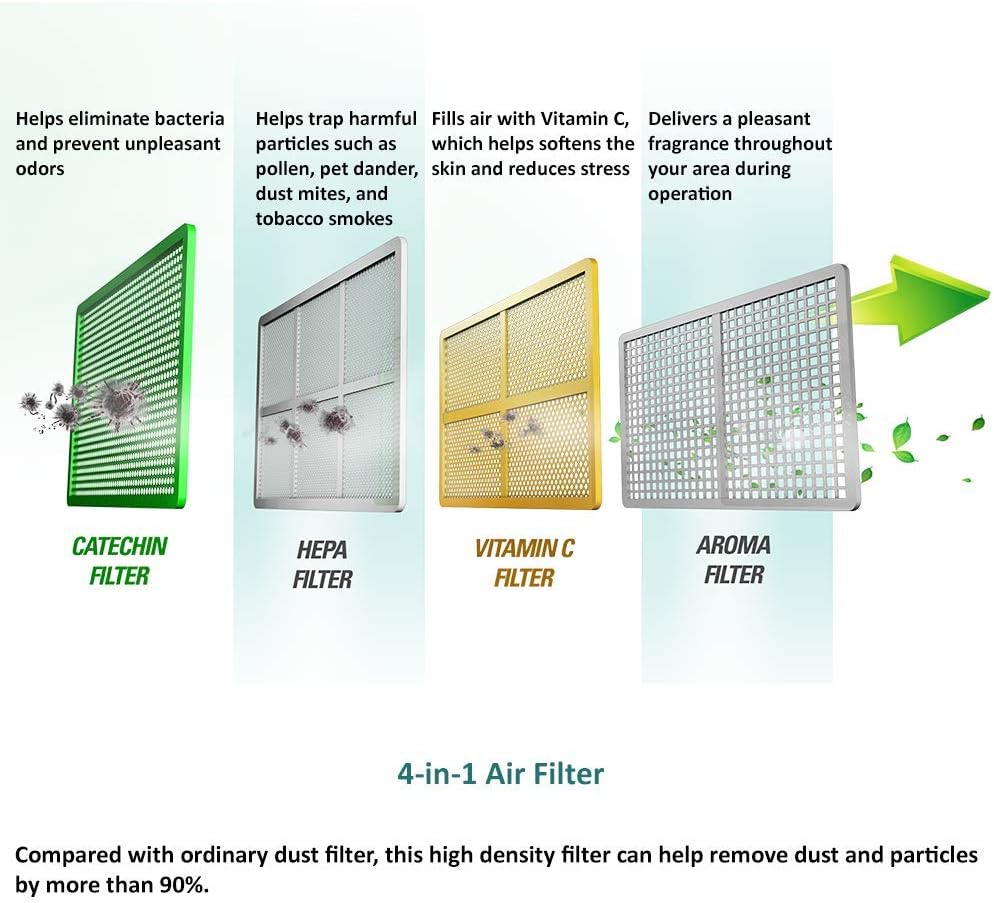
Figure 3.5: The 4-in-1 Air Filter system, including Catechin, HEPA, Vitamin C, and Aroma filters, designed to improve indoor air quality by removing particles and odors.
4. Setup and Installation
The Innovair Mini Split System is designed for straightforward installation, with a 16FT installation kit included. However, professional installation is highly recommended to ensure proper functioning and adherence to safety standards.
Pre-Installation Checklist:
- Verify power supply (230V).
- Ensure adequate space for both indoor and outdoor units, allowing for proper airflow and maintenance access.
- Confirm the outdoor unit is placed on a stable, level surface.
- Check that the refrigerant lines and electrical wiring can be routed safely and efficiently between units.
Installation Steps (Summary - Refer to detailed installation guide for full instructions):
- Mounting the Indoor Unit: Secure the mounting plate to the wall, ensuring it is level.
- Drilling Wall Hole: Drill a hole through the wall for the refrigerant pipes, drain hose, and electrical cable.
- Connecting Piping and Wiring: Connect the refrigerant pipes, drain hose, and electrical wiring to the indoor unit.
- Installing the Outdoor Unit: Place the outdoor unit on a stable base. Connect the refrigerant pipes and electrical wiring from the indoor unit.
- Vacuuming and Leak Check: Evacuate the refrigerant lines using a vacuum pump. Perform a leak check on all connections.
- Electrical Connection: Connect the unit to the main power supply.
- Test Run: Perform a test run to ensure all functions are operating correctly.
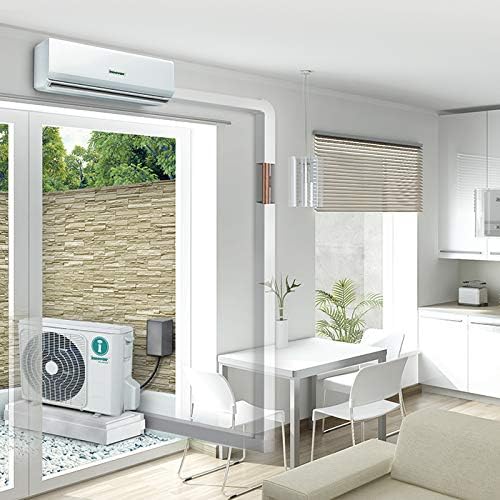
Figure 4.1: An example of a typical installation, illustrating the placement of both indoor and outdoor units for optimal performance.
5. Operating Instructions
Your Innovair Mini Split System can be controlled using the included remote control or via a WiFi-enabled mobile application.
Remote Control Functions:

Figure 5.1: The advanced remote control, providing easy access to all system functions and settings.
- ON/OFF BUTTON: Press to turn the unit on or off.
- MODE BUTTON: Cycles through operating modes: Auto, Cool, Dry, Heat, Fan.
- FAN BUTTON: Adjusts fan speed: Auto, Low, Medium, High.
- ROOM TEMPERATURE SWING BUTTONS (Up/Down Arrows): Adjusts the desired room temperature.
- SWING BUTTON: Controls the horizontal louvers for airflow direction.
- SMART BUTTON: Activates fuzzy logic operation for optimized comfort.
- SLEEP BUTTON: Engages sleep mode for quiet operation and energy saving during sleep.
- TIMER ON/OFF BUTTON: Sets or cancels the timer for automatic operation.
- SUPER BUTTON: Activates fast cooling or heating.
- CLOCK BUTTON: Sets the current time.
- DIMMER BUTTON: Turns the display light on or off.
- MUTE BUTTON: Silences the unit's beeps.
- IFeel BUTTON: Activates the IFeel function, which senses temperature at the remote's location for more precise control.
- 8° HEAT BUTTON: Sets the heating temperature to 8°C (46°F) for anti-freeze protection in unoccupied spaces.
Basic Operation:
- To Turn On/Off: Press the ON/OFF button.
- To Select Mode: Press the MODE button repeatedly until the desired mode (Cool, Heat, Dry, Fan, Auto) is displayed.
- To Adjust Temperature: Use the Up/Down Arrow buttons to set your desired temperature.
- To Adjust Fan Speed: Press the FAN button to cycle through fan speeds.
WiFi Control:
For WiFi control, download the Innovair smart app from your device's app store. Follow the in-app instructions to connect your unit to your home network. This allows for remote control and scheduling features.
6. Maintenance
Regular maintenance ensures optimal performance and longevity of your Innovair Mini Split System.
Air Filter Cleaning:
The multi-layer air filters should be cleaned every two weeks or more frequently depending on usage and air quality. Dirty filters can reduce efficiency and airflow.
- Turn off the unit and disconnect power.
- Open the front panel of the indoor unit.
- Carefully remove the air filters.
- Clean the filters with a vacuum cleaner or wash them with lukewarm water (below 40°C / 104°F).
- Allow filters to dry completely in a shaded area before re-installing. Do not expose to direct sunlight.
- Re-install the filters and close the front panel.
Outdoor Unit Maintenance:
- Coil Cleaning: Periodically check the outdoor unit's coil for dirt and debris. Clean with a soft brush or water hose if necessary.
- Clearance: Ensure no obstructions are blocking the airflow around the outdoor unit.
- Drainage: Check the condensate drain line for blockages.
Seasonal Checks:
- Before the cooling season, ensure the outdoor unit is free of debris and the filters are clean.
- Before the heating season, check for any ice buildup on the outdoor unit and ensure the drain pan is clear.
7. Troubleshooting
Before contacting customer support, please refer to the following common issues and solutions:
| Problem | Possible Cause | Solution |
|---|---|---|
| Unit does not turn on. | No power, circuit breaker tripped, remote control batteries dead. | Check power supply, reset breaker, replace remote batteries. |
| Insufficient cooling/heating. | Dirty air filters, blocked outdoor unit, wrong mode selected, temperature setting too high/low. | Clean filters, clear obstructions, select correct mode, adjust temperature. |
| Water leaking from indoor unit. | Clogged drain hose, improper installation. | Clear drain hose, contact professional for inspection. |
| Unusual noise. | Loose parts, foreign objects, fan imbalance. | Inspect for loose parts, remove foreign objects. If persistent, contact support. |
| Remote control not working. | Dead batteries, obstruction between remote and unit, remote malfunction. | Replace batteries, remove obstruction, try resetting the remote. |
If the problem persists after attempting these solutions, please contact Innovair customer support.
8. Specifications
| Attribute | Detail |
|---|---|
| Brand | Innovair |
| Model Number | WIN12H1V51 |
| Capacity | 18000 BTUH (Cooling/Heating) / 3 Tons |
| Voltage | 230 Volts |
| Efficiency (SEER) | 18.00 |
| Refrigerant | R 410A |
| Installation Type | Split System |
| Special Features | Dehumidifier, WiFi Enabled |
| Product Dimensions | Indoor Unit: 32 x 11 x 8.5 inches (approx.) |
| Item Weight | 24 pounds (approx. indoor unit) |
9. Warranty and Support
Innovair provides a limited warranty for this product. Please refer to the warranty card included with your purchase for specific terms and conditions, including coverage period and what is covered.
Customer Support:
For technical assistance, troubleshooting beyond this manual, or warranty claims, please contact Innovair customer support:
- Website: Visit the official Innovair website for support resources and contact information.
- Phone: Refer to your product packaging or warranty card for customer service phone numbers.
- Online Store: For product information and to visit the Innovair store, you can go to Innovair Amazon Store.
When contacting support, please have your model number (WIN12H1V51) and purchase date ready.
Related documentsWIN12H1V51


Ask a question about this manual
Ask about setup, troubleshooting, compatibility, parts, safety, or missing instructions. Manuals+ will review the question and use this page’s manual context to help answer it.