
1. Introduction
This manual provides essential information for the correct installation, operation, and maintenance of the Dieffematic AUTUN2 control unit. The AUTUN2 is designed to manage one or two 230V motors for various automation systems, such as gates or doors. Please read this manual carefully before proceeding with installation or use to ensure safety and optimal performance.
Keep this manual in a safe place for future reference.
2. Safety Information
WARNING: Incorrect installation or misuse can cause serious injury or damage. All electrical connections and programming must be performed by qualified personnel in compliance with local electrical codes and regulations.
- Disconnect power before performing any work on the control unit or connected motors.
- Ensure all wiring is correctly sized and insulated.
- Install appropriate safety devices (e.g., photocells, safety edges) as required by local regulations.
- Do not modify the control unit. Any modifications will void the warranty and may compromise safety.
- Keep children and unauthorized persons away from the automation system during operation.
3. Package Contents
Verify that all components are present and undamaged upon unpacking:
- Dieffematic AUTUN2 Control Unit
- Instruction Manual (this document)
- Mounting hardware (screws, anchors) - may vary by package
4. Product Overview
The Dieffematic AUTUN2 is a robust control unit designed for reliable operation of 230V motors. It features inputs for various safety and command devices, as well as outputs for motor control and auxiliary functions.
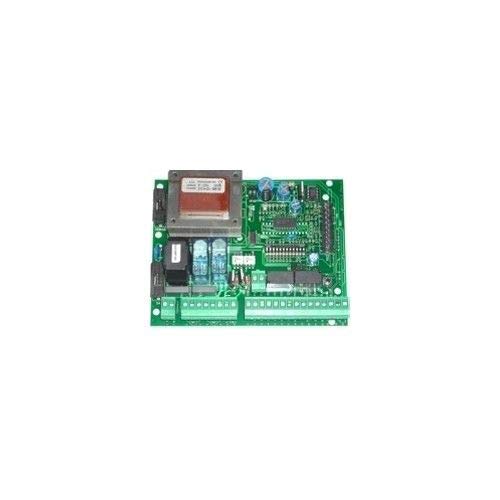
Figure 1: Dieffematic AUTUN2 Control Unit. This image displays the main housing of the control unit, showing various connection terminals for power, motors, and accessories. The internal components are visible, indicating the layout for wiring.
Key features include:
- Support for one or two 230V motors.
- Integrated receiver for remote controls.
- Adjustable operating parameters (e.g., force, pause time).
- Inputs for safety photocells, stop buttons, and other command devices.
5. Installation and Setup
5.1 Mounting the Control Unit
- Choose a suitable location, protected from weather and easily accessible for maintenance.
- Ensure the mounting surface is flat and secure.
- Use the provided mounting hardware to securely fix the control unit to the wall or post.
5.2 Electrical Connections
IMPORTANT: All wiring must be performed with the main power supply disconnected.
- Main Power Supply (230V AC): Connect the main power supply to the designated terminals (L, N, PE). Ensure a proper earth connection.
- Motor Connections: Connect the motor(s) to the respective motor terminals (e.g., M1, M2 for two motors). Follow the motor manufacturer's wiring diagram for correct phase and direction.
- Safety Devices (Photocells, Safety Edges): Connect safety devices to their dedicated inputs. These devices are crucial for preventing accidents.
- Command Devices (Push Buttons, Key Switches): Connect command devices to the appropriate inputs (e.g., START, STOP).
- Accessories (Flashing Light, Courtesy Light): Connect auxiliary devices to the designated output terminals.
5.3 Initial Programming
After all connections are made and verified, restore power to the unit. Refer to the specific programming section in the detailed manual (if provided separately) for:
- Motor direction learning.
- Force adjustment.
- Pause time setting.
- Remote control pairing.
6. Operation
Once installed and programmed, the automation system can be operated using remote controls or wired command devices.
- Opening/Closing: Press the assigned button on the remote control or wired push button to initiate the opening or closing cycle.
- Stop: Press the STOP button or the same command button during operation to halt the movement.
- Safety Intervention: If a safety device (e.g., photocell) detects an obstruction, the movement will stop or reverse, depending on the programming.
7. Maintenance
Regular maintenance ensures the longevity and safe operation of your automation system. Perform these checks periodically:
- Visual Inspection: Check for any visible damage to the control unit, wiring, or motors.
- Cleaning: Keep the control unit and safety devices (e.g., photocell lenses) clean and free from dust, dirt, or spiderwebs.
- Functionality Test: Periodically test the safety devices (e.g., block the photocell beam) to ensure they are working correctly.
- Fasteners: Ensure all mounting screws and terminal connections are tight.
For complex maintenance or repairs, contact a qualified technician.
8. Troubleshooting
This section addresses common issues. For problems not listed here, consult a qualified technician.
| Problem | Possible Cause | Solution |
|---|---|---|
| System does not respond to commands. |
|
|
| Motor runs in the wrong direction. | Incorrect motor wiring or programming. | Reverse motor wiring or re-perform motor direction learning procedure. |
| System stops unexpectedly. |
|
|
9. Specifications
- Brand: Dieffematic
- Model: AUTUN2
- Power Supply: 230V AC
- Motor Compatibility: 1 or 2 x 230V motors
- ASIN: B07JR7GMMX
- First Available Date: September 20, 2018
10. Warranty and Support
The Dieffematic AUTUN2 control unit is covered by a manufacturer's warranty against defects in materials and workmanship. The duration and terms of the warranty are subject to local regulations and the point of purchase.
For technical support, warranty claims, or service, please contact your authorized Dieffematic dealer or the manufacturer directly. Keep your proof of purchase for warranty purposes.