
Dieffematic P926182 00004
Dieffematic 24V Sliding Gate Operator Instruction Manual
Model: P926182 00004
1. Introduction
This instruction manual provides comprehensive guidelines for the installation, operation, and maintenance of your Dieffematic 24V Sliding Gate Operator, model P926182 00004. Designed for reliable and efficient automation of sliding gates, this operator ensures smooth and secure gate movement. Please read this manual thoroughly before installation and use to ensure proper function and safety.
2. Safety Information
Safety is paramount when installing and operating automated gate systems. Failure to follow these instructions could result in serious injury or property damage.
- Qualified Personnel: Installation and electrical connections must be performed by qualified and authorized personnel in accordance with local electrical codes and regulations.
- Power Disconnection: Always disconnect power to the operator before performing any installation, maintenance, or repair work.
- Moving Parts: Keep hands, feet, and clothing clear of the gate and operator's moving parts during operation.
- Obstruction Sensors: Ensure all safety devices, such as photocells and safety edges, are correctly installed and functioning to prevent entrapment.
- Children and Pets: Do not allow children or pets to play near the gate area or with the gate controls.
- Manual Release: Familiarize yourself with the manual release mechanism for emergency gate operation during power outages.
3. Setup and Installation
3.1 Pre-installation Checks
- Verify the gate is in good mechanical condition, moves freely, and is properly balanced.
- Ensure the gate structure can support the weight and forces exerted by the operator.
- Confirm adequate space for the operator and its accessories.
3.2 Mounting the Operator
Mount the operator on a stable, level concrete base adjacent to the gate. Ensure the rack (not included) aligns perfectly with the operator's pinion gear.
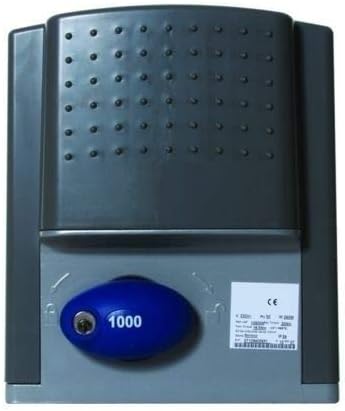
Figure 1: Dieffematic 24V Sliding Gate Operator. This image displays the Dieffematic 24V sliding gate operator. The unit features a robust grey housing. A prominent blue oval-shaped manual release mechanism, marked with '1000', is visible on the lower front, allowing for manual operation during power outages. A white label on the right side provides technical details and certifications.
3.3 Electrical Connections
Connect the operator to a dedicated 24V power supply. Follow the wiring diagram provided in the separate installation guide for connecting power, safety devices (photocells, flashing light), and control accessories (remote receiver, push button). Ensure all connections are secure and insulated.
3.4 Limit Switch Adjustment
Adjust the mechanical or magnetic limit switches to define the gate's fully open and fully closed positions. Refer to the detailed instructions in the separate control unit manual for precise adjustment procedures.
4. Operating Instructions
4.1 Basic Operation
- Opening/Closing: Press the designated button on your remote control or wall switch to initiate gate movement. A second press will stop the gate.
- Automatic Closing: If enabled, the gate will automatically close after a set time delay once it reaches the fully open position.
4.2 Remote Control Pairing
To pair new remote controls, follow the specific programming instructions provided with your control board. Typically, this involves pressing a programming button on the control board and then a button on the remote control.
4.3 Manual Release
In case of a power failure or malfunction, the gate can be operated manually. Locate the blue manual release mechanism on the front of the operator (as shown in Figure 1). Insert the key (if applicable) and turn it to disengage the motor, allowing the gate to be moved by hand. Remember to re-engage the motor after manual operation.
5. Maintenance
Regular maintenance ensures the longevity and safe operation of your gate system.
- Monthly: Check the gate's smooth movement, ensuring no obstructions in the path. Clean the rack and pinion gear of any debris.
- Quarterly: Inspect all electrical connections for corrosion or looseness. Test safety devices (photocells) by breaking the beam while the gate is closing.
- Annually: Lubricate moving parts of the gate (hinges, wheels) as recommended by the gate manufacturer. Have a qualified technician inspect the entire system.
6. Troubleshooting
Refer to the table below for common issues and their potential solutions. If the problem persists, contact qualified technical support.
| Problem | Possible Cause | Solution |
|---|---|---|
| Gate does not move. | No power; Safety device activated; Motor disengaged. | Check power supply; Clear obstruction from safety sensors; Re-engage manual release. |
| Remote control not working. | Dead battery; Not paired; Out of range. | Replace battery; Re-pair remote; Move closer to receiver. |
| Gate stops unexpectedly. | Obstruction detected; Limit switch issue. | Remove obstruction; Check and adjust limit switches. |
7. Specifications
| Feature | Detail |
|---|---|
| Brand | Dieffematic |
| Model | P926182 00004 |
| Power Supply | 24V DC |
| Application | Sliding Gates (compatible with BFT Ares 1500 Prox systems) |
| ASIN | B07JR5J884 |
8. Warranty and Support
For warranty information, please refer to the documentation provided at the time of purchase or contact your authorized Dieffematic dealer. For technical support or service inquiries, please contact Dieffematic customer service or the seller directly, providing your model number and purchase details.
Contact Information: Refer to your purchase invoice or the Dieffematic official website for current contact details.
Ask a question about this manual
Ask about setup, troubleshooting, compatibility, parts, safety, or missing instructions. Manuals+ will review the question and use this page’s manual context to help answer it.