
Introduction
The MIFA A60 is a versatile device combining a white noise machine with a 20W TWS Bluetooth speaker. It is designed to help users relax, improve sleep, and enjoy audio content with its array of soothing sounds and robust speaker capabilities. This manual provides detailed instructions for setup, operation, and maintenance of your MIFA A60.

Figure 1: MIFA A60 White Noise Speaker. This image shows the compact, white, circular design of the speaker with its control panel and digital display on top.
Package Contents
Please verify that all items are present in the package:
- 1 * White Noise Machine (MIFA A60)
- 1 * 3.5mm Audio Cable
- 1 * USB Charging Cable
- 1 * User Manual
Product Features
- 15 Soothing Sleep Sounds: Includes White Noise, Clock, Bubbles, No-looping Fan, Lullaby, Rain, Lullaby and water, Ocean Wave, Summer Night, Cricket, Birds, Campfire, Thunder and Rain, Creek and Birds. Designed to aid relaxation and sleep.
- 20W TWS Bluetooth Speaker: Capable of linking two A60 speakers for a 2.0 channel stereo audio experience. Features dual speakers and radiators for enhanced bass. Supports 3.5mm audio cable, Micro SD card slot, and hands-free calling.
- Three Timer Settings: Auto-off timers for 30, 60, and 90 minutes in sleep aid mode. Volume gradually reduces before turning off. Also supports continuous play.
- Precise Volume Control: 31 grades of volume adjustment to set the ideal sound level. Separate volume memory function for Bluetooth and sleep-aid modes.
- Long Battery Life & Powered USB: Equipped with a 2200mAh Lithium Battery providing 8-10 hours of playback. The display can remain on as a clock when connected to power via USB.
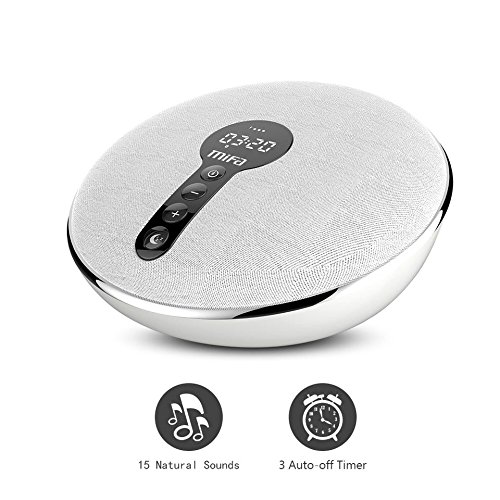
Figure 2: Key features of the MIFA A60. This image highlights the 15 natural sounds and 3 auto-off timer functions with corresponding icons.
Setup
- Charging the Device:
Connect the provided USB charging cable to the MIFA A60's charging port and the other end to a standard USB power adapter (DC 5V / 1A) or a computer's USB port. The charging indicator will illuminate. A full charge typically takes 3-4 hours.
- Powering On/Off:
Press and hold the Power button (usually integrated with the Mode button) for a few seconds to turn the device on or off. The display will light up upon activation.
Operating Instructions

Figure 3: Simplified Controls of the MIFA A60. This diagram labels the buttons: Bluetooth/Mode, Previous/Volume Down, Next/Volume Up, and Sleep Pattern.
Bluetooth Mode
- Pairing:
Turn on the MIFA A60. It will automatically enter Bluetooth pairing mode (indicated by a flashing Bluetooth icon on the display). On your device (smartphone, tablet, etc.), enable Bluetooth and search for "MIFA A60". Select it to pair. A confirmation sound will indicate successful pairing.
- Playing Audio:
Once paired, you can play audio from your connected device. Use the volume buttons on the A60 or your device to adjust playback volume. Use the Previous/Next buttons on the A60 to skip tracks.
- Hands-Free Calling:
When a call comes in, press the Bluetooth/Mode button to answer. Press again to end the call. Press and hold to reject a call.
- TWS (True Wireless Stereo) Pairing:
To use two A60 speakers in stereo mode, ensure both are powered on and not connected to any other Bluetooth device. On one A60, double-press the Bluetooth/Mode button. It will search for another A60. Once connected, they will function as left and right channels. Then, pair your device to the primary A60.
White Noise / Sleep Aid Mode
- Switching Modes:
Press the Bluetooth/Mode button to cycle between Bluetooth mode and Sleep Aid mode. In Sleep Aid mode, the display will show the current sound and timer setting.
- Selecting Sounds:
In Sleep Aid mode, press the "Sleep pattern" button (often indicated by a moon icon) to cycle through the 15 available soothing sounds. The display will show the sound number or name.
- Setting the Timer:
While in Sleep Aid mode, press the "Sleep pattern" button repeatedly to cycle through timer options: 30 minutes, 60 minutes, 90 minutes, or continuous play. The selected timer will be displayed. The volume will gradually decrease as the timer approaches its end.
- Adjusting Volume:
Use the '+' and '-' buttons to adjust the volume level (31 grades). The volume setting for Sleep Aid mode is independent of the Bluetooth mode volume.

Figure 4: Examples of natural sounds available on the MIFA A60. This image displays icons for Wave, Bird, White Noise, Rain, Cricket, Campfire, Lullaby, and a central MIFA logo.

Figure 5: Common applications of the MIFA A60. This image shows the device being used for sleep aid, office relaxation, yoga, music listening, travel, and addressing insomnia.
Maintenance
- Cleaning:
Wipe the device with a soft, dry, or slightly damp cloth. Do not use abrasive cleaners, alcohol, or chemical solvents, as these may damage the surface.
- Storage:
Store the MIFA A60 in a cool, dry place away from direct sunlight and extreme temperatures. If storing for an extended period, charge the battery periodically to maintain its health.
- Battery Care:
To prolong battery life, avoid fully discharging the battery frequently. Charge the device when the low battery indicator appears.
Troubleshooting
| Problem | Possible Cause | Solution |
|---|---|---|
| Device does not power on. | Low battery or no charge. | Connect the device to a power source using the USB charging cable and allow it to charge for at least 30 minutes before attempting to power on again. |
| No sound from speaker. | Volume too low; device not paired correctly (Bluetooth); incorrect mode. | Increase volume using the '+' button. Re-pair the Bluetooth device. Ensure the correct mode (Bluetooth or Sleep Aid) is selected. |
| Cannot connect via Bluetooth. | Device not in pairing mode; too far from source; interference; previously connected to another device. | Ensure the A60 is in Bluetooth pairing mode (flashing icon). Move the devices closer. Disconnect from other Bluetooth devices. Restart both the A60 and the source device. |
| Timer not working. | Incorrect timer setting. | Ensure you are in Sleep Aid mode and have selected a 30, 60, or 90-minute timer setting. |
Specifications
| Feature | Detail |
|---|---|
| Output Power | 10W x 2 (Total 20W) |
| Frequency Response | 50Hz-19KHz |
| Bluetooth Standard | Bluetooth 4.2 |
| Battery Type | Lithium battery |
| Battery Capacity | 2200mAh |
| Charging Voltage | DC 5V / 1A |
| Charging Time | 3-4 hours |
| Playback Time | 8-10 hours |
| Product Dimensions (L*W*H) | 15.4cm * 7.8cm * 14.8cm |
| Unit Weight | 380g |
| Color | White |
| Material | Plastic |
| Manufacturer | MIFA INNOVATIONS LLC |
| Number of Music Tracks | 15 (White Noise, Clock, Bubbles, No-looping Fan, Lullaby, Rain, Lullaby and water, Ocean Wave, Summer Night, Cricket, Birds, Campfire, Thunder and Rain, Creek and Birds) |
Warranty and Support
This product comes with a standard 30-day warranty as per Amazon's policy. For any technical support, warranty claims, or inquiries, please contact MIFA customer service through the retailer's platform or refer to the contact information provided on the product packaging or MIFA's official website.
Please retain your purchase receipt as proof of purchase for warranty purposes.

