
1. Introduction
This manual provides essential information for the safe and efficient operation of your Cecotec 9050 Energy-Saving Heated Towel Rail. Please read these instructions carefully before installation and use, and retain them for future reference.
The Cecotec 9050 is designed to provide both towel drying and supplementary bathroom heating. It features a 500W power output, IP24 splash protection, two operating modes, a timer function, and an intuitive LED display.

Figure 1: Front view of the Cecotec 9050 Heated Towel Rail.
2. Safety Instructions
WARNING: Failure to follow these safety instructions may result in electric shock, fire, or personal injury.
- Ensure the power supply voltage matches the rating indicated on the appliance.
- Do not operate the appliance with a damaged cord or plug. Contact qualified service personnel for repair.
- This appliance is rated IP24, providing protection against splashing water. It is suitable for bathroom use, but must not be submerged in water.
- Do not install the towel rail directly above or below a power outlet.
- Maintain a safe distance from flammable materials.
- The appliance features an Overprotect System which automatically shuts off the unit if it overheats, preventing damage. If this occurs, unplug the unit and allow it to cool before restarting.
- This appliance is not intended for use by persons (including children) with reduced physical, sensory or mental capabilities, or lack of experience and knowledge, unless they have been given supervision or instruction concerning use of the appliance by a person responsible for their safety.
- Children should be supervised to ensure that they do not play with the appliance.


Figure 2: Icons representing Overprotect System and IP24 splash protection.
3. Package Contents
Verify that all components are present and undamaged upon opening the package. If any items are missing or damaged, contact Cecotec customer service.
- Cecotec 9050 Heated Towel Rail
- Installation Kit (screws, wall plugs, brackets)
- Instruction Manual
4. Setup and Installation
The Cecotec 9050 Heated Towel Rail is designed for wall-mounted installation. The included installation kit contains all necessary components for secure mounting.
4.1 Wall Mounting
- Choose a suitable location on a solid wall, away from water sources (other than splashes, for which it is protected) and flammable materials. Ensure there is adequate space around the unit for air circulation and towel placement.
- Using the provided template (if applicable) or by measuring the mounting points on the towel rail, mark the drilling positions on the wall.
- Drill holes at the marked positions using an appropriate drill bit for your wall type.
- Insert the wall plugs into the drilled holes.
- Attach the mounting brackets to the wall using the screws provided. Ensure they are securely fastened.
- Carefully align the towel rail with the brackets and secure it in place. Refer to the specific diagrams in the installation kit for detailed steps.
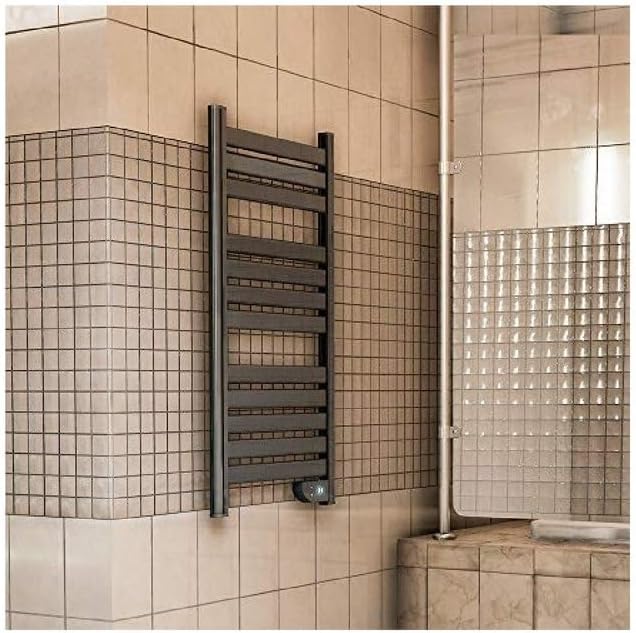
Figure 3: Example of the Cecotec 9050 Heated Towel Rail installed on a bathroom wall.
4.2 Electrical Connection
Once mounted, plug the appliance into a grounded electrical outlet. Ensure the outlet is easily accessible.
5. Operating Instructions
The Cecotec 9050 features a user-friendly control panel with an LED display.

Figure 4: Control panel and LED display.
5.1 Power On/Off
- To turn the unit ON, press the power button (U). The LED display will illuminate.
- To turn the unit OFF, press the power button (U) again.
5.2 Operating Modes
The towel rail offers two distinct operating modes:
- Continuous Heating Mode: Provides constant heat for warming the bathroom.
- 2-Hour Towel Drying Mode (Flashdrive Function): Designed to quickly dry towels. The unit will operate for two hours and then automatically switch off.
To switch between modes, refer to the specific button on the control panel (often indicated by a '2H' or similar icon for the towel drying mode).


Figure 5: Icons representing Twin Heat function and timer capability.
5.3 LED Display (SmartTemp)
The SmartTemp LED display shows the ambient temperature of the room where the towel rail is installed. This allows for easy monitoring of the bathroom's temperature.
6. Maintenance
Regular maintenance ensures optimal performance and extends the lifespan of your appliance.
6.1 Cleaning
- Always unplug the towel rail from the power outlet before cleaning.
- Allow the unit to cool completely.
- Wipe the exterior surfaces with a soft, damp cloth. Do not use abrasive cleaners, solvents, or harsh chemicals, as these can damage the finish.
- Ensure no water enters the control panel or electrical components.
- Dry the unit thoroughly before plugging it back in.
6.2 Storage
If storing the appliance for an extended period, ensure it is clean and dry. Store it in a cool, dry place, protected from dust and direct sunlight.
7. Troubleshooting
If you encounter issues with your Cecotec 9050 Heated Towel Rail, consult the following table before contacting customer service.
| Problem | Possible Cause | Solution |
|---|---|---|
| Appliance does not turn on. | No power supply. Power button not pressed. | Check if the plug is securely inserted into a working outlet. Press the power button (U). |
| No heat output. | Unit is off. Overheat protection activated. | Ensure the unit is powered on and in an active heating mode. Unplug the unit, allow it to cool for 15-20 minutes, then plug it back in. Ensure proper ventilation. |
| LED display is not working. | Unit is off. Electrical fault. | Ensure the unit is powered on. If the unit is on but the display is off, unplug and re-plug. If the issue persists, contact customer service. |
If the problem persists after attempting these solutions, please contact Cecotec customer support.
8. Specifications
| Feature | Specification |
|---|---|
| Model Number | 9050 (05343) |
| Power Output | 500 W |
| Material | Aluminum |
| Color | Grey |
| Dimensions (Product) | 60.5 x 108 x 9 cm |
| Weight | 5 kg |
| Protection Rating | IP24 (Splash-proof) |
| Special Features | Warm Space Technology, TwinHeat System, Flashdrive Function, SmartTemp LED Display, Overprotect System |
| Installation Method | Wall-mounted |


Figure 6: Icons illustrating 500W power and 8m² heating capacity.
9. Warranty and Support
Your Cecotec 9050 Heated Towel Rail comes with a manufacturer's warranty. Please refer to the warranty card included in your product packaging for specific terms and conditions, including the warranty period and coverage details.
For technical assistance, troubleshooting beyond this manual, or to inquire about spare parts, please contact Cecotec customer support. Contact information can typically be found on the Cecotec website or on the product packaging.


