
1. Introduction
Thank you for choosing the EZ RED XLF1000-GR Work Light. This manual provides essential information for the safe and effective operation, maintenance, and troubleshooting of your new rechargeable work light. Please read this manual thoroughly before use and retain it for future reference.
2. Safety Information
To ensure safe operation, always adhere to the following safety guidelines:
- Do not look directly into the light beam. The high intensity light can cause temporary vision impairment or eye damage.
- Do not immerse the work light in water or expose it to heavy rain. This product is not waterproof.
- Do not attempt to disassemble, modify, or repair the work light. Refer all servicing to qualified personnel.
- Keep the work light away from flammable materials, gases, or liquids.
- Use only the provided or a certified Micro-USB cable for charging.
- Store the work light in a cool, dry place when not in use.
- Keep out of reach of children.
3. Package Contents
Verify that all items are present in the package:
- EZ RED XLF1000-GR Work Light
- Integrated Micro-USB Charging Cable
- Magnetic Accessory
4. Product Overview
The EZ RED XLF1000-GR is a versatile rechargeable work light designed for various tasks, featuring a powerful COB LED and multiple functionalities.

Figure 1: Front view of the EZ RED XLF1000-GR Work Light, showcasing the central COB LED and green protective corners.
Key Features:
- High Brightness: Up to 1,000 lumens for maximum illumination.
- Adjustable Brightness: Dimmable feature for precise light output control.
- Rechargeable: Integrated Lithium-Ion battery with a built-in Micro-USB charging cable.
- Hands-Free Operation: Features a rotating stand and a magnetic accessory for flexible positioning.
- Battery Level Indicator: Provides real-time battery status.
- Outbound Charging Port: Allows the work light to function as a power bank for other devices.
5. Setup
Initial Charge:
Before first use, fully charge the work light. Pull out the integrated Micro-USB cable from the back of the unit and connect it to a standard USB power adapter (not included). The battery level indicator lights will illuminate during charging. A full charge is indicated when all indicator lights are solid.
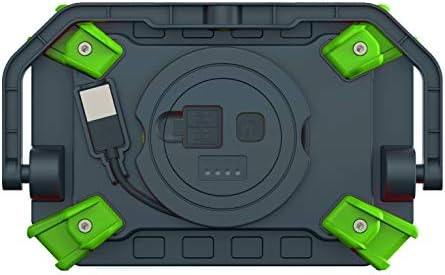
Figure 2: Rear view of the work light, highlighting the integrated Micro-USB charging cable and battery level indicator.
6. Operating Instructions
Power On/Off and Brightness Modes:
- Press the power button once to turn the light on at high brightness (1,000 lumens).
- Press the power button a second time to switch to low brightness (500 lumens).
- Press the power button a third time to turn the light off.
Dimmable Feature:
While the light is on (either high or low brightness), press and hold the power button. The light will gradually dim or brighten. Release the button when the desired brightness level is achieved.
Hands-Free Use:
- Rotating Stand: The integrated stand allows the light to be angled for optimal illumination. Adjust the stand to the desired position.
- Magnetic Accessory: Attach the included magnetic accessory to the back of the work light. This allows the light to be securely mounted to metallic surfaces.

Figure 3: Side view illustrating the adjustable rotating stand for hands-free operation.
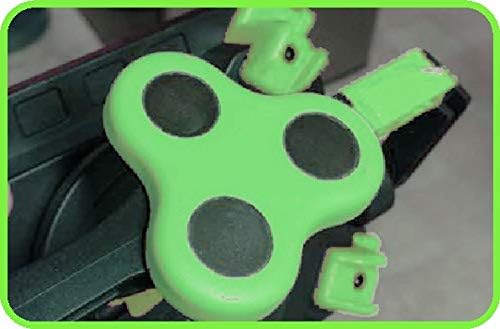
Figure 4: Close-up view of the magnetic accessory, which attaches to the work light for mounting on metal surfaces.
7. Charging
Recharging the Work Light:
To recharge the internal battery, pull out the integrated Micro-USB cable and connect it to a USB power source (e.g., wall adapter, computer USB port). The battery indicator lights on the back of the unit will show the charging progress. All lights solid indicate a full charge.
Outbound Charging (Power Bank Function):
The work light features an outbound charging port, allowing it to be used as a power bank to charge other small electronic devices. Connect your device's charging cable to the outbound USB port on the work light.
8. Maintenance
- Cleaning: Wipe the exterior of the work light with a soft, damp cloth. Do not use abrasive cleaners or solvents.
- Storage: When not in use for extended periods, store the work light in a cool, dry place. It is recommended to charge the battery every 3-6 months to maintain battery health.
- Battery Care: Avoid fully discharging the battery frequently to prolong its lifespan.
9. Troubleshooting
| Problem | Possible Cause | Solution |
|---|---|---|
| Light does not turn on. | Battery is depleted. | Charge the work light using the integrated Micro-USB cable. |
| Light does not charge. | Charging cable or power source issue. | Ensure the Micro-USB cable is fully inserted and the USB power source is functional. Try a different USB power source. |
| Light output is dim. | Battery is low or light is in low brightness mode. | Charge the work light. Press the power button to cycle to high brightness mode. |
10. Specifications
| Feature | Detail |
|---|---|
| Model Number | XLF1000-GR |
| Brightness | 1000 lumens (High), 500 lumens (Low) |
| Light Source Type | COB LED |
| Power Source | Rechargeable Lithium-Ion Battery |
| Charging Port | Micro-USB (integrated cable) |
| Voltage | 12 Volts |
| Item Weight | 16 ounces (1 pound) |
| Product Dimensions | 2.5 x 7.25 x 4.25 inches |
| Color | Green |
| Shade Material | Aluminum |
| Mounting Type | Magnetic Mount |
11. Warranty and Support
Warranty Information:
This EZ RED XLF1000-GR Work Light comes with a Limited 1-year warranty. Please retain your proof of purchase for warranty claims.
Customer Support:
For technical assistance, warranty inquiries, or replacement parts, please contact EZRED customer support. Refer to the EZRED official website for current contact information.