
Introduction
This manual provides essential instructions for the proper setup, operation, and maintenance of your JBL PS3300 Wireless Bluetooth Speaker. Please read this guide thoroughly before using the product to ensure optimal performance and longevity. Keep this manual for future reference.
Package Contents
Verify that all items listed below are present in your product packaging:
- JBL PS3300 Wireless Bluetooth Speaker (Pair)
- USB Charging Cable
- User Manual (This document)

Image: The JBL PS3300 Wireless Bluetooth Speaker pair, showcasing their compact design and front-facing drivers.
Product Overview
The JBL PS3300 is a pair of compact wireless Bluetooth speakers designed for versatile audio playback. They feature a stereo audio output mode and can connect wirelessly to various compatible devices.
Front Panel Controls
- Power Button: Used to turn the speaker on or off.
- Volume Up (+): Increases the audio volume.
- Volume Down (-): Decreases the audio volume.
- Status Indicator Light: Provides information on power and Bluetooth connection status.
Rear Panel Connections

Image: The rear panel of the JBL PS3300 speakers, illustrating the USB charging port and other connections.
- USB Charging Port: For connecting the USB charging cable to power the speakers.
- Auxiliary Input (if present): For wired audio connections (not explicitly listed in specs, but common).
Setup
1. Charging the Speakers
- Connect the supplied USB charging cable to the USB charging port on the rear of each speaker.
- Connect the other end of the USB cable to a compatible USB power adapter (not included) or a computer's USB port.
- The status indicator light will illuminate during charging and turn off or change color when fully charged.
2. Powering On/Off
- To power on, press and hold the Power button on the front panel until the status indicator light illuminates.
- To power off, press and hold the Power button again until the status indicator light turns off.
3. Bluetooth Pairing
The JBL PS3300 speakers utilize Bluetooth for wireless audio streaming. Follow these steps to pair with your device:
- Ensure the speakers are powered on and within close proximity to your Bluetooth-enabled device (e.g., Laptop, Smartphone, Tablet, Television).
- The speakers will automatically enter pairing mode when first powered on, or if no device is currently connected. The status indicator light will typically flash to indicate pairing mode.
- On your device, navigate to the Bluetooth settings menu.
- Search for available devices. You should see "JBL PS3300" or a similar name appear in the list.
- Select "JBL PS3300" to initiate the connection.
- Once successfully paired, the status indicator light on the speakers will typically become solid, and your device will confirm the connection.
The speakers will attempt to reconnect to the last paired device automatically when powered on.
Operating Instructions
Volume Control
- Press the + button on the front panel to increase the volume.
- Press the - button on the front panel to decrease the volume.
- You can also adjust the volume directly from your connected Bluetooth device.
Audio Playback
Control audio playback (play, pause, skip tracks) directly from your connected Bluetooth device. The speakers will reproduce the audio stream from your device.

Image: The JBL PS3300 speakers positioned on a desk next to a laptop, demonstrating a typical usage scenario for multimedia audio.
Maintenance
Cleaning
To clean the speakers, use a soft, dry, lint-free cloth. Do not use abrasive cleaners, waxes, or solvents. Avoid spraying liquids directly onto the speakers.
Water Resistance
The JBL PS3300 speakers are designed to be waterproof. However, ensure all ports are securely closed (if applicable) before exposure to water. Do not submerge the speakers for extended periods or expose them to pressurized water jets.
Storage
When not in use for extended periods, store the speakers in a cool, dry place away from direct sunlight and extreme temperatures. Fully charge the speakers before storing them for long durations to maintain battery health.
Troubleshooting
If you encounter issues with your JBL PS3300 speakers, refer to the following common problems and solutions:
- No Power:
- Ensure the speakers are fully charged. Connect them to a power source using the USB charging cable.
- Press and hold the Power button for a few seconds to ensure it's properly activated.
- No Sound:
- Check the volume level on both the speakers and your connected Bluetooth device.
- Ensure the speakers are successfully paired and connected to your device.
- Try playing audio from a different application or source on your device.
- Bluetooth Not Connecting:
- Ensure Bluetooth is enabled on your device and the speakers are in pairing mode.
- Move the speakers closer to your device and away from potential interference sources (e.g., Wi-Fi routers, other Bluetooth devices).
- Forget or unpair "JBL PS3300" from your device's Bluetooth settings and attempt to pair again.
- Restart both your device and the speakers.
- Poor Audio Quality:
- Ensure the speakers are within the effective Bluetooth range of your device.
- Check for any physical obstructions between the speakers and your device.
- Try disconnecting and reconnecting the Bluetooth connection.
Specifications
Detailed technical specifications for the JBL PS3300 Wireless Bluetooth Speaker:
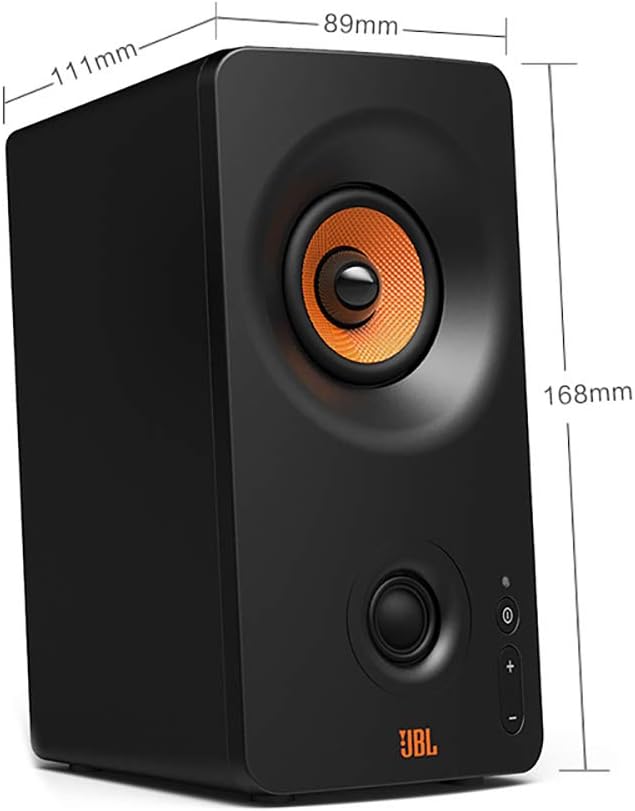
Image: A JBL PS3300 speaker with key dimensions (height, width, depth) indicated in millimeters.
| Brand Name | JBL |
| Model Name | PS3300 |
| Connectivity Technology | Bluetooth |
| Audio Output Mode | Stereo |
| Mounting Type | Tabletop |
| Speaker Type | Multimedia |
| Special Features | Bluetooth, Wireless |
| Compatible Devices | Laptop, Smartphone, Tablet, Television |
| Included Components | USB charging cable |
| Is Waterproof | True |
| Package Dimensions | 22.8 x 20.4 x 13.4 cm |
| Item Weight | 1.36 kg |
| Manufacturer | JBL |
| Date First Available | 15 June 2021 |
Warranty and Support
For warranty information, technical support, or service inquiries regarding your JBL PS3300 Wireless Bluetooth Speaker, please refer to the warranty card included with your product or visit the official JBL support website. You can also visit the JBL Store on Amazon for additional product information.