
1. Introduction
The EXFIT BCS-700 Wireless Bluetooth Neckband Headphones provide a convenient audio solution with retractable earbuds and advanced call management features. This manual provides instructions for proper setup, operation, and maintenance of your device.
2. Safety Information
- Do not expose the device to extreme temperatures or direct sunlight.
- Avoid listening at high volume levels for extended periods to prevent hearing damage.
- Keep the device away from water and moisture. The device is IPx4 sweat and splash resistant, but not waterproof.
- Do not attempt to disassemble or repair the device yourself. Contact qualified service personnel.
- Ensure earbuds are securely placed in your ears to prevent them from falling out.
3. Package Contents
Verify that all items are present in your package:
- EXFIT BCS-700 Neckband Headphones
- USB Charging Cable
- Multiple sizes of Ear Tips
- User Manual

Figure 3.1: Package Contents
4. Product Overview
The EXFIT BCS-700 features a flexible neckband design with retractable earbuds for convenient storage and use. Key components include control buttons for power, volume, and call management, as well as a charging port.

Figure 4.1: EXFIT BCS-700 Neckband Headphones
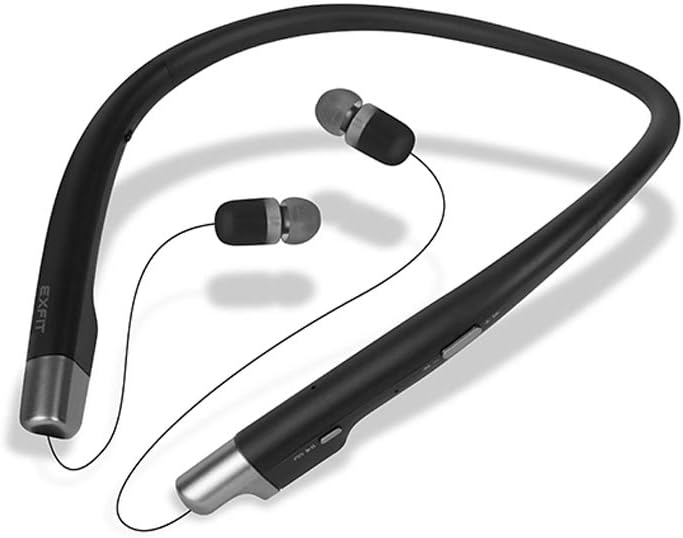
Figure 4.2: Earbuds Extended

Figure 4.3: Control Buttons
5. Setup
5.1 Charging the Headphones
Before first use, fully charge the headphones. Connect the provided USB cable to the charging port on the neckband and to a USB power source. The LED indicator will show charging status and turn off when fully charged.
5.2 Bluetooth Pairing
- Ensure the headphones are powered off.
- Press and hold the Power button until the LED indicator flashes blue and red, indicating pairing mode.
- On your device (smartphone, tablet, etc.), enable Bluetooth and search for available devices.
- Select 'EXFIT BCS-700' from the list of devices.
- Once connected, the LED indicator will flash blue periodically.
6. Operating Instructions
6.1 Power On/Off
- Power On: Press and hold the Power button until the LED indicator flashes blue.
- Power Off: Press and hold the Power button until the LED indicator flashes red and then turns off.
6.2 Call Management
- Answer Call: Pull an earbud wire from the neckband.
- End Call: Retract the extended earbud(s) into the neckband.
- Reject Call: Press and hold the Call button.
- Vibration Alert: The neckband will vibrate for incoming calls.
6.3 Audio Playback
- Play/Pause: Press the Play/Pause button.
- Next Track: Press and hold the Volume Up button.
- Previous Track: Press and hold the Volume Down button.
- Volume Up/Down: Press the Volume Up/Down buttons.
6.4 Audio Transparency Mode
This mode allows you to hear ambient sounds while wearing the headphones. Activate or deactivate this feature using the dedicated switch on the neckband. This feature is for awareness, not a substitute for caution in dangerous environments.
6.5 Voice Assistant
The EXFIT BCS-700 is compatible with Apple Siri and Google Assistant. Activate your device's voice assistant by pressing the dedicated Voice Assistant button (if available) or following your device's instructions.
Video 6.1: Overview of EXFIT BCS-700 Wireless Neckband Headphones features and design.
7. Maintenance
- Cleaning: Wipe the neckband and earbuds with a soft, dry cloth. Do not use harsh chemicals or abrasive materials.
- Storage: When not in use, store the headphones in a cool, dry place. Ensure earbuds are retracted to prevent cable damage.
- Ear Tips: Regularly clean or replace ear tips for hygiene and optimal sound quality.
8. Troubleshooting
8.1 No Power
- Ensure the headphones are fully charged.
- Check the charging cable and power source.
8.2 Pairing Issues
- Ensure Bluetooth is enabled on your device and the headphones are in pairing mode.
- Move the headphones closer to your device.
- Forget the device from your phone's Bluetooth settings and attempt to re-pair.
8.3 No Sound or Poor Sound Quality
- Adjust the volume on both the headphones and your connected device.
- Ensure the headphones are properly paired.
- Check for obstructions or debris in the earbud nozzles.
8.4 Callers Cannot Hear Me
- Ensure the microphone is not obstructed.
- Check the microphone settings on your connected device.
9. Specifications
| Model Name | BCS-700 |
| Connectivity Technology | Wireless (Bluetooth) |
| Bluetooth Version | 4.0 |
| Bluetooth Range | 10 Meters |
| Battery Life | 8 Hours (Play Time) |
| Audio Driver Size | 8 Millimeters |
| Water Resistance Level | IPx4 (Sweat and Splash Resistant) |
| Item Weight | 4 ounces |
| Product Dimensions | 7.01 x 6.26 x 0.71 inches |
| Material | Metal, Plastic, Silicone |
10. Warranty and Support
The EXFIT BCS-700 comes with a manufacturer's warranty. For detailed warranty information, please refer to the warranty card included in your product packaging or visit the official EXFIT website. For technical support, troubleshooting assistance, or service inquiries, please contact EXFIT customer support through their official channels.
