
VILTROX EF-M1
VILTROX EF-M1 Auto Focus Lens Mount Adapter User Manual
Model: EF-M1
Introduction
The VILTROX EF-M1 Auto Focus Lens Mount Adapter is designed to enable the use of Canon EF/EF-S series lenses on Micro Four Thirds (M4/3) system cameras. This adapter facilitates essential functions such as EXIF signal transmission, autofocus (AF), and aperture adjustment, ensuring seamless integration between your Canon lenses and M4/3 camera body. It also supports firmware upgrades via a built-in USB port for enhanced compatibility and performance.
Key Features
- Broad Compatibility: Designed for Canon EF/EF-S lenses on Micro Four Thirds cameras (e.g., Panasonic GH5, GH4, Olympus OM-D E-M1, E-M5II).
- Fast and Accurate Auto-Focus: Provides quick and smooth focusing performance, comparable to native lens operation.
- EXIF Signal Transmission: Supports real-time transmission of lens and camera information, including aperture, shutter speed, and ISO.
- Aperture Control: Allows direct aperture adjustment from the camera body via electronic contacts.
- USB Firmware Upgrade: Equipped with a USB port for future software updates and bug fixes.
Setup and Installation
Proper installation of the VILTROX EF-M1 adapter is crucial for optimal performance. Follow these steps carefully:
- Prepare Equipment: Ensure both your camera and lens are powered off before beginning the installation process.
- Attach Adapter to Lens: Align the red dot on the VILTROX EF-M1 adapter with the red dot on your Canon EF/EF-S lens. Gently twist the lens clockwise until it clicks into place, indicating a secure lock.
- Attach Lens and Adapter to Camera: Align the white dot on the VILTROX EF-M1 adapter with the white dot on your Micro Four Thirds camera body. Gently twist the adapter (with the lens attached) clockwise until it clicks into place.
- Verify Connection: Once attached, ensure both the lens and adapter are firmly seated and do not wobble.

Image: The VILTROX EF-M1 adapter securely mounted between a Canon lens and a Panasonic Lumix camera body, demonstrating a complete setup.
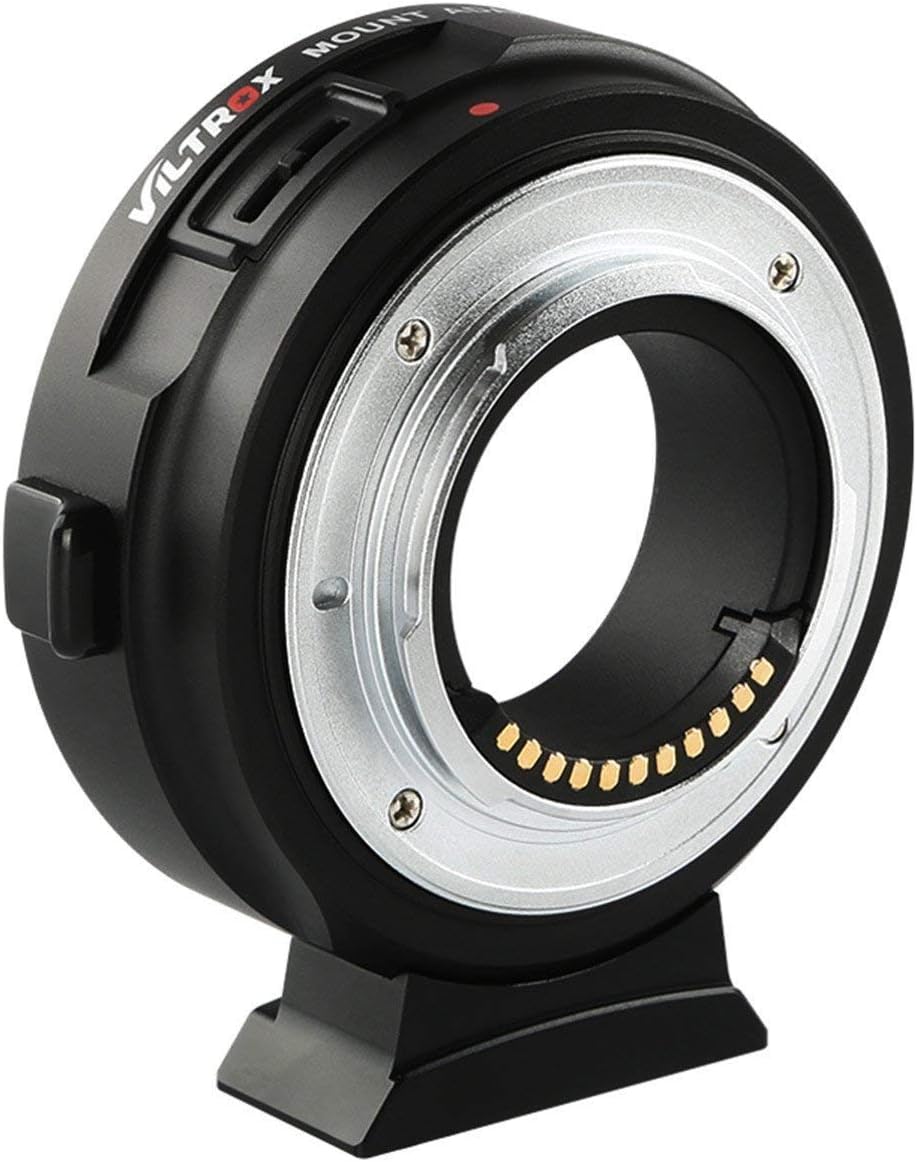
Image: A Canon lens mounted on a Panasonic Lumix GH4 camera via the VILTROX EF-M1 adapter, showcasing the assembled unit.
Operating Instructions
The VILTROX EF-M1 adapter allows your Canon EF/EF-S lenses to function effectively on M4/3 cameras. Here's how to operate its key features:
Autofocus Function
Once the adapter and lens are securely mounted, the camera's autofocus system will communicate with the lens through the adapter's electronic contacts. Ensure your camera's autofocus mode is set appropriately (e.g., AF-S, AF-C, MF) for your shooting needs. The adapter is designed to provide fast and accurate autofocus performance.
Aperture Control
The adapter's built-in aperture motor and electronic contacts allow you to control the lens aperture directly from your M4/3 camera body. Adjust the aperture settings on your camera as you normally would, and the adapter will transmit these commands to the attached Canon lens.
EXIF Information Transmission
The VILTROX EF-M1 supports EXIF signal transmission, meaning your camera will display and record essential lens information. After installing the lens, you can view details such as the current aperture, shutter speed, and ISO settings directly on your camera's display or in the image metadata.

Image: A detailed view of the gold-plated electronic contacts on the VILTROX EF-M1 adapter, essential for communication between lens and camera.
Firmware Upgrade
The VILTROX EF-M1 adapter features a USB port for firmware upgrades. This allows for improved compatibility with new camera models or lenses, as well as performance enhancements and bug fixes.
Upgrade Procedure:
- Download Firmware: Visit the official VILTROX website (www.viltrox.com) and navigate to the support or download section for the EF-M1 adapter. Download the latest firmware file to your computer.
- Connect Adapter: Use a standard USB cable to connect the VILTROX EF-M1 adapter to your computer. The USB port is located on the side of the adapter.
- Run Upgrade Tool: Follow the instructions provided with the firmware download to run the upgrade tool on your computer.
- Complete Upgrade: Do not disconnect the adapter or power off your computer during the upgrade process. Once complete, safely eject the adapter from your computer.

Image: A close-up view of the USB port on the VILTROX EF-M1 adapter, used for firmware updates.
Maintenance and Care
To ensure the longevity and optimal performance of your VILTROX EF-M1 adapter, follow these maintenance guidelines:
- Cleaning: Use a soft, dry, lint-free cloth to clean the exterior of the adapter. For the electronic contacts, use a clean, dry cotton swab or a specialized lens contact cleaner. Avoid touching the contacts directly with your fingers.
- Storage: When not in use, store the adapter in a dry, dust-free environment, preferably with both front and rear caps attached to protect the mounts and contacts.
- Handling: Always handle the adapter by its body. Avoid applying excessive force when attaching or detaching lenses and cameras.
- Environmental Conditions: Protect the adapter from extreme temperatures, high humidity, dust, and direct sunlight.

Image: The VILTROX EF-M1 adapter shown from the front, highlighting its robust construction and lens mount.

Image: The VILTROX EF-M1 adapter shown from the rear, displaying the camera mount and electronic contacts.
Troubleshooting
If you encounter issues while using your VILTROX EF-M1 adapter, refer to the following common problems and solutions:
| Problem | Possible Cause | Solution |
|---|---|---|
| Autofocus not working or slow. | Poor connection; lens/camera incompatibility; outdated firmware. |
|
| Aperture cannot be controlled. | Electronic contact issue; lens not fully recognized. |
|
| EXIF data not displayed. | Communication error; adapter not fully engaged. |
|
| Adapter not recognized by computer for firmware update. | Faulty USB cable; driver issue; incorrect connection. |
|
Specifications
| Feature | Detail |
|---|---|
| Model | EF-M1 |
| Compatible Lens | Canon EF/EF-S Series Lens |
| Compatible Camera | Micro Four Thirds (M4/3) Cameras (e.g., Panasonic GH4, GH5, GF6, GX7; Olympus E-M5, E-M10II, E-PL5) |
| Focus Mode | Auto Focus |
| Firmware Upgrade | USB Port |
| Product Dimensions | 4.72 x 3.94 x 2.68 inches |
| Item Weight | 3.98 ounces (112.8 grams) |
| Manufacturer | VILTROX |
Warranty and Support
VILTROX products are designed for reliability and performance. For warranty information, technical support, or service inquiries, please contact VILTROX customer service directly or visit their official website.
Official VILTROX Website: www.viltrox.com
You can also refer to the VILTROX store on Amazon for additional product information and support resources: VILTROX Amazon Store
Related documentsEF-M1


Ask a question about this manual
Ask about setup, troubleshooting, compatibility, parts, safety, or missing instructions. Manuals+ will review the question and use this page’s manual context to help answer it.