
1. Product Overview
The DOMO DO221SV is a powerful cordless stick vacuum cleaner designed for efficient home cleaning. It features a cyclonic system for effective dust capture and LED lighting on the floor brush to illuminate hidden dust. With two speed settings and a 29V lithium-ion battery, it offers up to 50 minutes of continuous cleaning. The dust tank has a capacity of 1 liter.

Figure 1.1: DOMO DO221SV Cordless Stick Vacuum Cleaner, full view.
Key Features:
- Powerful cyclonic suction system.
- Integrated LED lighting on the floor brush for enhanced visibility.
- Two adjustable speed settings.
- Long-lasting 29V lithium-ion battery providing up to 50 minutes of runtime.
- Large 1-liter dust tank capacity.
- Lightweight design for easy maneuverability.
2. Important Safety Instructions
Please read all instructions carefully before using this appliance. Failure to follow these instructions may result in electric shock, fire, or serious injury.
- This appliance is for household use only. Do not use outdoors or on wet surfaces.
- Do not allow children to operate the vacuum cleaner. Close supervision is necessary when used near children.
- Always unplug the appliance from the power outlet before cleaning or performing any maintenance.
- Do not pick up flammable or combustible liquids, such as gasoline, or use in areas where they may be present.
- Do not pick up anything that is burning or smoking, such as cigarettes, matches, or hot ashes.
- Do not use without the dust cup and/or filters in place.
- Use only as described in this manual. Use only manufacturer's recommended attachments.
- If the supply cord is damaged, it must be replaced by the manufacturer, its service agent, or similarly qualified persons in order to avoid a hazard.
- Store the appliance indoors in a cool, dry place.
3. Package Contents
Verify that all components are present and in good condition upon opening the package. If any items are missing or damaged, contact your retailer immediately.
- DOMO DO221SV Main Unit (Motor Body and Dust Tank Assembly)
- Extension Tube
- Floor Brush with LED Lighting
- Power Adapter/Charger
- Wall Mount Bracket
- User Manual (this document)
4. Assembly and Setup
4.1 Assembling the Vacuum Cleaner
- Insert the extension tube into the main unit until it clicks securely into place.
- Attach the floor brush to the other end of the extension tube, ensuring it locks firmly.

Figure 4.1: Fully assembled DOMO DO221SV vacuum cleaner.
4.2 Charging the Battery
Before first use, fully charge the vacuum cleaner's battery. The charging time is approximately 4 to 5 hours.
- Connect the power adapter to the charging port on the main unit.
- Plug the adapter into a suitable wall outlet.
- The charging indicator lights will illuminate to show the charging status.
- Once fully charged, disconnect the adapter.
4.3 Wall Mount Installation
The included wall mount allows for convenient storage and charging.
- Choose a suitable location near a power outlet, ensuring it is a sturdy wall surface.
- Mark the drilling points for the wall mount bracket.
- Drill holes and insert wall plugs (if necessary).
- Secure the wall mount bracket to the wall using appropriate screws.
- Hang the vacuum cleaner on the wall mount for storage and charging.

Figure 4.2: DOMO DO221SV stored on its wall mount bracket.
5. Operation
5.1 Powering On/Off and Speed Selection
- To turn on the vacuum cleaner, press the power button located on the main unit.
- The vacuum will start in the default speed setting.
- Press the speed selection button to switch between the two available speed settings (e.g., standard and high power).
- To turn off the vacuum cleaner, press the power button again.
5.2 Using the LED Lighting
The floor brush is equipped with LED lights to illuminate dark areas and make hidden dust visible.
- The LED lights automatically activate when the vacuum cleaner is in operation.
- Direct the floor brush into dimly lit areas, such as under furniture or in corners, to reveal dust and debris.

Figure 5.1: Floor brush with illuminated LED lights for improved visibility.
5.3 Runtime
The DOMO DO221SV provides an autonomy of up to 50 minutes on a full charge, depending on the selected speed setting and surface type.
6. Maintenance and Cleaning
Regular maintenance ensures optimal performance and extends the lifespan of your vacuum cleaner. Always ensure the appliance is turned off and unplugged before performing any cleaning or maintenance.
6.1 Emptying the Dust Tank
The dust tank has a capacity of 1 liter and should be emptied regularly, especially when the MAX line is reached.
- Locate the dust tank release button/lever on the main unit.
- Press the release button and carefully detach the dust tank from the main unit.
- Position the dust tank over a waste bin.
- Open the bottom lid of the dust tank to release the collected dust and debris.
- Close the lid and reattach the dust tank to the main unit, ensuring it clicks into place.

Figure 6.1: Detaching the dust tank for emptying.
6.2 Cleaning the Filter
The cyclonic filter system includes a cartridge filter that requires regular cleaning to maintain suction power.
- With the dust tank removed, carefully pull out the filter assembly.
- Separate the filter components (e.g., outer mesh and inner cartridge filter).
- Tap the filter gently over a waste bin to remove loose dust.
- If necessary, rinse the filter under cold running water. Ensure it is completely dry before reassembling and placing it back into the vacuum cleaner. Do not use detergents or hot water.
- Reassemble the filter components and place them back into the dust tank.
- Reattach the dust tank to the main unit.
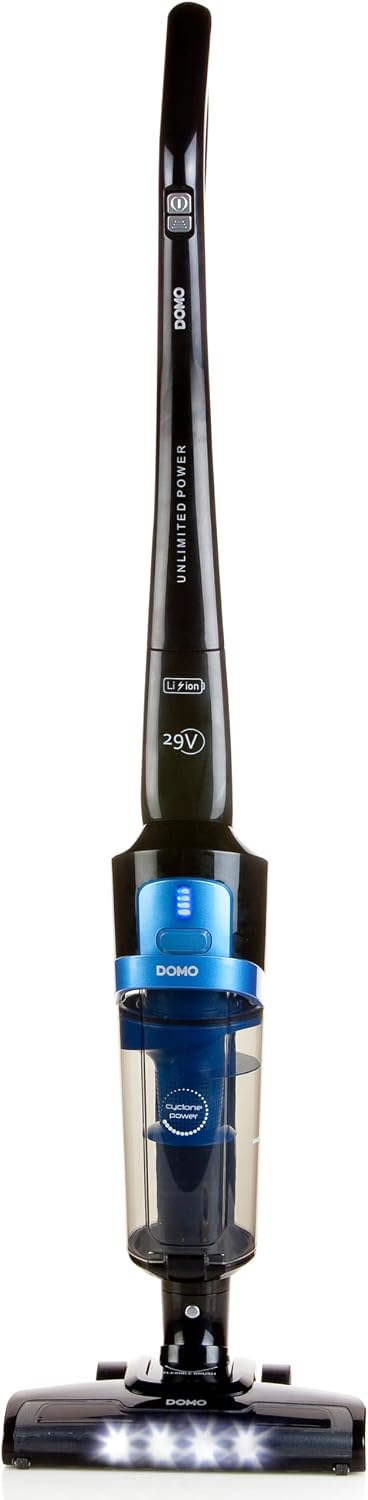
Figure 6.2: Dust tank and filter components.
6.3 Cleaning the Floor Brush
Periodically check the floor brush for tangled hair, threads, or debris that may reduce its effectiveness.
- Turn off and unplug the vacuum cleaner.
- If the brush roll is removable, detach it according to the instructions (refer to specific diagrams if available on the product).
- Use scissors or a brush to remove any tangled hair or debris from the brush roll.
- Wipe the exterior of the floor brush with a damp cloth.
- Reattach the brush roll if it was removed.
7. Troubleshooting
If you encounter issues with your DOMO DO221SV, refer to the table below for common problems and solutions.
| Problem | Possible Cause | Solution |
|---|---|---|
| Vacuum does not turn on. | Battery is depleted. | Charge the battery for 4-5 hours. |
| Power button not pressed correctly. | Ensure the power button is pressed firmly. | |
| Reduced suction power. | Dust tank is full. | Empty the dust tank. |
| Filter is clogged. | Clean or replace the filter. | |
| Brush roll is tangled. | Remove hair and debris from the brush roll. | |
| Hose or nozzle is blocked. | Check for and remove any blockages. | |
| Short runtime. | Battery not fully charged. | Ensure battery is fully charged before use. |
| Using high power mode continuously. | High power mode consumes more battery; use standard mode for longer runtime. |
If the problem persists after trying these solutions, please contact customer support.
8. Technical Specifications
| Feature | Specification |
|---|---|
| Model Number | DO221SV |
| Brand | Domo |
| Color | Black, Blue |
| Dimensions (L x W x H) | 20.2 x 27.2 x 111.4 cm |
| Weight | 2.78 kg |
| Dust Tank Capacity | 1 Litre |
| Power (Motor) | 140 Watts |
| Voltage | 29 Volts |
| Maximum Suction Power | 8 KPA |
| Number of Speeds | 2 |
| Noise Level | 78 dB |
| Runtime | Up to 50 minutes |
| Recharge Time | 4-5 hours |
| Filter Type | Cartridge, Cyclonic |
| Power Source | Battery powered (Lithium-ion) |
| Included Components | Adapter, Wall mount, Charging station |
9. Warranty and Support
Specific warranty information for the DOMO DO221SV is not provided in the product details. For warranty claims, technical support, or inquiries regarding spare parts, please contact your retailer or the manufacturer directly.
Keep your proof of purchase (receipt or invoice) as it may be required for warranty service.
For further assistance, please visit the official Domo website or contact their customer service department.


