
1. Introduction
Thank you for choosing the Karcher HDS 10/20-4M Pressure Washer. This professional-grade machine is designed for heavy-duty cleaning tasks, offering exceptional power and efficiency. To ensure safe and optimal operation, please read this manual thoroughly before using the appliance for the first time. Keep this manual for future reference.
2. Safety Instructions
General Safety:
- Always disconnect the power supply before performing any maintenance or cleaning.
- Never direct the water jet at people, animals, or electrical equipment.
- Do not operate the machine if the power cord or other essential parts are damaged.
- Ensure the work area is well-ventilated, especially when operating the burner.
- Keep children and unauthorized persons away from the appliance.
Personal Protective Equipment (PPE):
- Wear appropriate safety glasses or face shield.
- Use protective gloves and non-slip footwear.
- Hearing protection is recommended during extended operation.
Electrical Safety:
- Connect the machine only to a properly grounded power outlet.
- Ensure the power supply matches the specifications on the machine's rating plate.
- Avoid using extension cords unless absolutely necessary, and ensure they are rated for outdoor use and the machine's power requirements.
Hot Water and Fuel Safety:
- The machine produces hot water. Be aware of hot surfaces and steam.
- Use only recommended fuel types. Refuel in a well-ventilated area away from ignition sources.
- Do not overfill the fuel tank.
3. Components Overview
Familiarize yourself with the main components of your Karcher HDS 10/20-4M pressure washer:
- High-pressure hose connection
- Water inlet connection
- Detergent tank and dosing valve
- Fuel tank
- Control panel (pressure/temperature adjustment, main switch)
- High-pressure gun and spray lance
- Nozzle storage
- Wheels and transport handle

Figure 3.1: Front view of the Karcher HDS 10/20-4M Pressure Washer, showing its robust grey and black casing with the Karcher Professional logo.
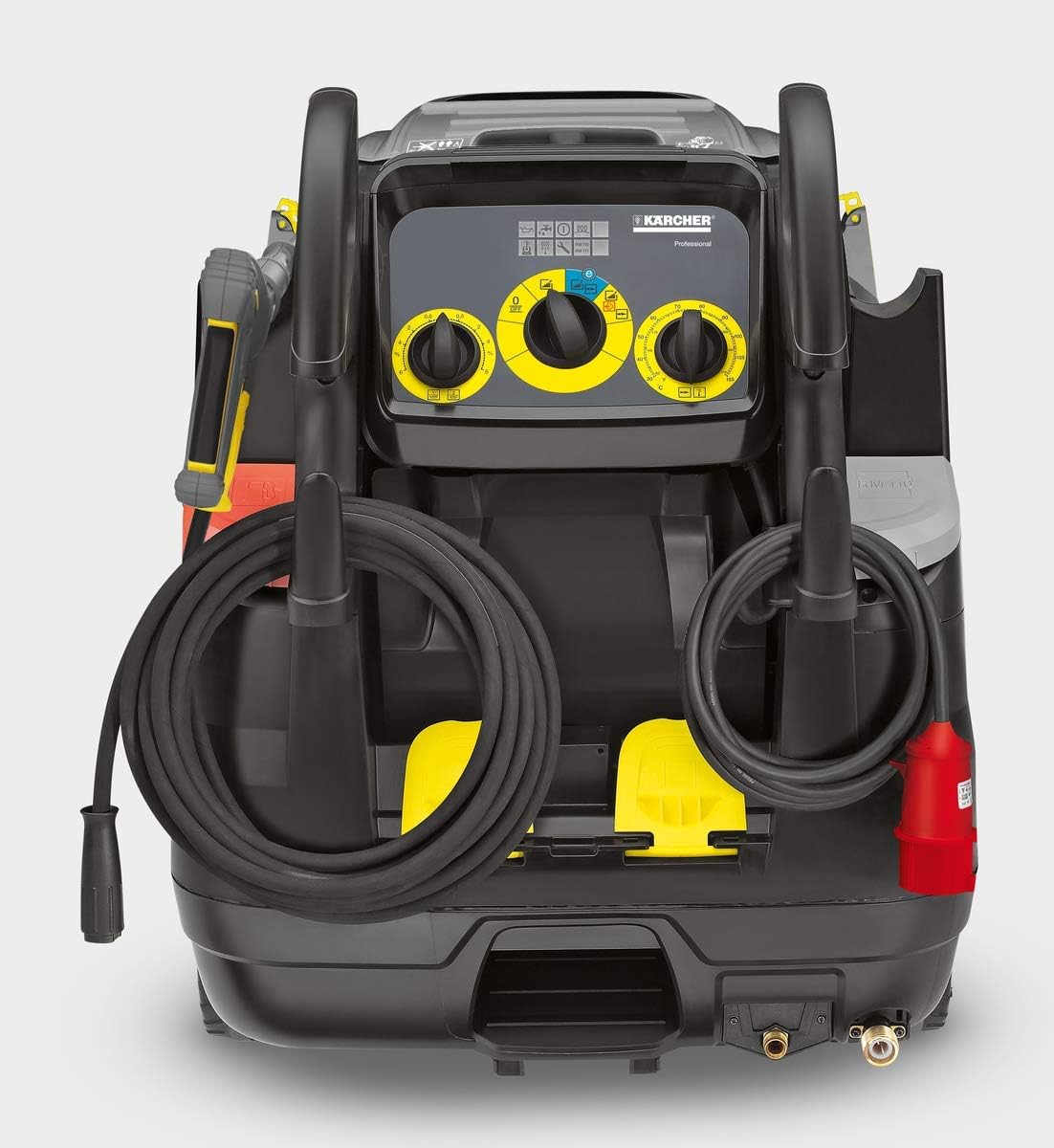
Figure 3.2: Rear view of the Karcher HDS 10/20-4M, highlighting the control panel with yellow dials for pressure and temperature, and integrated storage for hoses and power cable.
4. Setup
- Unpacking: Carefully remove the pressure washer and all accessories from the packaging. Check for any damage during transit.
- Assembly:
- Attach the high-pressure hose to the machine's outlet and the high-pressure gun. Ensure connections are secure.
- Connect the spray lance to the high-pressure gun.
- Water Supply Connection:
- Connect a water supply hose (not supplied) to the water inlet connection on the machine.
- Ensure the water supply has sufficient flow and pressure (refer to specifications).
- Open the water tap fully.
- Power Supply Connection:
- Plug the power cord into a suitable 3-phase, 420V, 50Hz grounded electrical outlet.
- Verify that the power supply meets the machine's requirements.
- Fueling (for hot water operation):
- Open the fuel tank cap.
- Fill the tank with diesel fuel (or recommended alternative) up to the maximum fill line. Do not overfill.
- Securely close the fuel tank cap.
- Detergent (Optional):
- If using detergent, fill the detergent tank with Karcher-approved cleaning agent.
- Adjust the detergent dosing valve as needed.
5. Operating Instructions
- Starting the Machine:
- Ensure all connections (water, power, hose) are secure.
- Turn the main switch to the desired operating mode (cold water, hot water, steam).
- Press the trigger on the high-pressure gun to release air from the system until a steady water flow is achieved.
- The pump will start automatically once the trigger is pressed.
- Adjusting Pressure and Temperature:
- Use the pressure regulator dial on the control panel to adjust the working pressure.
- For hot water operation, use the temperature dial to select the desired water temperature. The burner will ignite automatically.
- Applying Detergent:
- Switch the machine to detergent mode (if available) or use a low-pressure nozzle.
- Adjust the detergent dosing valve to control the amount of detergent mixed with the water.
- After applying detergent, switch back to high-pressure mode to rinse the surface.
- Shutting Down:
- Release the trigger on the high-pressure gun.
- Turn the main switch to the 'OFF' position.
- Close the water tap.
- Press the trigger on the high-pressure gun again to release any residual pressure in the system.
- Disconnect the power supply.
- Storage:
- Drain all water from the machine and hoses, especially in freezing temperatures, to prevent damage.
- Store the machine in a dry, frost-free location.

Figure 5.1: A man using the Karcher HDS 10/20-4M to clean the side of a large truck, demonstrating its powerful cleaning capability for commercial vehicles.

Figure 5.2: A worker cleaning a barn or stable area with the Karcher HDS 10/20-4M, showcasing its effectiveness in demanding agricultural or industrial environments.
6. Maintenance
Regular maintenance ensures the longevity and optimal performance of your pressure washer.
- After Each Use:
- Clean the exterior of the machine with a damp cloth.
- Rinse the high-pressure hose and gun.
- Check the water inlet filter for debris and clean if necessary.
- Monthly / Every 50 Operating Hours:
- Inspect the high-pressure nozzle for wear or blockage. Clean or replace as needed.
- Check oil level in the pump (if applicable) and top up if low. Refer to the oil type specified in the technical data.
- Inspect all hoses and connections for leaks or damage.
- Annually / Every 200 Operating Hours:
- Change the pump oil.
- Clean the fuel filter.
- Descaling the heating coil (if hard water is used regularly). This may require professional service.
- Have the burner checked and serviced by a qualified technician.
Note: For complex maintenance tasks, it is recommended to contact an authorized Karcher service center.
7. Troubleshooting
This section provides solutions to common issues you might encounter.
| Problem | Possible Cause | Solution |
|---|---|---|
| No pressure or low pressure |
|
|
| Machine does not start |
|
|
| Burner does not ignite (no hot water) |
|
|
| Pulsating pressure |
|
|
8. Specifications
Detailed technical specifications for the Karcher HDS 10/20-4M Pressure Washer:
| Specification | Value |
|---|---|
| Model Number | HDS 10/20-4M |
| Manufacturer | Karcher |
| Power Supply | 3-phase, 420V, 50Hz |
| Power Rating | 7.8 kW |
| Flow Rate (min-max) | 500 - 1000 Liters/Hour |
| Working Pressure (min-max) | 30 - 200 Bar (3 - 20 MPa) |
| Max. Water Temperature | 80°C / 155°F |
| Fuel Tank Capacity | 25 Liters |
| Fuel Consumption (full load) | 6.4 kg/hour |
| Weight | 171 kg (75.8 kg shipping weight) |
| Dimensions (L x W x H) | 1330 x 750 x 1060 mm (128 x 100.5 x 79.5 cm shipping) |
| Color | Grey |
| Batteries Included? | No |
9. Warranty and Support
Karcher products are manufactured to the highest quality standards and undergo rigorous quality control. This product is covered by a manufacturer's warranty against defects in materials and workmanship. Please refer to the warranty card included with your purchase for specific terms and conditions, including warranty period and coverage details.
For technical assistance, spare parts, or warranty claims, please contact Karcher customer support or your authorized Karcher dealer. Ensure you have your product model number (HDS 10/20-4M) and serial number ready when contacting support.
You can find contact information for Karcher support on their official website or in the documentation provided with your machine.


