
Introduction
This manual provides detailed instructions for the safe and efficient use of your Uniclife 400 GPH Submersible and Inline Water Pump. Please read all instructions carefully before operation and retain this manual for future reference. This pump is designed for various aquatic applications, including fish tanks, ponds, waterfalls, fountains, sumps, and gardens.
Setup Instructions
The Uniclife 400 GPH pump can be used either fully submerged in water or externally as an inline pump.
1. Attaching Nozzles
Select the appropriate nozzle for your water pipe's inner diameter (1/2", 3/5", or 3/4"). Screw the chosen nozzle onto the pump's outlet. All nozzles can be connected to both the water inlet and outlet.
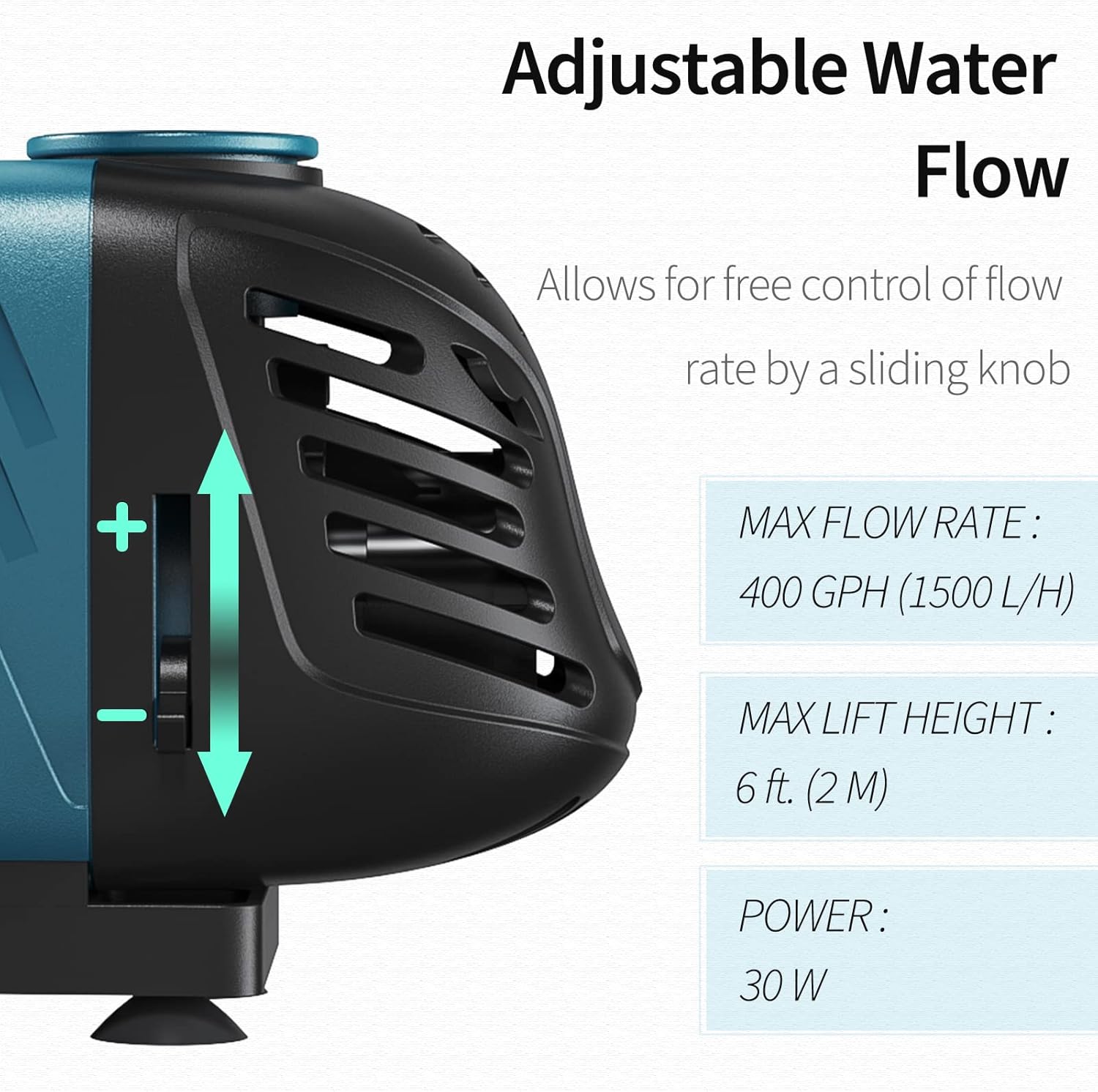
Image: Uniclife 400 GPH pump with included nozzle attachments. This image shows the Uniclife 400 GPH water pump with three different nozzle sizes (1/2", 3/5", 3/4") for connecting to various pipe diameters. The pump is designed for both submersible and inline applications.
2. Placement
- Submersible Use: Place the pump entirely underwater. The four strong suction cups on the base will help secure it to a clean, smooth surface.
- Inline Use: For external use, ensure the pump is placed below the water level of the source to allow for gravity priming. It is crucial to pour water into the pump (prime it) before starting it to prevent dry running. The suction cups can also be used to secure the pump externally.

Image: Uniclife 400 GPH pump operating quietly in an aquarium. The Uniclife 400 GPH pump shown submerged in an aquarium, highlighting its quiet operation and efficient water circulation for aquatic environments.
3. Power Connection
Connect the 6-foot waterproof power cord to a standard AC 120V grounded outlet. The 3-prong grounded plug is designed to prevent electric shock. Ensure your hands are dry before handling the power cord or plug.
Operating Instructions
1. Power On
Once the pump is correctly installed and, if applicable, primed, plug it into the power outlet. The pump will begin operating immediately.
2. Adjusting Flow Rate
The pump features a sliding knob on its side that allows you to adjust the water flow rate. Slide the knob to increase or decrease the flow as needed for your specific application.

Image: Uniclife 400 GPH pump showing adjustable flow control. The pump features a sliding knob on its side to adjust the water flow rate. Maximum flow rate is 400 GPH, with a maximum lift of 6 feet and 30W power consumption.
3. Continuous Operation
The pump is designed for continuous operation (24/7) due to its durable ceramic shaft and bearing, providing a long lifespan of over 25,000 hours.
Maintenance
Regular cleaning is essential to maintain the pump's performance and extend its lifespan.
1. Disassembly for Cleaning
Unplug the pump from the power source before performing any maintenance. The pump is designed for easy disassembly without tools. Gently detach the front cover, then remove the impeller cover, filter, and impeller/rotor.

Image: Exploded view of Uniclife 400 GPH pump showing detachable parts for cleaning. This image illustrates the pump's detachable design, allowing for easy disassembly of the front cover, impeller, and filter for cleaning. The base includes four strong suction cups for stable placement.
2. Cleaning Components
Rinse all detached parts under clean water. Use a small brush to remove any debris, algae, or mineral buildup from the impeller, impeller housing, and filter. Ensure the ceramic shaft is clean and free of obstructions.
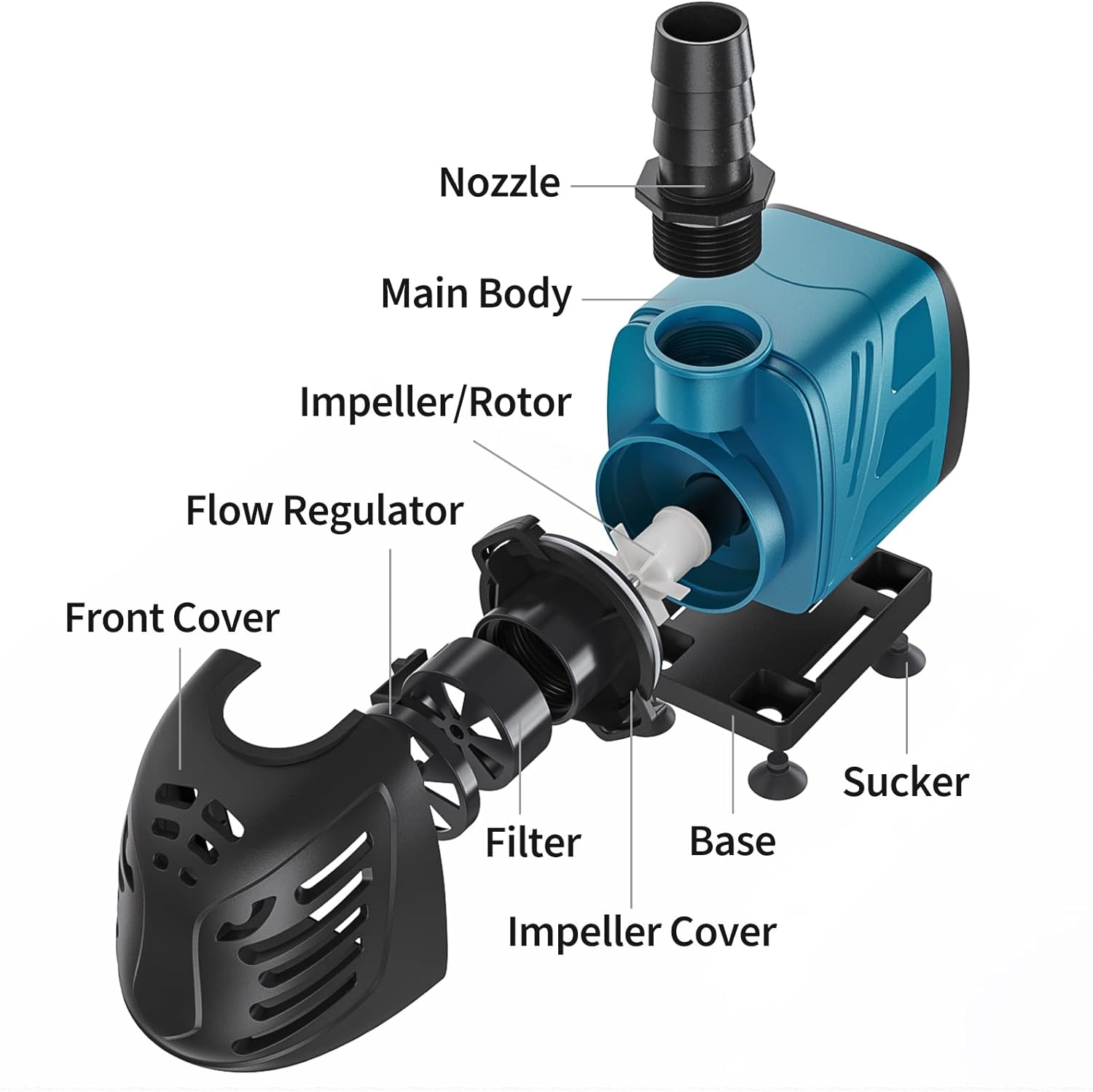
Image: Diagram of Uniclife 400 GPH pump with labeled components. A detailed diagram labeling the main components of the Uniclife 400 GPH pump, including the nozzle, main body, impeller/rotor, flow regulator, front cover, filter, impeller cover, base, and suction cups.
3. Reassembly
After cleaning, reassemble the pump by reversing the disassembly steps. Ensure all parts are securely fitted before returning the pump to operation.
Troubleshooting
- Pump does not start:
- Check if the power cord is securely plugged into a working outlet.
- Ensure there is power to the outlet.
- Inspect the impeller for any blockages or damage. Clean if necessary.
- Reduced water flow:
- Check the flow regulator knob and adjust it to the desired setting.
- Clean the pump's filter, impeller, and housing to remove any debris or buildup.
- Ensure the inlet and outlet nozzles are not obstructed.
- For inline use, ensure the pump is properly primed and not running dry.
- Pump is noisy:
- Ensure the pump is fully submerged if used underwater, or properly primed if used inline.
- Check for any foreign objects in the impeller area.
- Ensure the suction cups are securely attached to prevent vibration.
- Water leakage:
- Verify that all nozzle connections are tight and properly sealed.
- Inspect the pump casing for any cracks or damage.
Specifications
| Feature | Specification |
|---|---|
| Brand | Uniclife |
| Model | 400 GPH |
| Maximum Flow Rate | 400 GPH (1500 L/H) / 13.33 gpm |
| Maximum Lift Height | 6 feet (2 M) |
| Power | 30 W |
| Voltage | AC 120 V |
| Power Cord Length | 6 feet |
| Material | Ceramic (shaft and bearing) |
| Dimensions (L x W x H) | 5" x 2.6" x 3.5" |
| Nozzle Inner Diameters | 1/2", 3/5", 3/4" |
| Item Weight | 847 g |
Warranty Information
Uniclife products are manufactured to high-quality standards. For specific warranty details, please refer to the product packaging or contact Uniclife customer support. Keep your purchase receipt as proof of purchase for any warranty claims.
Customer Support
If you have any questions, require assistance, or encounter issues with your Uniclife 400 GPH Submersible and Inline Water Pump, please contact Uniclife customer support. Contact information can typically be found on the product packaging or the official Uniclife website.