
1. Introduction
This manual provides comprehensive instructions for the UBay RC-057 replacement remote control. It is designed to operate various COBY TV models without the need for programming or pairing. Simply install batteries, and the remote is ready for use.
2. Setup
2.1 Battery Installation
To begin using your UBay RC-057 remote control, you must first install batteries.
- Locate the battery compartment cover on the back of the remote control.
- Slide the cover downwards or press the latch to open it.
- Insert two new AAA alkaline batteries, ensuring the positive (+) and negative (-) terminals align correctly with the markings inside the compartment.
- Replace the battery compartment cover by sliding it back into place until it clicks securely.
The remote control is now ready for immediate use with compatible COBY TV models. No additional programming or pairing steps are required.
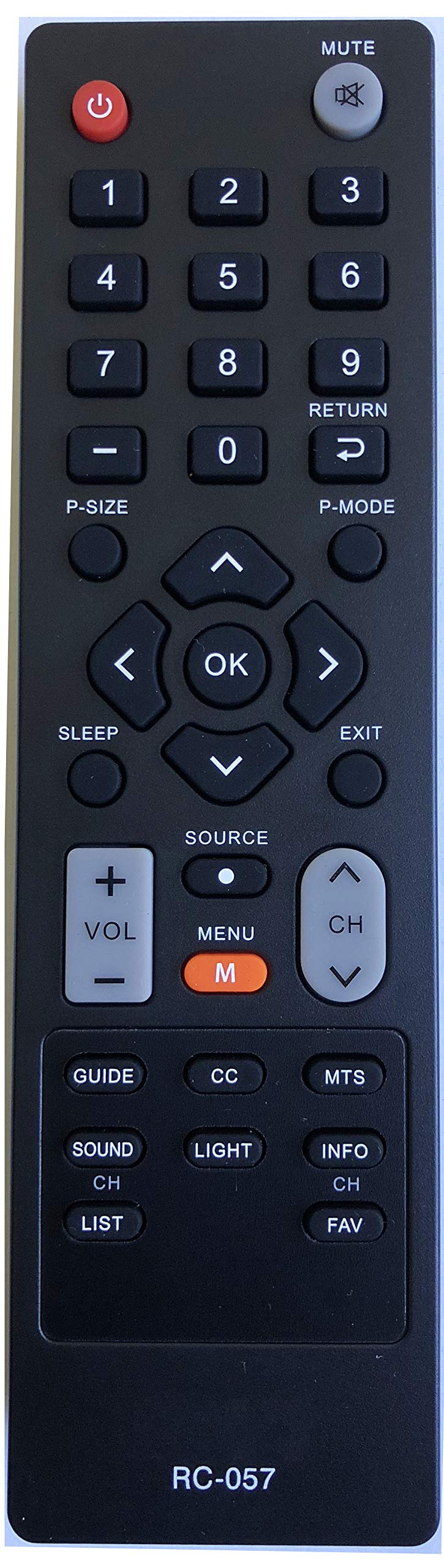
Image: Front view of the UBay RC-057 remote control, showing all buttons and their labels. The remote is black with grey and red buttons.
3. Operating Instructions
This section details the functions of each button on the UBay RC-057 remote control.
- Power (): Turns the television on or off.
- MUTE (): Mutes or unmutes the television's audio output.
- Number Buttons (0-9): Directly selects television channels.
- P-SIZE: Adjusts the picture size or aspect ratio of the display.
- RETURN (): Returns to the previously viewed channel or navigates back in a menu.
- P-MODE: Cycles through various preset picture modes (e.g., Standard, Dynamic, Movie).
- Navigation Buttons ( ): Navigates through menus, lists, and options.
- OK: Confirms selections or enters sub-menus.
- SLEEP: Activates or adjusts the sleep timer function.
- EXIT: Closes the current menu or on-screen display.
- SOURCE: Selects the input source (e.g., HDMI, AV, Component, TV).
- VOL +/-: Increases or decreases the television's volume level.
- MENU (M): Opens the main menu of the television.
- CH Up/Down ( ): Changes the television channel sequentially.
- GUIDE: Displays the Electronic Program Guide (EPG).
- CC: Toggles Closed Captions on or off.
- MTS: Selects Multi-channel Television Sound options (e.g., Stereo, SAP).
- SOUND: Accesses the television's audio settings.
- LIGHT: (Function varies by TV model) May adjust backlight or screen brightness.
- INFO: Displays information about the current channel or program.
- CH LIST: Displays a list of available channels.
- FAV: Accesses the list of favorite channels.
4. Maintenance
4.1 Cleaning
To maintain the remote control's performance and appearance:
- Wipe the remote control with a soft, dry cloth.
- For stubborn dirt, lightly dampen the cloth with water or a mild cleaning solution, then wipe dry immediately.
- Do not use abrasive cleaners, alcohol, or solvents, as these can damage the remote's surface or internal components.
4.2 Battery Replacement
Replace batteries when the remote control's response becomes sluggish or stops working. Always replace both batteries simultaneously with new AAA alkaline batteries. Do not mix old and new batteries or different types of batteries.
5. Troubleshooting
If you experience issues with your UBay RC-057 remote control, refer to the following common solutions:
- Remote not responding:
- Check if the batteries are inserted correctly with the correct polarity (+/-).
- Replace the batteries with new ones.
- Ensure there are no obstructions between the remote control and the TV's infrared sensor.
- Confirm the remote is pointed directly at the TV's sensor.
- Limited range:
- Ensure batteries are fresh.
- Reduce the distance between the remote and the TV.
- Remove any potential sources of infrared interference (e.g., strong lights, other electronic devices).
- Specific buttons not working:
- Clean the remote control, especially around the unresponsive buttons, to remove any dirt or debris.
- If cleaning and battery replacement do not resolve the issue, the remote control may be faulty.
6. Specifications
| Brand | UBay |
| Model Name | RC-057 |
| Compatible Devices | COBY Televisions (TFTV1925, LEDTV1926, TFTV2225, LEDTV1935, LEDTV2326, LEDTV3226, LEDTV5536, LEDVD1596, TFTV2425, TFTV4028, TFTV3229) |
| Connectivity Technology | Infrared |
| Controller Type | Button Control |
| Battery Type | 2 x AAA Alkaline Batteries (Not Included) |
| Maximum Range | 10 Meters |
| Special Feature | Ergonomic Design |
7. Warranty and Support
Information regarding specific warranty terms or direct customer support for the UBay RC-057 remote control is not provided in this manual. Please refer to the retailer or manufacturer's website for any available warranty details or support contacts.