
1. Introduction
This manual provides essential information for the proper use and maintenance of your new ZdalaMit AH59-02767A Replacement Remote Control. This remote is designed to be a direct replacement for original Samsung Soundbar remotes, offering seamless compatibility and functionality without the need for complex programming.
Please read this manual thoroughly before using the product to ensure optimal performance and longevity.
2. Product Features
- Direct replacement for Samsung Soundbar remote control model AH59-02767A.
- Compatible with Samsung Soundbar models: HW-N650, HW-N550, HW-N450, HW-N450/ZA, HW-N650/ZA, HW-N550/ZA.
- No programming or pairing required; ready for use immediately after battery installation.
- Ergonomic design for comfortable handling.
3. Package Contents
- 1X ZdalaMit AH59-02767A Replacement Remote Control
Note: 2X 1.5V AA Alkaline batteries are required and are not included in the package.
4. Setup
4.1 Battery Installation
- Locate the battery compartment on the back of the remote control.
- Slide the battery cover downwards or in the direction indicated by the arrow to open it.
- Insert two (2) 1.5V AA Alkaline batteries, ensuring the positive (+) and negative (-) terminals align correctly with the markings inside the compartment.
- Close the battery cover by sliding it back into place until it clicks securely.

Figure 1: Back view of the remote control, illustrating the battery compartment location.
Once batteries are installed, the remote control is ready for immediate use with compatible Samsung Soundbar models. No additional programming or setup is required.
5. Operating Instructions
The ZdalaMit AH59-02767A remote control functions identically to the original Samsung Soundbar remote. Simply point the remote towards your Samsung Soundbar and press the desired buttons to control its functions.
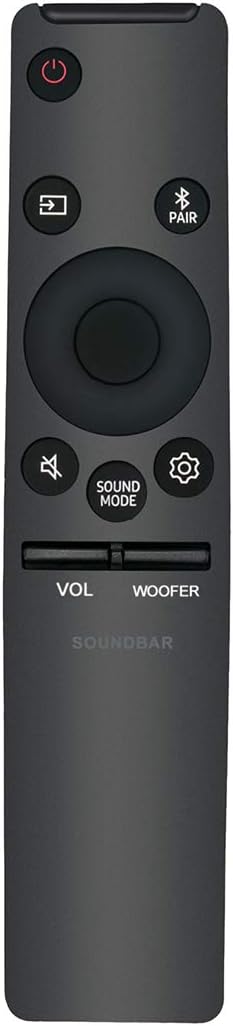
Figure 2: Front view of the remote control, displaying all functional buttons.
5.1 Key Functions
| Button | Function |
|---|---|
| Power (Red Circle) | Turns the Soundbar On or Off. |
| Source (Rectangle with Arrow) | Cycles through input sources (e.g., HDMI, Optical, Bluetooth). |
| Bluetooth Pair (Bluetooth Symbol + PAIR) | Initiates Bluetooth pairing mode. |
| Volume (VOL +/-) | Adjusts the main volume level. |
| Woofer (WOOFER +/-) | Adjusts the subwoofer volume level. |
| Mute (Speaker with Slash) | Mutes or unmutes the sound. |
| Sound Mode (SOUND MODE) | Cycles through various sound modes (e.g., Standard, Surround, Game). |
| Settings (Gear Icon) | Accesses Soundbar settings menu. |
| Navigation Pad (Center Circle) | Used for menu navigation and selection. |
6. Maintenance
6.1 Cleaning
To clean the remote control, use a soft, dry cloth. Do not use liquid cleaners, sprays, or abrasive materials, as these may damage the remote's surface or internal components.
6.2 Battery Replacement
Replace batteries when the remote's response becomes sluggish or it stops functioning. Always replace both batteries simultaneously with new 1.5V AA Alkaline batteries. Do not mix old and new batteries, or different types of batteries.
Dispose of used batteries according to local regulations.
7. Troubleshooting
| Problem | Possible Cause | Solution |
|---|---|---|
| Remote not responding. | Dead or incorrectly installed batteries. | Ensure batteries are inserted with correct polarity. Replace with new 1.5V AA Alkaline batteries. |
| Remote range is limited. | Weak batteries; Obstruction between remote and Soundbar. | Replace batteries. Ensure a clear line of sight between the remote and the Soundbar's sensor. |
| Specific buttons not working. | Dirt or debris under the button; Internal malfunction. | Clean the remote surface. If problem persists, contact customer support. |
If you encounter issues not listed here or if the problem persists after attempting the suggested solutions, please refer to the Support section.
8. Specifications
| Attribute | Detail |
|---|---|
| Model Number | 0814frjs-106 |
| Compatible Models | Samsung Soundbar HW-N650, HW-N550, HW-N450, HW-N450/ZA, HW-N650/ZA, HW-N550/ZA |
| Power Supply | 2 x 1.5V AA Alkaline Batteries (not included) |
| Product Dimensions | 6 x 1 x 0.5 inches |
| Item Weight | 1.5 ounces |
| Color | Black |
| Manufacturer | ZdalaMit Factory |
| Country of Origin | China |
9. Support
For any queries, technical assistance, or issues not covered in this manual, please feel free to contact our customer support. We are committed to providing prompt and helpful assistance.
Please refer to your purchase documentation or the retailer's website for specific contact information.