
TP-Link TL-PoE4824G
TP-Link TL-PoE4824G Passive PoE Injector Instruction Manual
Model: TL-PoE4824G | Brand: TP-Link
Introduction
The TP-Link TL-PoE4824G is a passive Power over Ethernet (PoE) adapter designed to supply power and transmit data simultaneously to compatible passive PoE devices. This includes devices such as TP-Link's EAP245 3.0, EAP225 3.0, and CPE610. Its design incorporates convenient wall-mounting brackets for easy installation.
Key Features:
- 48V passive PoE support for compatible devices.
- Automatic determination of necessary power requirements.
- Convenient wall-mounting design for flexible placement.
- Gigabit speed support for high-speed data transmission.
- Plug-and-Play functionality, requiring no complex configuration.
- Ethernet connectivity technology.
Package Contents
Verify that your package contains the following items:
- 48V 24W Passive PoE Adapter (TL-PoE4824G)
- Power Cord
- Wall Mounting Kits
Product Overview
The TL-PoE4824G PoE Injector features a compact design with essential ports and indicators for easy operation.

Figure 1: Top-down view of the TP-Link TL-PoE4824G Passive PoE Injector.
Ports and Indicators:
- PoE Port: Connects to the passive PoE device to deliver both power and data.
- LAN Port: Connects to your network device (e.g., router, switch) for data input.
- Power Input: Connects to the provided power cord for electrical supply.
- LED Indicator: Provides status information (e.g., power, connection activity).
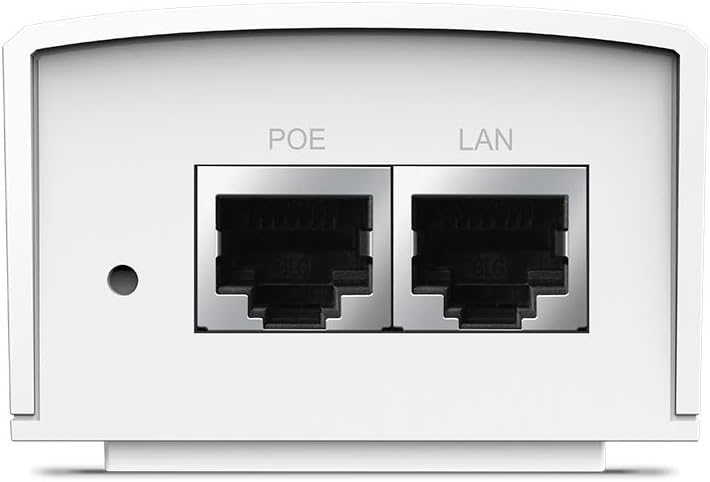
Figure 2: Close-up view of the PoE and LAN data ports.

Figure 3: Close-up view of the power input port.

Figure 4: Side view showing the LED indicator for device status.
Setup
The TL-PoE4824G is designed for simple plug-and-play installation. Follow these steps to set up your PoE injector:
- Connect to Power: Plug the provided power cord into the power input port of the TL-PoE4824G and then into a standard electrical outlet.
- Connect to Network: Connect an Ethernet cable from your network device (e.g., router, switch) to the LAN port on the TL-PoE4824G.
- Connect to PoE Device: Connect another Ethernet cable from the PoE port on the TL-PoE4824G to your passive PoE-compatible device (e.g., access point, IP camera).
- Verify Connection: Check the LED indicator on the TL-PoE4824G. A solid light typically indicates a successful power and data connection.

Figure 5: Connection diagram for the TL-PoE4824G, illustrating data and power flow to a passive PoE device.
Wall Mounting:
The TL-PoE4824G includes wall-mounting kits for secure installation. Refer to the diagram below for the mounting process:

Figure 6: Wall-mounting steps for the TL-PoE4824G using the provided brackets.
Operating
Once properly connected, the TL-PoE4824G operates automatically. It provides 48V DC passive PoE to the connected device, eliminating the need for a separate power adapter for the PoE device. Data transmission occurs at Gigabit speeds through the Ethernet connection.
The injector is designed to auto-determine the necessary power requirements for the connected passive PoE device, ensuring efficient and safe operation.
Maintenance
- Cleaning: Use a soft, dry cloth to clean the device. Do not use liquid or aerosol cleaners.
- Placement: Ensure the device is placed in a well-ventilated area, away from direct sunlight, heat sources, and moisture.
- Cable Management: Keep all cables neatly organized to prevent damage and ensure proper airflow.
- Firmware Updates: Periodically check the TP-Link official website for any available firmware updates to ensure optimal performance and security.
Troubleshooting
No Power/LED Indicator Off:
- Ensure the power cord is securely connected to both the injector and a working electrical outlet.
- Test the electrical outlet with another device to confirm it is supplying power.
No Data Connection:
- Verify that the Ethernet cables are securely connected to the LAN port (from your network) and the PoE port (to your device).
- Ensure the connected passive PoE device is functioning correctly and is compatible with 48V passive PoE.
- Check the status of your network device (router/switch) to ensure it is providing an active network connection.
- Try using different Ethernet cables to rule out cable defects.
Device Not Receiving Power:
- Confirm that your end device is a passive PoE device and supports 48V DC input. This injector is not compatible with 802.3af/at active PoE standards.
- Ensure the cable length does not exceed 100 meters (325 feet) for optimal power and data delivery.
Specifications
| Model | TL-PoE4824G |
| Brand | TP-Link |
| PoE Standard | 48V DC Passive PoE |
| Data Transfer Rate | 1000 Mbps (Gigabit Ethernet) |
| Connectivity Technology | Ethernet |
| Ports | 1x LAN (Data In), 1x PoE (Data & Power Out) |
| Max Cable Length | Up to 100 meters (325 feet) |
| Dimensions (LxWxH) | 4.33 x 2.24 x 1.41 inches |
| Weight | 5.6 ounces |
Warranty and Support
For warranty information, technical support, and product registration, please visit the official TP-Link website or contact their customer service. Keep your purchase receipt for warranty claims.
- TP-Link Support Website: www.tp-link.com/us/support/
- Contact: Refer to the TP-Link website for regional contact information.
Related documentsTL-PoE4824G


Ask a question about this manual
Ask about setup, troubleshooting, compatibility, parts, safety, or missing instructions. Manuals+ will review the question and use this page’s manual context to help answer it.