
1. Introduction
Thank you for choosing the Matrix PG 2000i-USB Inverter Generator. This generator is designed to provide reliable and clean power for various applications, from sensitive electronics to power tools. Its inverter technology ensures a pure sine wave output, making it safe for charging smartphones, laptops, and other delicate devices. This manual provides essential information for the safe operation, maintenance, and troubleshooting of your generator.
2. Safety Instructions
Read all safety warnings and instructions carefully before operating the generator. Failure to follow these instructions may result in electric shock, fire, serious injury, or death.
- Carbon Monoxide Hazard: Generators produce carbon monoxide, a colorless, odorless, poisonous gas. Operate the generator outdoors only, far away from windows, doors, and vents. Never operate indoors or in partially enclosed spaces.
- Fire Hazard: Gasoline is highly flammable. Refuel in a well-ventilated area with the engine off and cool. Do not smoke or allow flames or sparks near the generator or fuel tank.
- Electrical Shock Hazard: Do not operate the generator in wet conditions. Ensure all electrical connections are secure and dry. Never touch electrical components with wet hands.
- Hot Surfaces: The generator engine and muffler become very hot during operation and remain hot for a while after stopping. Avoid touching hot surfaces to prevent burns.
- Children and Pets: Keep children and pets away from the generator during operation.
- Proper Ventilation: Ensure adequate airflow around the generator to prevent overheating.
3. Package Contents
Your Matrix PG 2000i-USB Inverter Generator package should include the following items:
- Matrix PG 2000i-USB Inverter Generator
- User Manual
- Spark Plug Wrench
- Oil Funnel
- Screwdriver
- 12V Battery Charging Cables

Figure 3.1: Generator with included accessories.
4. Product Overview
Familiarize yourself with the components of your Matrix PG 2000i-USB Inverter Generator.

Figure 4.1: Front view of the Matrix PG 2000i-USB Inverter Generator.
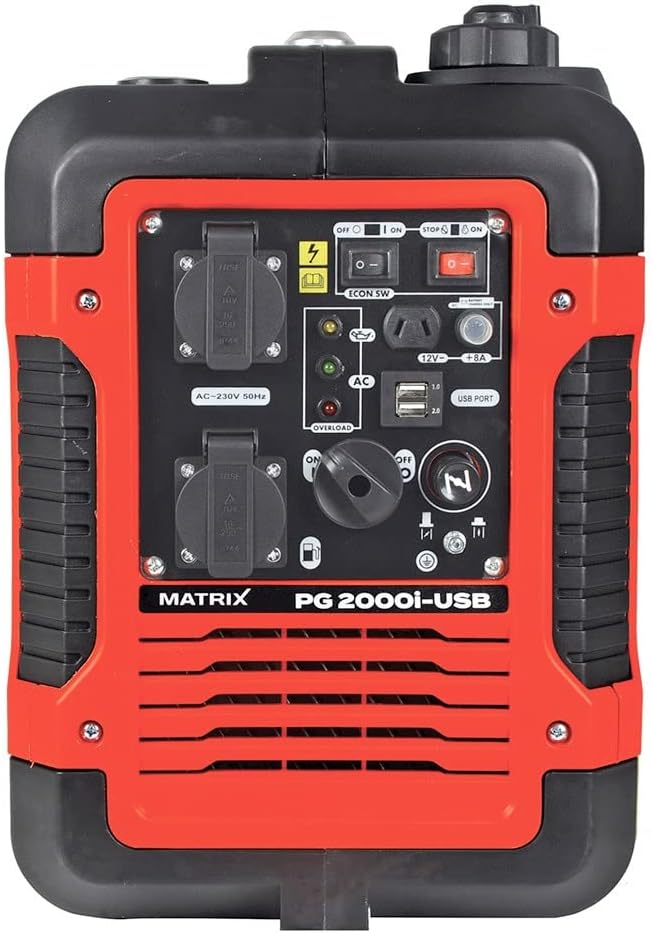
Figure 4.2: Detailed view of the control panel.
Key Components:
- AC 230V Outlets: Two standard 230V outlets for connecting electrical appliances.
- USB Ports: Two USB ports (1.0 and 2.0) for charging sensitive devices like smartphones and tablets.
- DC 12V / 8A Output: For charging 12V batteries.
- Engine Switch: Controls the engine's power (ON/OFF).
- Eco Switch: Activates Eco Mode for fuel efficiency and reduced noise.
- Choke Lever: Used for starting a cold engine.
- Fuel Cap: For filling the gasoline tank.
- Oil Fill Cap/Dipstick: For adding and checking engine oil.
- Pull Start Handle: For manually starting the engine.
- Indicator Lights: Oil warning, overload warning, AC output indicator.

Figure 4.3: USB ports for charging devices.

Figure 4.4: Top view with carrying handle and fuel cap.
5. Setup
5.1. Adding Engine Oil
The generator is shipped without engine oil. You must add the correct amount of oil before first use.
- Place the generator on a level surface.
- Locate and remove the oil fill cap/dipstick.
- Using the provided funnel, slowly add approximately 330 ml of 15W-40 engine oil. Do not overfill.
- Reinsert the dipstick and check the oil level. It should be at the upper mark.
- Securely replace the oil fill cap.
5.2. Adding Fuel
Use unleaded gasoline only. Do not use E85 or mixed fuels. Ensure the engine is off and cool before refueling.
- Unscrew the fuel cap.
- Carefully pour unleaded gasoline into the fuel tank. The tank capacity is 4 liters.
- Do not fill above the red indicator inside the tank. Leave space for fuel expansion.
- Securely replace the fuel cap.
6. Operating Instructions
6.1. Starting the Generator
- Ensure the generator is on a level surface and all electrical devices are disconnected.
- Turn the fuel valve to the 'ON' position.
- Move the choke lever to the 'CHOKE' position (for cold starts). For warm starts, the choke may not be necessary.
- Turn the engine switch to the 'ON' position.
- Firmly pull the recoil starter handle until the engine starts.
- Once the engine starts, slowly move the choke lever to the 'RUN' position.
- Allow the engine to warm up for a few minutes before connecting electrical loads.
6.2. Stopping the Generator
- Disconnect all electrical loads from the generator.
- Allow the engine to run for a few minutes without load to cool down.
- Turn the engine switch to the 'OFF' position.
- Turn the fuel valve to the 'OFF' position.
6.3. Eco Mode
The Eco Mode switch allows the generator to automatically adjust engine speed to match the electrical load. This reduces fuel consumption and noise levels when less power is required.
- To activate Eco Mode, press the 'ECON SW' switch to the 'ON' position.
- To deactivate Eco Mode (for full power output), press the 'ECON SW' switch to the 'OFF' position.
6.4. Connecting Devices
Connect your devices to the appropriate outlets:
- AC 230V: Plug appliances directly into the 230V outlets. Ensure the total wattage does not exceed the generator's continuous output (1700W).
- USB Ports: Use standard USB cables to charge compatible devices.
- DC 12V: Use the provided 12V charging cables to connect to a 12V battery.

Figure 6.1: The generator can power various outdoor tools and appliances.
7. Maintenance
Regular maintenance is crucial for the longevity and optimal performance of your generator. Always ensure the engine is off and cool before performing any maintenance.
7.1. Maintenance Schedule
| Item | Every Use | Every 25 Hours / Monthly | Every 100 Hours / Annually |
|---|---|---|---|
| Check Engine Oil Level | ✓ | ||
| Clean Air Filter | ✓ | ||
| Change Engine Oil | First 20 hours, then | ✓ | |
| Inspect Spark Plug | ✓ | ||
| Inspect Fuel Filter | ✓ |
7.2. Oil Change
Drain the old oil and refill with fresh 15W-40 engine oil. Refer to section 5.1 for oil filling instructions.
7.3. Air Filter Cleaning
Remove the air filter cover, take out the foam filter element, and clean it with warm, soapy water. Rinse thoroughly and allow to air dry completely before reinstallation. Replace if damaged.
7.4. Spark Plug Inspection
Remove the spark plug using the provided wrench. Inspect for wear, carbon buildup, or damage. Clean or replace as necessary. Ensure the gap is correct according to specifications.
7.5. Storage
For long-term storage, drain the fuel tank and carburetor to prevent fuel degradation. Change the engine oil, clean the air filter, and store the generator in a clean, dry place.
8. Troubleshooting
This section addresses common issues you might encounter with your generator.
| Problem | Possible Cause | Solution |
|---|---|---|
| Engine will not start | No fuel Engine switch OFF Choke not set correctly Low oil level Spark plug issue | Add fuel Turn engine switch ON Adjust choke Add oil Inspect/replace spark plug |
| No power output | Overload Circuit breaker tripped Eco Mode engaged with high load | Reduce load Reset circuit breaker Turn off Eco Mode for full power |
| Engine runs rough | Stale fuel Dirty air filter Spark plug issue | Drain and refill with fresh fuel Clean/replace air filter Inspect/replace spark plug |
| Overload indicator on | Connected devices exceed capacity | Disconnect devices, reduce load, restart generator |
9. Technical Specifications
| Feature | Specification |
|---|---|
| Model | PG 2000i-USB (Reference: 160100034) |
| Engine Type | 4-stroke, Air-cooled |
| Engine Displacement | 79 cm³ |
| Engine Power | 3 HP (2.6 ch) |
| Max Power Output | 1900 W |
| Continuous Power Output | 1700 W |
| Voltage | 230 V AC, 12 V DC |
| Frequency | 50 Hz |
| Fuel Type | Unleaded Gasoline |
| Fuel Tank Capacity | 4 Liters |
| Run Time (at 50% load) | Approx. 6 hours |
| Oil Type | 15W-40 |
| Oil Capacity | Approx. 330 ml |
| Noise Level (at 5m) | 59 dB |
| Dimensions (L x W x H) | 50 x 33 x 45 cm |
| Weight | 23 kg |
| Special Features | Inverter Technology, Eco Mode, USB Port |
10. Warranty and Support
For warranty information and customer support, please refer to the warranty card included with your product or contact Matrix customer service directly. Keep your purchase receipt as proof of purchase.


