
1. Introduction
This manual provides essential instructions for the proper setup, operation, and maintenance of your Brondi Adara Cordless Phone. Please read this guide thoroughly before using the device to ensure optimal performance and safety. The Brondi Adara is a DECT GAP compatible cordless telephone featuring a large backlit alphanumeric display, high-sensitivity hands-free function, and caller ID.
2. Safety Information
- Do not expose the phone or base unit to water or moisture.
- Avoid extreme temperatures, direct sunlight, or dusty environments.
- Use only the provided power adapter and batteries. Using unauthorized accessories may damage the device and void the warranty.
- Do not attempt to open or repair the device yourself. Refer all servicing to qualified personnel.
- Keep the phone away from medical devices such as pacemakers, as it may cause interference.
- Dispose of batteries responsibly according to local regulations.
3. Package Contents
Verify that all items are present in the package:
- Brondi Adara Handset
- Brondi Adara Base Unit
- Power Adapter for Base Unit
- Telephone Line Cord
- Rechargeable Batteries (NiMH)
- User Manual (this document)
4. Product Overview
Familiarize yourself with the main components of your Brondi Adara cordless phone.
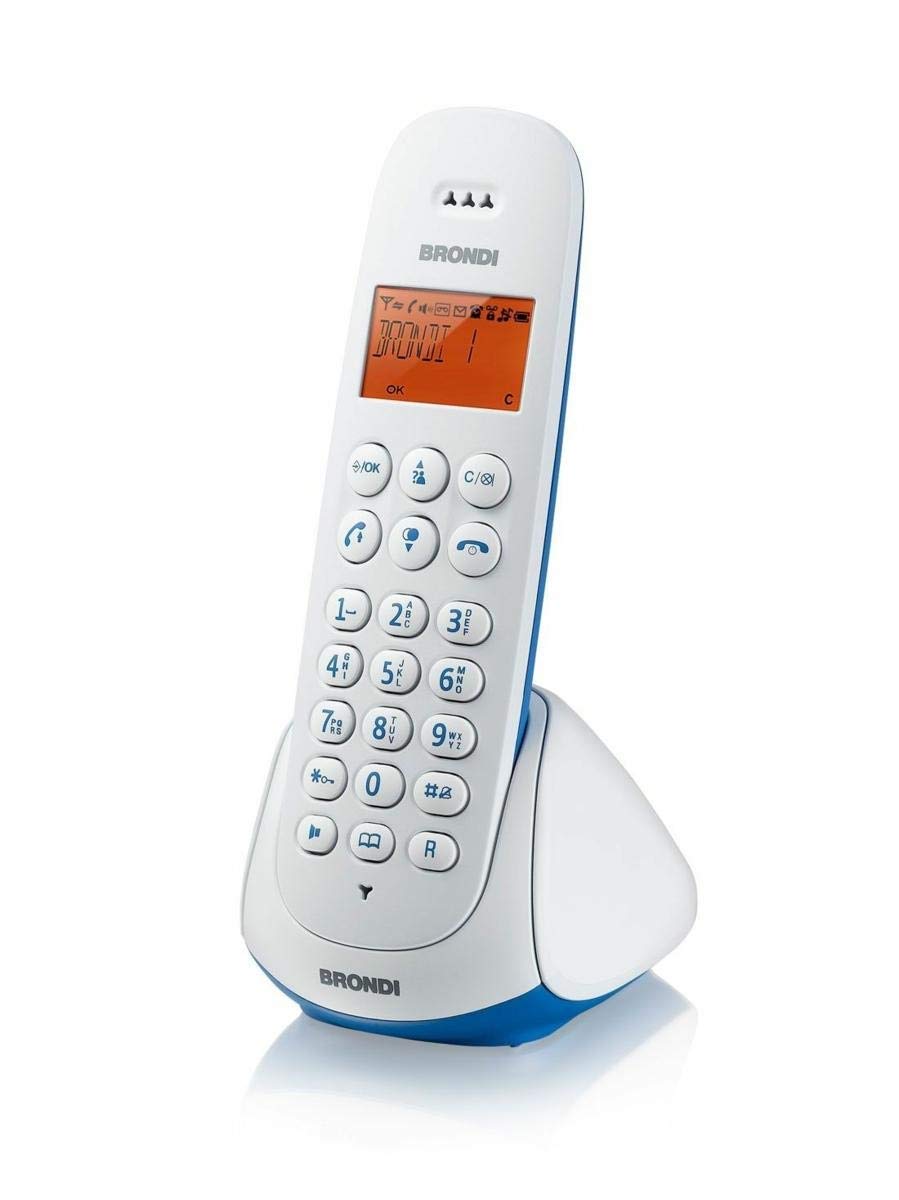
Image 1: Brondi Adara Cordless Phone, showing the handset and base unit.
4.1 Handset
- Display: Large alphanumeric backlit screen for menu navigation and call information.
- Keypad: Standard numeric keys (0-9), *, #, and function keys.
- Call Button (Green): To make or answer a call.
- End Call Button (Red): To end a call or return to standby.
- Navigation Keys: For scrolling through menus and options.
- Hands-Free Button: To activate or deactivate the speakerphone during a call.
- Volume Keys: To adjust earpiece or speaker volume.
4.2 Base Unit
- Charging Cradle: For charging the handset batteries.
- PAGE Button: To locate a misplaced handset.
- Power Socket: For connecting the power adapter.
- Telephone Line Socket: For connecting to the telephone wall outlet.

Image 2: Brondi Adara Cordless Phone, illustrating key features and components.
5. Setup
Follow these steps to set up your Brondi Adara cordless phone:
- Install Batteries: Open the battery compartment on the back of the handset. Insert the supplied rechargeable batteries, ensuring correct polarity. Close the compartment.
- Connect Base Unit Power: Plug the small end of the power adapter into the 'DC IN' socket on the base unit. Plug the other end into a standard electrical wall outlet.
- Connect Telephone Line: Plug one end of the telephone line cord into the 'LINE' socket on the base unit. Plug the other end into your telephone wall outlet.
- Charge Handset: Place the handset on the base unit's charging cradle. The display will indicate charging. Allow the handset to charge for at least 12-15 hours before initial use, even if the display shows a full battery. This ensures optimal battery performance.
- Handset Registration (if necessary): Your handset is usually pre-registered to the base. If not, or if you are adding additional handsets (up to 5 total), refer to the 'DECT GAP Pairing' section in Operating Instructions.
6. Operating Instructions
6.1 Making a Call
- Pick up the handset from the base or press the Call button.
- Dial the desired phone number using the keypad.
- Press the Call button again if you dialed before picking up, or wait for the call to connect.
6.2 Receiving a Call
When the phone rings:
- Press the Call button to answer.
- Alternatively, if the auto-answer feature is enabled, simply lift the handset from the base.
6.3 Hands-Free Function
During a call, press the Hands-Free button to activate the speakerphone. Press it again to switch back to the earpiece.
6.4 Caller ID
If you subscribe to Caller ID service from your telephone provider, the caller's number (and name, if available) will be displayed on the handset screen before you answer the call. You can review past calls in the call log menu.
6.5 DECT GAP Pairing (Registering Additional Handsets)
Your Brondi Adara base unit supports up to 5 DECT GAP compatible handsets. To register a new handset:
- On the base unit, press and hold the PAGE button for approximately 5 seconds until the registration indicator on the base starts flashing.
- On the handset you wish to register, navigate to the 'Registration' or 'Add Handset' option in the menu.
- Follow the on-screen prompts to enter the PIN (usually '0000' by default).
- Once registered, the handset display will confirm successful pairing.
7. Maintenance
7.1 Cleaning
Wipe the handset and base unit with a soft, dry, lint-free cloth. Do not use cleaning sprays, waxes, or solvents.
7.2 Battery Care
- Always use the specified rechargeable batteries.
- For optimal battery life, fully charge the handset for 12-15 hours before first use.
- If the handset will not be used for an extended period, remove the batteries to prevent leakage.
- Replace batteries when their performance significantly degrades (e.g., shorter talk time).
8. Troubleshooting
If you encounter issues with your Brondi Adara phone, refer to the following common problems and solutions:
| Problem | Possible Cause | Solution |
|---|---|---|
| No dial tone | Base unit not powered or telephone line disconnected. | Check power adapter connection to base and wall outlet. Ensure telephone line cord is securely connected to base and wall jack. |
| Cannot make/receive calls | Handset out of range, low battery, or line issue. | Move closer to the base unit. Place handset on base to charge. Check if other phones on the same line are working. |
| Poor sound quality / Static | Interference from other electronic devices, handset too far from base. | Move base unit away from other electrical appliances (TVs, computers). Move handset closer to the base. |
| Handset not charging | Handset not properly seated, dirty charging contacts, or faulty batteries. | Ensure handset is correctly placed on the base. Clean charging contacts on both handset and base with a dry cloth. Replace old batteries. |
| Caller ID not displayed | No Caller ID subscription or service issue. | Contact your telephone service provider to ensure Caller ID service is active. |
9. Specifications
| Feature | Detail |
|---|---|
| Brand | BRONDI |
| Model Number | 10273841 |
| Phone Type | Cordless |
| Color | Light Blue/White |
| Material | Acrylonitrile Butadiene Styrene (ABS) |
| Power Source | Battery Powered |
| Dialer Type | Single Keypad |
| Answering System Type | Digital |
| Compatible Devices | PSTN, ISDN |
| Multi-line Operation | Single-line Operation |
| Caller ID | Yes |
| Talk Time | 7 Hours |
10. Warranty and Support
For warranty information, technical support, or service inquiries, please refer to the warranty card included with your product or visit the official BRONDI website. Keep your proof of purchase for warranty claims.


