
1. Introduction
Thank you for choosing the kwmobile Foldable LED Desk Lamp. This versatile and portable lamp is designed to provide optimal lighting for various environments, whether you're studying, working, or relaxing. This manual will guide you through the setup, operation, and maintenance of your new lamp to ensure a long-lasting and satisfying experience.

Image 1.1: The kwmobile Foldable LED Desk Lamp in its extended form, showcasing its sleek rose gold design and bright illumination.
2. Product Overview
The kwmobile LED Desk Lamp features a unique foldable design and a rotating head, making it highly adaptable for different lighting needs. It includes a built-in rechargeable battery for cordless operation and touch-sensitive controls for dimming.
2.1. Key Features
- Foldable Design: Easily folds for compact storage and portability, fitting into bags or backpacks.
- 360° Rotating Head: The lamp head can be adjusted to direct light precisely where needed.
- 3-Grade Touch Dimmer: Adjust brightness levels (100%, 50%, 10%) with a simple touch.
- Built-in Rechargeable Battery: Provides cordless operation for convenience.
- Micro USB Charging: Charges easily via a standard Micro USB cable.

Image 2.1: Detailed view highlighting the lamp's touch dimmer, rotatable head, and Micro USB charging port.
2.2. Components
- LED Light Panel
- Foldable Arm Joints
- Base
- Touch Control Button
- Micro USB Charging Port
3. Setup
3.1. Unboxing
- Carefully remove all contents from the packaging.
- Verify that all items listed in the 'Box Contents' section are present and undamaged.
3.2. Initial Charging
Before first use, it is recommended to fully charge the lamp.
- Connect the supplied Micro USB cable to the charging port on the lamp.
- Connect the other end of the USB cable to a compatible USB power source (e.g., computer USB port, USB wall adapter).
- The charging indicator light (if present) will illuminate during charging and turn off or change color when fully charged.
- A full charge typically takes 2-3 hours.
3.3. Positioning the Lamp
The lamp's foldable design allows for various configurations:
- Desk Lamp: Unfold the lamp to your desired height and angle for reading or working.
- Bedside Lamp: Adjust the head for focused light.
- Portable Light: Fold it compactly for travel or camping.
- Wall Mount: Use the included wall bracket to mount the lamp on a wall for fixed lighting.

Image 3.1: The lamp shown in different configurations, highlighting its adaptability for various uses.
4. Operating Instructions
4.1. Power On/Off
Locate the touch control button, usually on the base or head of the lamp.
- To turn the lamp ON, lightly touch the control button.
- To turn the lamp OFF, touch and hold the control button for a few seconds, or cycle through the brightness levels until it turns off.
4.2. Adjusting Brightness (Dimming)
The lamp features 3 touch-sensitive dimming levels:
- With the lamp ON, tap the touch control button to cycle through the brightness levels: 100% (brightest) → 50% (medium) → 10% (lowest).
- Continue tapping to return to the brightest setting or to turn the lamp off after the lowest setting.
4.3. Adjusting Lamp Head and Angle
The lamp's arm joints and head are designed for flexible positioning:
- Gently adjust the foldable arm joints to achieve the desired height and reach.
- Rotate the lamp head 360 degrees to direct the light beam precisely.
5. Charging and Battery
5.1. Charging the Lamp
When the light output becomes dim or the lamp stops working, it's time to recharge the battery.
- Use the provided Micro USB cable to connect the lamp to a 5V/500mA USB power source.
- Charging time is approximately 2-3 hours for a full charge.
5.2. Battery Performance
The lamp is equipped with a permanently installed polymer ion battery. While the lamp can be powered continuously via the USB cable, prolonged use while charging or frequent deep discharges may affect overall battery performance and lifespan over time. For optimal battery health, avoid completely draining the battery frequently.
- Operating Time: Up to 3 hours on a full charge (at lowest brightness setting).
6. Maintenance
6.1. Cleaning
- Ensure the lamp is turned off and unplugged before cleaning.
- Wipe the lamp's surface with a soft, dry cloth.
- For stubborn marks, slightly dampen the cloth with water and mild soap, then wipe dry immediately.
- Do not use abrasive cleaners, solvents, or harsh chemicals, as these can damage the finish and electronic components.
6.2. Storage
- When not in use, fold the lamp into its compact form.
- Store it in the provided storage bag to protect it from dust and scratches.
- Keep the lamp in a cool, dry place away from direct sunlight and extreme temperatures.
7. Troubleshooting
If you encounter any issues with your lamp, please refer to the following common problems and solutions:
| Problem | Possible Cause | Solution |
|---|---|---|
| Lamp does not turn on. | Battery is depleted. | Charge the lamp fully (2-3 hours). |
| Lamp light is dim. | Low battery or set to lowest brightness. | Recharge the lamp. Tap the touch button to increase brightness. |
| Lamp does not charge. | Faulty cable or power adapter. | Try a different Micro USB cable and/or USB power adapter. Ensure connections are secure. |
| Touch control is unresponsive. | Temporary software glitch or low battery. | Charge the lamp. If issue persists, try resetting by fully discharging and then recharging. |
If the problem persists after trying these solutions, please contact customer support.
8. Technical Specifications
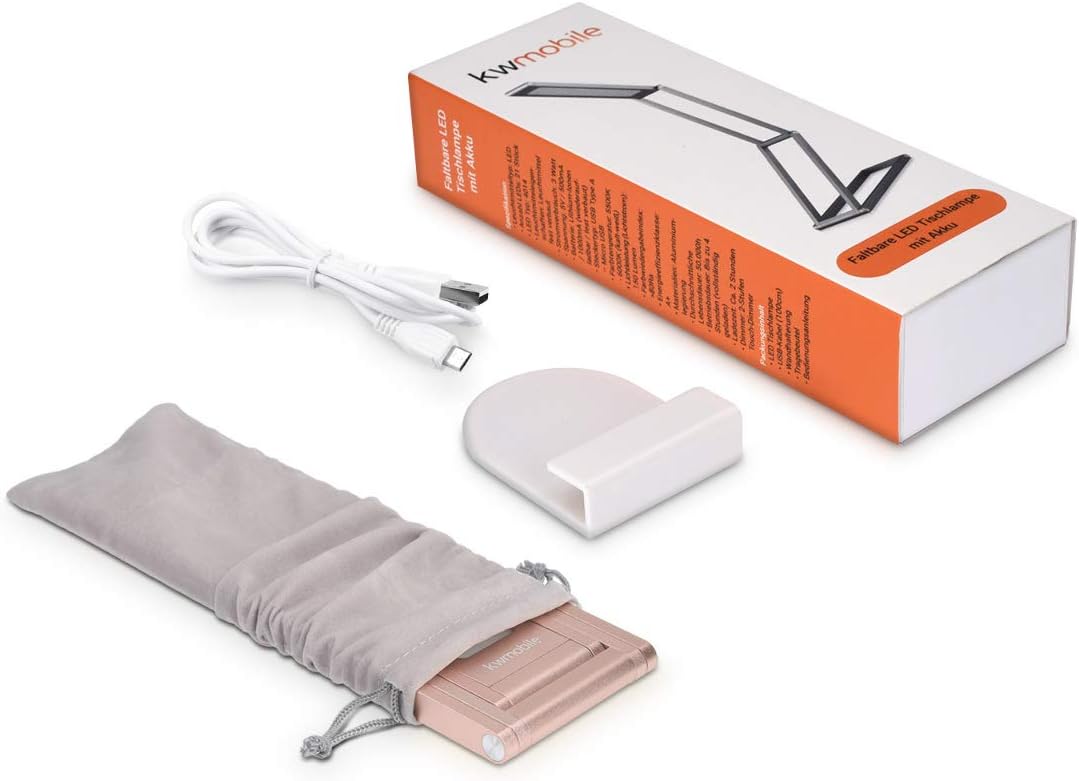
Image 8.1: Dimensions of the lamp in both folded and extended states.
| Feature | Specification |
|---|---|
| Model Number | 45535.81_m001319 |
| Bulb Type | 25 LEDs (permanently installed) |
| Connector Type | USB Type A - Micro USB |
| Power Consumption | 2.2 W |
| Voltage | 5 V |
| Current | 500 mA |
| Operating Time (max) | 3 hours (fully charged) |
| Charging Time | 2-3 hours |
| Battery Type | Polymer Ion (permanently installed) |
| Dimmer Levels | 3 touch levels (100%, 50%, 10% brightness) |
| Color Temperature | 5500-6000 Kelvin (Cool White) |
| Light Output (max) | 150 lumens |
| Dimensions (folded) | 20 x 6.6 x 1 cm (7.87 x 2.6 x 0.39 inches) |
| Dimensions (extended) | Approx. 55.2 cm (21.7 inches) height |
| Weight | 380 grams (0.84 lbs) |
| Materials | Aluminum alloy, plastic, electrical components |
| Color | Rose Gold |
9. Box Contents
The package includes the following items:
- 1 x kwmobile Foldable LED Lamp with Rotating Head
- 1 x Wall Bracket
- 1 x Storage Bag
- 1 x Micro USB Charging Cable (1 meter)

Image 9.1: All items included in the product packaging.
10. Warranty and Support
Information regarding product warranty and customer support is typically provided with your purchase documentation or on the product packaging. Please refer to those resources for details on warranty coverage, returns, and technical assistance.
For further inquiries or support, please contact the seller or manufacturer directly through the contact information provided at the point of purchase.