
1. Introduction
The Satisfyer Pro 3+ is an innovative device designed for clitoral stimulation, combining air pulse technology with vibration. Crafted from medical-grade silicone, it offers a gentle and comfortable experience. This device is fully waterproof (IPX7), allowing for use in various environments, including baths and showers.

Image 1: Satisfyer Pro 3+ device and its retail packaging.
2. Safety Information
Before using the Satisfyer Pro 3+, please read all safety information provided in the Quick Start Guide. Ensure the device is clean and fully charged before initial use. This product is intended for personal use only.
Legal Disclaimer: Statements regarding dietary supplements have not been evaluated by the FDA and are not intended to diagnose, treat, cure, or prevent any disease or health condition.
3. Setup
3.1 Initial Charging
The Satisfyer Pro 3+ is powered by a rechargeable Lithium-Ion battery. Before first use, fully charge the device. A magnetic USB charging cable is included for this purpose.
- Connect the magnetic end of the USB cable to the charging points on the device.
- Plug the USB end of the cable into a compatible USB power source (e.g., computer, USB wall adapter).
- A full charge typically takes approximately 4 hours. The device's indicator light will signal charging status.
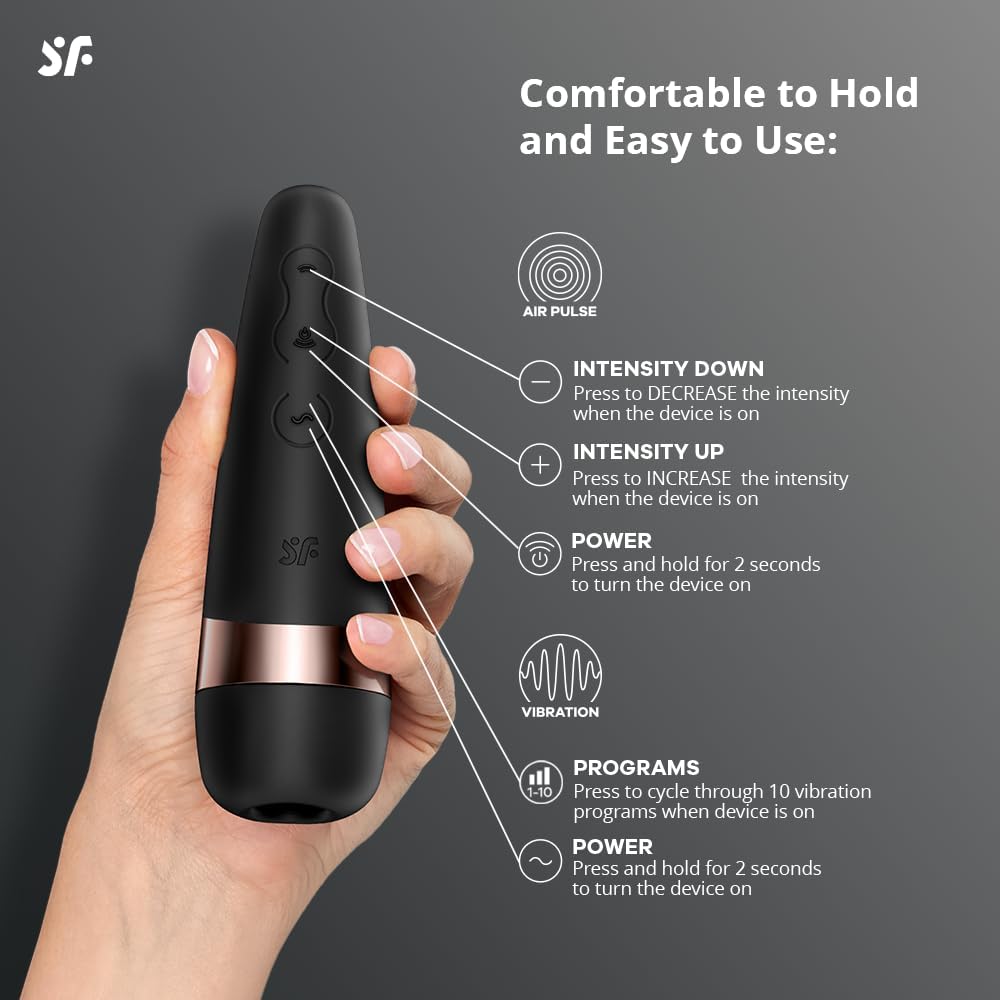
Image 2: Satisfyer Pro 3+ showing the magnetic USB charging cable connection.
Once fully charged, the device provides an operating time of up to 60 minutes, depending on the intensity settings used.
4. Operating Instructions
4.1 Controls Overview
The Satisfyer Pro 3+ features three discreet buttons for controlling its functions:
- Power Button (Middle): Press and hold for 2 seconds to turn the device on or off.
- Intensity Up (+) Button: Press to increase the intensity of the air pulse when the device is on.
- Intensity Down (-) Button: Press to decrease the intensity of the air pulse when the device is on.
- Program Button (Wave Symbol): Press to cycle through 10 vibration programs when the device is on. Press and hold to turn the vibration function on or off.

Image 3: Diagram illustrating the air pulse technology and intensity programs.
4.2 Using the Device
The device offers 11 pressure wave levels and 10 vibration rhythms, which can be controlled separately or used in combination for a total of 110 exciting combinations.
- Power On: Press and hold the middle Power button for 2 seconds.
- Air Pulse Stimulation: Use the (+) and (-) buttons to adjust the intensity of the air pulse. There are 11 levels of intensity.
- Vibration: Press the Program button (wave symbol) to cycle through the 10 vibration patterns. Press and hold the Program button to turn the vibration on or off independently.
- Combined Use: Activate both air pulse and vibration functions simultaneously and adjust their intensities/patterns independently to find your preferred combination.
- Power Off: Press and hold the middle Power button for 2 seconds to turn off the device. If both air pulse and vibration are active, you may need to turn off each function individually before powering down the entire device.
The ergonomic design ensures a comfortable and intuitive grip. For enhanced comfort, the device is compatible with water-based lubricants.
Video 1: Official product demonstration of the Satisfyer Pro 3+ features, including independently controlled motors, clitoral stimulation via pressure waves and vibration, waterproof design, and magnetic USB charging.
5. Maintenance
5.1 Cleaning
Due to its waterproof design, cleaning the Satisfyer Pro 3+ is straightforward. Always clean the device before and after each use.
- Rinse the device under warm running water.
- Use a mild soap or a specialized toy cleaner to gently clean the silicone surface.
- Rinse thoroughly to remove all soap residue.
- Pat dry with a lint-free cloth or allow to air dry completely before storing.

Image 4: Satisfyer Pro 3+ demonstrating its waterproof capabilities.
5.2 Storage
Store the device in a clean, dry place, away from direct sunlight and extreme temperatures. Avoid storing with other toys made of different materials to prevent potential damage or reactions.
6. Troubleshooting
If you experience any issues with your Satisfyer Pro 3+, consider the following:
- Device not turning on: Ensure the device is fully charged. Connect it to the charger and wait for the indicator light to confirm charging.
- Weak or no stimulation: Check the intensity settings for both air pulse and vibration. Ensure the device is positioned correctly.
- Charging issues: Verify that the magnetic charging cable is securely connected to both the device and the power source. Try a different USB port or adapter.
- Buttons unresponsive: Ensure the device is not locked (if applicable, refer to the full manual for specific lock functions). If issues persist, try a full charge cycle.
For persistent problems, please refer to the full product manual or contact customer support.
7. Specifications
| Brand | Satisfyer |
| Model Name | Pro 3+ |
| Item Model Number | S4049369016532 |
| Material | Silicone |
| Water Resistance Level | Waterproof (IPX7) |
| Product Dimensions | 5.51 x 5.51 x 2.36 inches |
| Item Weight | 10.58 ounces |
| Battery Type | 1 Lithium Ion battery (included) |
| Charging | Magnetic USB Charging Cable |
| Air Pulse Intensities | 11 |
| Vibration Settings | 10 |
8. Warranty and Support
8.1 Warranty Information
The Satisfyer Pro 3+ comes with a 15-year guarantee. Please retain your proof of purchase for any warranty claims. For detailed warranty terms and conditions, refer to the guarantee information included in your product packaging.
8.2 Customer Support
Should you require further assistance, have questions about your device, or need to make a warranty claim, please visit the official Satisfyer website or contact their customer support directly. Contact information can typically be found in the product packaging or on the manufacturer's website.


