
1. Setup
The HUSSELL Dual USB Car Charger Adapter is designed for easy installation into your vehicle's 12V cigarette lighter socket.
- Locate the 12V Socket: Identify the 12V (cigarette lighter) power outlet in your car. This is typically found in the center console or dashboard.
- Insert the Charger: Firmly insert the HUSSELL car charger into the 12V socket. Ensure it is fully seated for a stable connection.
- Verify Power: Once properly inserted, the charger's blue LED indicator will illuminate, confirming that it is receiving power and ready for use.

Image: The HUSSELL car charger seamlessly integrated into a vehicle's power outlet, actively charging a smartphone and a tablet.
Video: See what you get! Hussell Car Charger Adapter
Video: An unboxing and demonstration of the HUSSELL car charger adapter, showing its compact design and how it fits into a car's cigarette lighter socket.
2. Operation
The HUSSELL car charger features two USB ports for simultaneous charging of multiple devices.
- Connect Your Device: Use a compatible USB charging cable to connect your mobile phone, tablet, navigation device, or other USB-powered gadget to one of the charger's ports.
- Utilize Dual Ports: The charger includes a Quick Charge 3.0 port (for rapid charging compatible devices) and a 2.4A port (for efficient charging of other devices). You can use both ports simultaneously.
- Charging Indication: The blue LED light on the charger indicates that it is powered on and actively charging.

Image: A detailed view of the charger's two USB ports, highlighting the Quick Charge 3.0 and 2.4A labels, with a charging cable connected.
Video: Hussell 3.0 USB Car Charger - Review & Testing
Video: A comprehensive review and testing of the HUSSELL 3.0 USB car charger, demonstrating its fast charging capabilities and dual port functionality.
3. Maintenance
To ensure the longevity and optimal performance of your HUSSELL car charger, follow these simple maintenance guidelines:
- Cleaning: Use a soft, dry cloth to wipe the exterior of the charger. Avoid using liquid cleaners or abrasive materials.
- Storage: When not in use, store the charger in a cool, dry place away from direct sunlight and extreme temperatures.
- Handling: Avoid dropping the charger or subjecting it to strong impacts. The durable polycarbonate housing is designed for resilience, but excessive force can cause damage.
- Port Care: Ensure USB ports are free from dust, debris, or moisture before inserting cables.
4. Troubleshooting
If you encounter issues with your HUSSELL car charger, refer to the following common solutions:
- No Power Indication (LED Off):
- Ensure the charger is fully and securely inserted into the 12V socket.
- Check your vehicle's fuse box for a blown fuse related to the 12V power outlet.
- Test the charger in a different 12V socket or vehicle to rule out a vehicle-specific issue.
- Slow Charging:
- Verify that your device and charging cable support Quick Charge 3.0 for the fastest speeds. Using a non-QC compatible cable or device will result in standard charging speeds.
- Ensure the cable is not damaged or frayed. Try a different, high-quality USB cable.
- Avoid using power-intensive applications on your device while charging, as this can slow down the charging process.
- Device Not Charging:
- Confirm that the blue LED on the charger is illuminated. If not, refer to 'No Power Indication'.
- Try a different USB port on the charger.
- Test with a different device and cable to isolate the problem.
- Overheating Protection: The charger has built-in protection mechanisms to prevent over-current, overcharging, and overheating. If the charger or your device feels excessively hot, disconnect it immediately. Allow it to cool down before attempting to charge again.
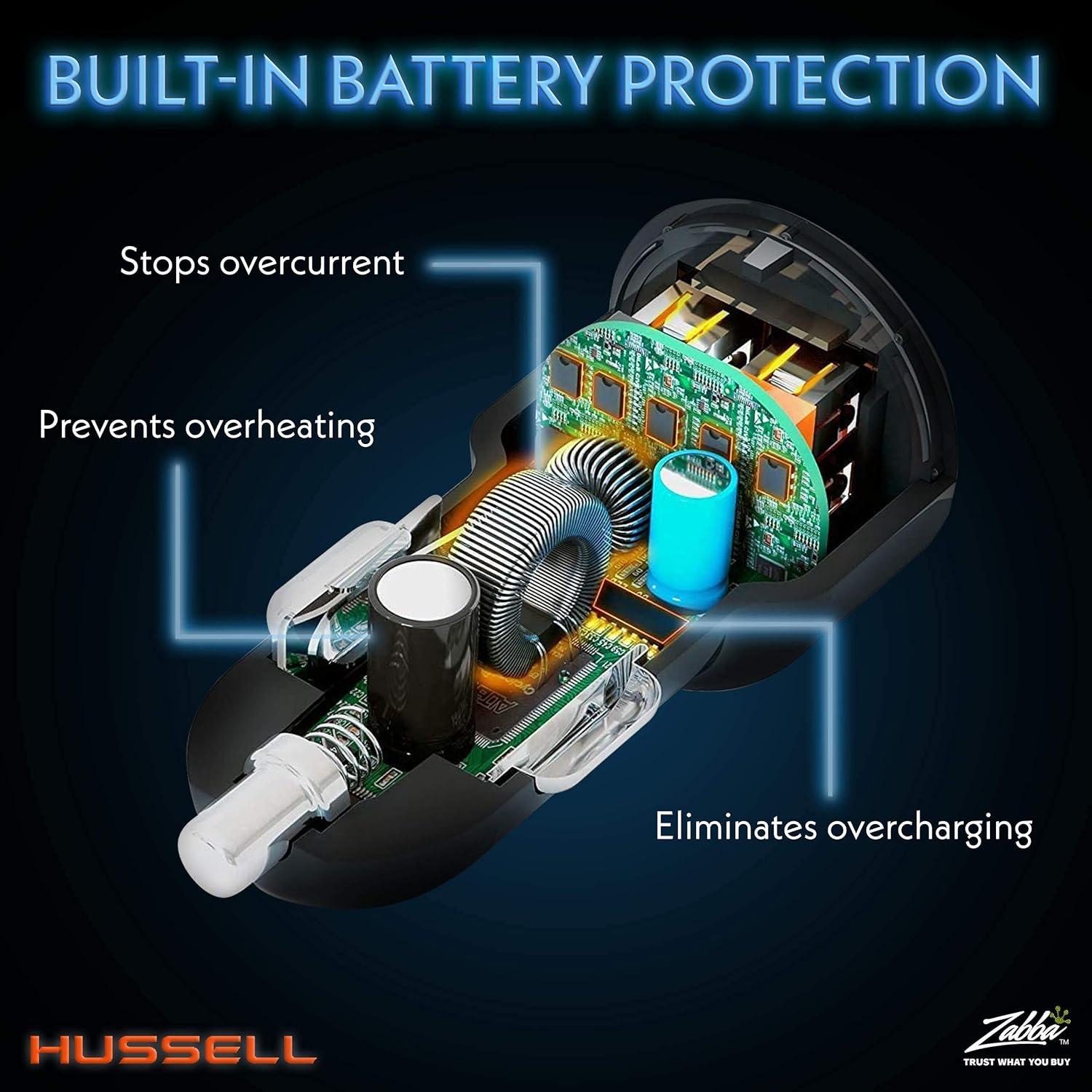
Image: An internal diagram illustrating the charger's safety features, such as protection against overcurrent, overheating, and overcharging.
5. Specifications
| Feature | Detail |
|---|---|
| Model Number | hussell |
| Package Dimensions | 3.94 x 3.86 x 1.77 inches |
| Item Weight | 1.13 ounces |
| Input Voltage | 12 Volts |
| Amperage | 5.4 Amps |
| Total USB Ports | 2 |
| Special Feature | Fast Charging (Qualcomm Quick Charge 3.0) |
| Compatible Devices | Mobile Phones, Tablets, E-readers, Sat Navs, etc. |
| Housing Material | Durable Polycarbonate Plastic |
6. Warranty & Support
HUSSELL is committed to providing high-quality products and excellent customer service.
- Quality Promise: We stand behind our products.
- Customer Service: If you have any questions or concerns about your car USB adapter, our customer service team is always available to assist you. Please refer to your purchase documentation for specific contact details.
