
1. Product Overview
This manual provides detailed instructions for the AOK motors 2 Channel RF 433.92 Remote Controller. This wireless emitter transmitter is designed for convenient control of tubular motors, curtain motors, and Venetian motors, offering a reliable solution for automated window coverings.
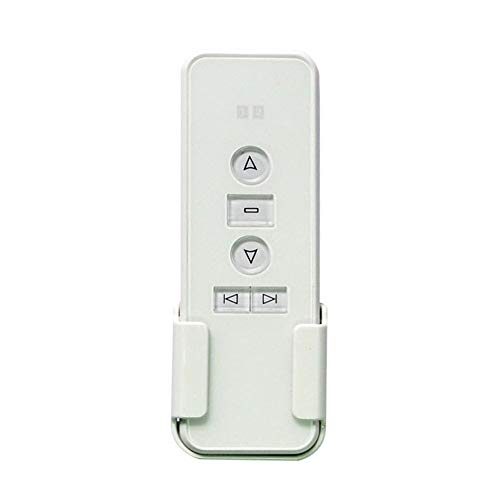
Image 1: The AOK motors 2 Channel RF 433.92 Remote Controller shown with its included wall mounting bracket. The remote is white with clearly labeled buttons for up, stop, down, and channel selection.
2. Key Features
- 2-Channel Control: Capable of individually controlling up to two shades or blinds.
- Extended Range: Offers a radio control range of up to 200 meters outdoors and 70 meters indoors.
- Durable Design: Features an acrylic design with high hardness, resistant to scratches.
- Easy Installation: Includes a magnet mounting holder for simple installation.
- Wide Compatibility: Handset controller is compatible with all AOK motors.
- Power Source: Operates on a DC 3V CR2430 battery.
- Frequency: Operates at 433.92MHz.

Image 2: This image highlights the core features of the remote: RF 433.92MHz frequency, stable signal launch, and reliable remote control capabilities, primarily for residential window coverings.
3. Setup and Installation
3.1 Battery Installation
- Locate the battery compartment on the back of the remote controller.
- Open the compartment cover.
- Insert one CR2430 DC 3V battery, ensuring correct polarity (+/-).
- Close the battery compartment cover securely.
3.2 Pairing with Motor
Refer to your specific AOK motor's instruction manual for detailed pairing procedures. Generally, the process involves putting the motor into pairing mode and then sending a signal from the remote controller.
3.3 Mounting the Remote
The remote comes with a magnetic mounting holder for convenient storage. Choose a suitable location near your window coverings, ensuring easy access. The holder can be affixed to a wall using screws or adhesive (not included).
4. Operating Instructions
The remote controller features intuitive buttons for easy operation of your motorized blinds or shades.

Image 3: This diagram illustrates the function of each button on the remote: the top triangle for 'Running up', the square for 'Stop', the bottom triangle for 'Running down', and the left/right arrows for 'Select Channel -' and 'Select Channel +'.
- Channel Selection: Use the < (Select Channel -) and > (Select Channel +) buttons to switch between the two available channels. The current channel number (1 or 2) is displayed on the remote's screen.
- Running Up: Press the ▲ (Up) button to raise the connected blind or shade.
- Running Down: Press the ▼ (Down) button to lower the connected blind or shade.
- Stop: Press the ■ (Stop) button to halt the movement of the blind or shade at any desired position.
4.1 Setting Memory Limits (if supported by motor)
Some AOK motors support multi-limit settings. If your motor has this feature, you can program specific stop positions. Refer to your motor's manual for detailed instructions on setting these limits.

Image 4: This image demonstrates the concept of multi-limit remote control, where the remote can be used to set and recall specific memory limits (e.g., 25%, 50%, 75%) for window coverings.
5. Maintenance
- Cleaning: Wipe the remote controller with a soft, dry cloth. Avoid using abrasive cleaners or solvents.
- Battery Replacement: Replace the CR2430 battery when the remote's performance degrades or the indicator light (if present) signals low battery.
- Storage: Store the remote in a cool, dry place away from direct sunlight and extreme temperatures.
6. Troubleshooting
| Problem | Possible Cause | Solution |
|---|---|---|
| Remote not responding | Low or dead battery | Replace the CR2430 battery. |
| Remote not controlling motor | Not paired or pairing lost | Re-pair the remote with the motor according to the motor's instructions. |
| Limited range | Obstructions or interference | Ensure clear line of sight or reduce distance between remote and motor. Avoid strong electromagnetic interference. |
| Incorrect motor response | Wrong channel selected | Verify the correct channel (1 or 2) is selected on the remote. |
7. Specifications
- Model Number: Sortfle-AC123-02
- Color: White
- Frequency: 433.92 MHz
- Channels: 2
- Radio Control Range: Outdoor 200 meters, Indoor 70 meters
- Battery Type: DC 3V, CR2430
- Item Weight: 82 g
- Dimensions (LxWxH): 12.7 x 4.2 x 1.2 Centimeters (approx. 5 x 1.65 x 0.5 inches)
- Primary Material: Acrylic

Image 5: This image provides the approximate dimensions of the remote controller: 5 inches in length, 1.65 inches in width, and 0.5 inches in thickness, illustrating its simple and ergonomic design.
8. Compatibility
This AOK motors remote controller is designed to be compatible with specific AOK remote series. It is crucial to ensure your existing remote or motor is from a compatible series for proper functionality.

Image 6: This image details the compatibility of the remote. It is compatible with AOK remote series AC114, AC123, AC127, AC136, AC140, AC141, AC145, and AC153. It explicitly states that it is not compatible with other brands or different remote models/shapes.
Note: This remote is only a replacement for the same shape and compatible series that you currently use. It will not be compatible with other brand remotes or AOK remotes of a different model or shape. If you have doubts about compatibility, please contact AOK motors support with pictures of your current remote.
9. Warranty and Support
For warranty information and technical support, please refer to the documentation provided with your purchase or contact AOK motors customer service directly. Keep your purchase receipt for warranty claims.