
1. Introduction and Overview
The Lorex LR-DPH2 is a coded card door access system designed to provide secure entry control for offices, buildings, and other restricted areas. This system allows access using either a numerical code or a proximity card, offering flexibility and enhanced security. It is suitable for both indoor and outdoor environments.
Key Features:
- Supports up to 999 user identifications.
- Operates with a combination of code and card, or card-only access.
- Compatible with Proximity Blue Keyring Indicators.
- Requires 12VDC power supply.
- Suitable for both indoor and outdoor use.
2. Package Contents
Please verify that all items listed below are present in your package:
- 1 x Lorex LR-DPH2 Coded Door Access Device
- 1 x KALE Electric Lock Strike (LOREX LR-ES12SC equivalent)
- 10 x RFID Proximity Cards
3. Setup and Installation
This section provides general guidelines for installing the Lorex LR-DPH2 system. Professional installation is recommended for optimal performance and security.
Installation Steps:
- Mount the LR-DPH2 Device: Choose a suitable location near the door, ensuring it is at an accessible height. Secure the device to the wall using appropriate screws and anchors.
- Install the Electric Lock Strike: Integrate the KALE Electric Lock Strike into your door frame. Ensure proper alignment with the door's latch bolt for smooth operation.
- Wiring Connections: Connect the LR-DPH2 device to the electric lock strike and a 12VDC power supply. Refer to the detailed wiring diagram provided in the separate installation guide for specific connections. Ensure all connections are secure and insulated.
- Initial Power-Up: Apply power to the system. The device should power on, indicated by an audible beep or LED light.
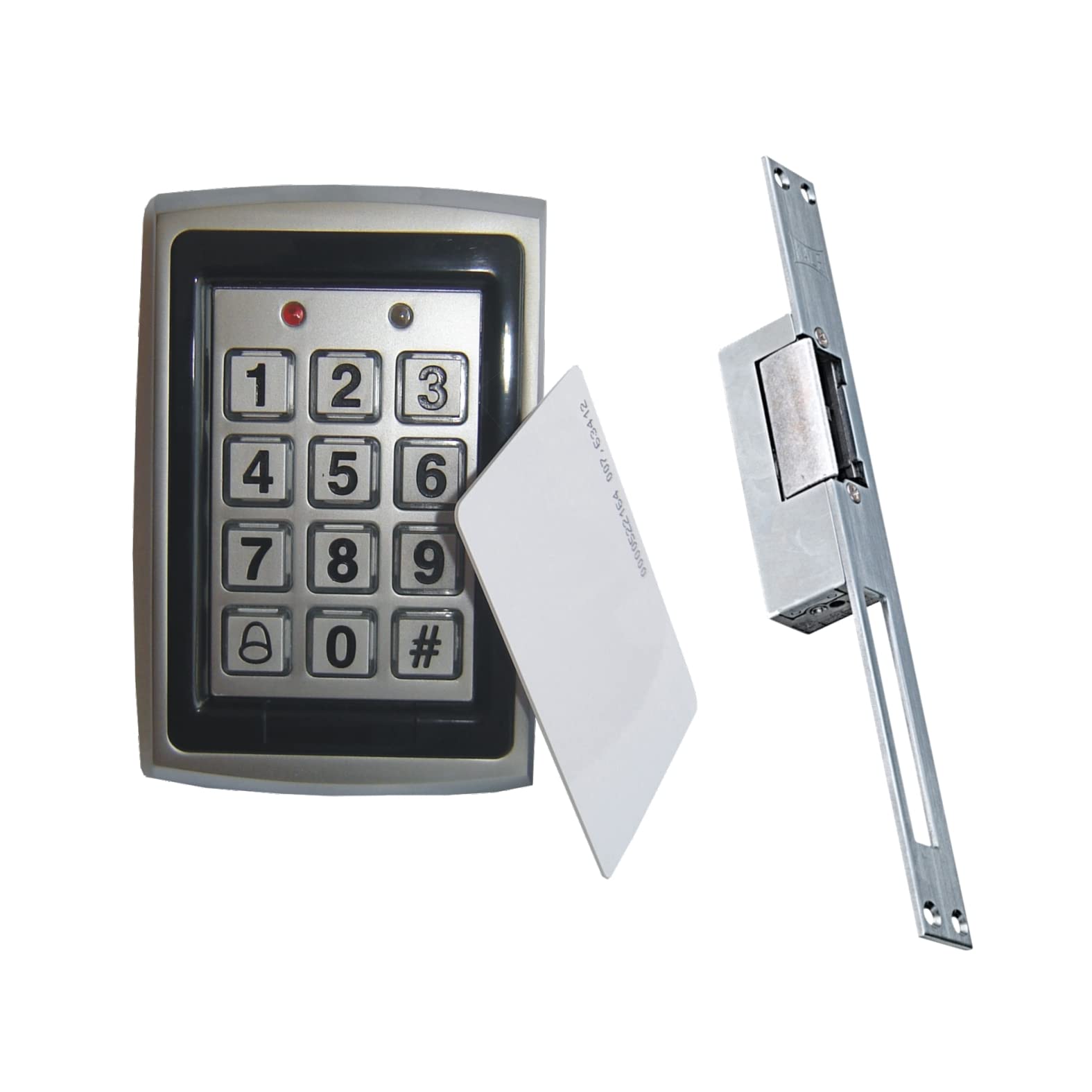
Figure 3.1: The Lorex LR-DPH2 Coded Card Door Access System, showing the keypad, card reader, and included electric lock strike and proximity cards. This image illustrates the main components of the access control kit.
4. Operating Instructions
This section details how to operate your Lorex LR-DPH2 system, including initial programming and daily use.
4.1. Initial Setup and Master Code
Upon first power-up, the system will be in a default state. You must set a master programming code to manage users.
- Enter the default master code (refer to your specific installation guide for the default code, typically '123456' or '888888').
- Press the '#' key.
- Enter '0' to enter programming mode.
- Enter '1' to change the master code.
- Enter your new 4-6 digit master code, then press '#'.
- Re-enter your new master code, then press '#' to confirm.
4.2. Adding Users (Code or Card)
The system supports up to 999 users. Each user can be assigned a unique code, a proximity card, or both.
- Enter the master code, then press '#'.
- Enter '0' to enter programming mode.
- Enter '2' to add a user.
- To add a code user: Enter a 4-6 digit user code, then press '#'.
- To add a card user: Present the proximity card to the reader. The device will beep to confirm.
- To add a code + card user: Enter a 4-6 digit user code, press '#', then present the proximity card to the reader.
- Repeat steps 4-6 for additional users or press '*' to exit programming mode.
4.3. Deleting Users
- Enter the master code, then press '#'.
- Enter '0' to enter programming mode.
- Enter '3' to delete a user.
- To delete a code user: Enter the user's 4-6 digit code, then press '#'.
- To delete a card user: Present the proximity card to the reader. The device will beep to confirm.
- Repeat for additional users or press '*' to exit programming mode.
4.4. Opening the Door
- Using a Code: Enter your assigned 4-6 digit user code, then press '#'. The door will unlock for a preset duration.
- Using a Card: Present your proximity card to the reader. The door will unlock for a preset duration.
- Using Code + Card: Enter your assigned 4-6 digit user code, press '#', then present your proximity card to the reader. The door will unlock for a preset duration.
5. Maintenance
Regular maintenance ensures the longevity and reliable operation of your Lorex LR-DPH2 system.
- Cleaning: Wipe the keypad and card reader surfaces with a soft, damp cloth. Avoid using abrasive cleaners, solvents, or harsh chemicals, as these can damage the finish or internal components.
- Inspection: Periodically check all wiring connections for signs of wear or damage. Ensure the electric lock strike operates smoothly and is free from obstructions.
- Power Supply: Ensure the 12VDC power supply is stable and free from fluctuations.
- Firmware Updates: Check the manufacturer's website for any available firmware updates for improved performance or security features.
6. Troubleshooting
This section addresses common issues you might encounter with your Lorex LR-DPH2 system.
| Problem | Possible Cause | Solution |
|---|---|---|
| Door does not unlock with valid code/card. | Incorrect wiring; power supply issue; electric lock strike malfunction; user not properly programmed. | Check all wiring connections. Verify 12VDC power supply. Test the electric lock strike independently. Re-program the user code/card. |
| Keypad is unresponsive. | No power; device malfunction. | Check power supply. Ensure connections are secure. If problem persists, contact support. |
| Proximity card not recognized. | Card not programmed; damaged card; interference. | Ensure the card is correctly programmed. Try a different card. Avoid placing metallic objects near the reader during use. |
| System beeps continuously. | Error condition; tamper alarm. | Refer to the full manual for specific beep codes. Check for tamper switch activation. |
7. Specifications
- Model: LR-DPH2
- Part Number: LR-GCSET1
- Brand: LOREX
- Power Supply: 12VDC
- User Capacity: 999 users
- Access Modes: Code, Card, Code + Card
- Environment: Indoor/Outdoor use
- ASIN: B07J2LHJWG
8. Warranty and Support
LOREX products are manufactured to high-quality standards. This product comes with a standard manufacturer's warranty against defects in materials and workmanship. For specific warranty terms and conditions, please refer to the warranty card included with your product or visit the official LOREX website.
For technical assistance, troubleshooting, or to inquire about replacement parts, please contact LOREX customer support. Contact information can typically be found on the LOREX website or on the product packaging.