
1. Introduction
Thank you for choosing the Croove Portable Karaoke Machine Party Box. This versatile system is designed to provide hours of entertainment with its powerful sound, multiple connectivity options, and dual microphones. This manual will guide you through the setup, operation, and maintenance of your new karaoke machine to ensure optimal performance and enjoyment.
2. What's in the Box
Please check the contents of your package to ensure all items are present:
- 1 x Croove Portable Karaoke Machine Party Box
- 1 x Wireless Microphone
- 1 x Wired Microphone
- 1 x Remote Control
- 1 x Micro USB Cable
- 1 x AUX Cable
- 1 x 15V DC Power Adapter
- 1 x Wireless Microphone Holder
- 1 x Wired Microphone Holder

Image: All components included in the Croove Portable Karaoke Machine Party Box package.
3. Product Overview
3.1. Top Panel Controls
The top panel of the Party Box features all essential controls for music playback, volume adjustments, and mode selection.
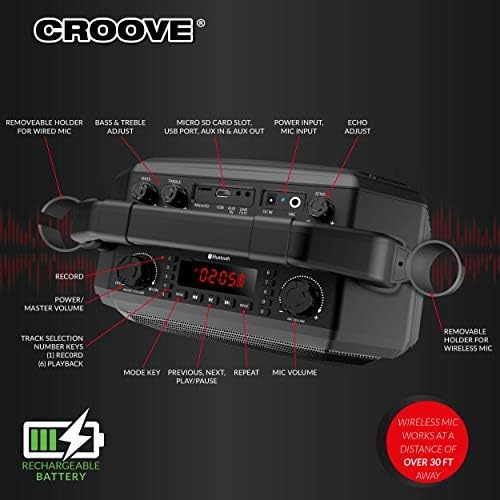
Image: Detailed view of the top control panel, highlighting various buttons and knobs.
- Power Button: Turns the unit on or off.
- Mode Button: Cycles through input modes (Bluetooth, AUX, USB, SD Card).
- EQ Button: Adjusts equalizer settings.
- Music Volume Knob: Controls the overall music playback volume.
- Mic Volume Knob: Adjusts the microphone volume independently.
- Track Selection Buttons: Previous, Play/Pause, Next.
- Display Screen: Shows current mode and track information.
3.2. Rear Panel Ports
The rear panel provides various input and output ports for connecting external devices.

Image: Rear panel connections for various audio sources and power.
- Micro SD Card Slot: For playing music from an SD card.
- USB Player Port: For playing music from a USB drive.
- AUX IN/OUT: For connecting external audio devices via a 3.5mm cable.
- DC 15V Input: For connecting the power adapter to charge the unit.
- Mic Input: For connecting the wired microphone.
3.3. Remote Control
The included remote control allows for convenient operation from a distance.

Image: The remote control for the Party Box, detailing its functions.
- Mode Button: Switches input modes.
- Volume +/-: Adjusts master volume.
- Track Control: Previous, Next, Play/Pause.
- Record/Playback: Initiates recording or plays back recorded audio.
- Number Keys: For direct track selection.
4. Setup
4.1. Powering On and Charging
- Before first use, fully charge the karaoke machine using the provided 15V DC power adapter. Connect the adapter to the DC 15V input port on the rear panel and plug it into a power outlet. The charging indicator will show the charging status.
- To power on the unit, press and hold the Power Button on the top panel.
4.2. Microphone Setup
The Party Box includes one wireless and one wired microphone.
- Wireless Microphone: Insert batteries (not included) into the wireless microphone. Turn on the microphone. It will automatically pair with the Party Box.
- Wired Microphone: Connect the wired microphone cable to the Mic Input port on the rear panel.
Use the provided microphone holders to conveniently store the microphones on the unit.
5. Operating Instructions
5.1. Connecting Audio Sources
The Party Box supports multiple audio input methods:
- Bluetooth: Press the Mode button until "BLUE" appears on the display. Enable Bluetooth on your smartphone, tablet, or other device and select "Croove Party Box" from the list of available devices to pair.
- AUX Input: Connect your audio device (e.g., MP3 player, laptop) to the AUX IN port using the provided 3.5mm AUX cable. Press the Mode button until "AUX" appears on the display.
- USB Playback: Insert a USB flash drive containing MP3 files into the USB Player port. The unit will automatically switch to USB mode and begin playback.
- SD Card Playback: Insert a Micro SD card containing MP3 files into the Micro SD Card slot. The unit will automatically switch to SD card mode and begin playback.

Image: Visual representation of various connectivity options for the Party Box.
5.2. Adjusting Audio Controls
- Music Volume: Use the Music Volume knob on the top panel or the VOL+/- buttons on the remote control.
- Microphone Volume: Use the Mic Volume knob on the top panel.
- Bass, Treble, Echo: Adjust these effects using the dedicated knobs on the top panel to customize your sound.
5.3. Recording and Playback
The Party Box allows you to record your performances onto an external Micro SD card.
- Ensure a Micro SD card is inserted into the Micro SD Card slot.
- Press the REC button on the remote control or the top panel to start recording.
- Press the REC button again to stop recording.
- To play back your recordings, press the PLAYBACK button on the remote control or navigate to the recorded files via the track selection buttons.
5.4. True Wireless Stereo (TWS) Function
If you have two Croove Portable Karaoke Machine Party Boxes, you can link them together for a true stereo sound experience.
- Ensure both units are powered on and in Bluetooth mode.
- On one unit, press and hold the TWS button (refer to the product diagram for exact location, usually combined with another button).
- The units will attempt to pair with each other. Once paired, one unit will act as the master (left channel) and the other as the slave (right channel).
- Connect your audio device via Bluetooth to the master unit.
5.5. LED Lights
The Party Box features dynamic LED lights on the speakers. These lights can be controlled via the remote control or a dedicated button on the top panel (if available) to enhance the party atmosphere.
6. Maintenance
- Cleaning: Use a soft, dry cloth to clean the exterior of the unit. Do not use abrasive cleaners or solvents.
- Storage: Store the unit in a cool, dry place away from direct sunlight and extreme temperatures.
- Battery Care: To prolong battery life, avoid fully discharging the unit frequently. Recharge the battery regularly, even if the unit is not in use for extended periods.
7. Troubleshooting
| Problem | Possible Cause | Solution |
|---|---|---|
| No power | Battery is low or depleted; Power adapter not connected properly. | Charge the unit using the provided power adapter. Ensure the power adapter is securely connected. |
| No sound from speakers | Volume is too low; Incorrect input mode selected; Device not connected properly. | Increase the music volume. Select the correct input mode (Bluetooth, AUX, USB, SD). Ensure your audio device is properly connected. |
| Microphone not working | Microphone volume is too low; Batteries in wireless mic are depleted; Wired mic not connected. | Increase the microphone volume. Replace batteries in the wireless mic. Ensure the wired mic is securely plugged into the Mic Input. |
| Bluetooth pairing failed | Unit is not in Bluetooth mode; Device is too far; Interference. | Ensure the unit is in Bluetooth mode. Move your device closer to the unit. Turn off other Bluetooth devices to reduce interference. |
8. Specifications
| Feature | Detail |
|---|---|
| Brand | Croove |
| Model | Portable Karaoke Machine Party Box |
| Mounting Type | Pole Mount |
| Power Source | Battery Powered |
| Connector Type | Aux |
| Material | Plastic |
| Item Weight | 13.77 Pounds |
| Number of Channels | 2 |
| Audio Input | Bluetooth, USB, AUX |
| Product Dimensions | 14.25 x 7.6 x 13.6 inches |
| Batteries | 1 Lithium Ion battery required (included) |
| Speaker Count | 1 |
| Battery Type | Lithium Ion |
| Connectivity Technology | AUX, Bluetooth, USB |
9. Warranty and Support
The Croove Portable Karaoke Machine Party Box comes with a 90-day warranty from the date of purchase. This warranty covers manufacturing defects and ensures your product is free from material and workmanship flaws under normal use.
For technical support, warranty claims, or any questions regarding your product, please contact Croove customer service through their official website or the retailer where the product was purchased. Please have your purchase receipt and product model information ready when contacting support.
10. Official Product Video
Watch this official product video for a quick overview of the Croove Party Box Karaoke machine and its features.
Video: An official overview of the Croove Party Box Karaoke machine, demonstrating its features and usage.