
Road Far 4f004d2d-4bb2-45b6-b43a-533b4d1ae77b
Benetech GM320 Infrared Thermometer User Manual
Model: GM320
1. Introduction
The Benetech GM320 is a non-contact infrared thermometer designed for safe and accurate temperature measurement of various objects. It utilizes infrared technology to measure surface temperatures from a distance, making it ideal for industrial, automotive, HVAC, and home use where direct contact is impractical or hazardous. This manual provides essential information for the proper operation, maintenance, and troubleshooting of your device.
2. Safety Information
Please read and understand all safety warnings and operating instructions before using this instrument. Failure to do so may result in injury or damage to the device.
- Laser Safety: This device emits a Class 2 laser. Do not look directly into the laser beam or point it at people or animals. Avoid direct eye exposure.
- Measurement Surfaces: Do not use the thermometer to measure the temperature of living beings. This device is intended for industrial object temperature measurement.
- Environmental Conditions: Do not expose the device to extreme temperatures, humidity, or direct sunlight. Avoid strong electromagnetic fields.
- Maintenance: Do not attempt to disassemble or modify the device. Refer all servicing to qualified personnel.
- Battery Handling: Ensure correct battery polarity. Remove batteries if the device will not be used for an extended period to prevent leakage.
3. Product Overview
The Benetech GM320 features a pistol-grip design for comfortable handling, a clear LCD display for easy reading, and intuitive button controls.

Figure 3.1: Front view of the Benetech GM320 Infrared Thermometer, showing the trigger, LCD display, and measurement lens.
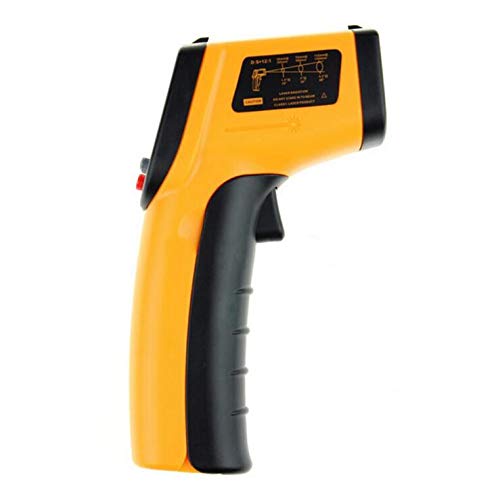
Figure 3.2: Side view of the Benetech GM320, highlighting the laser aperture and safety warnings printed on the casing.
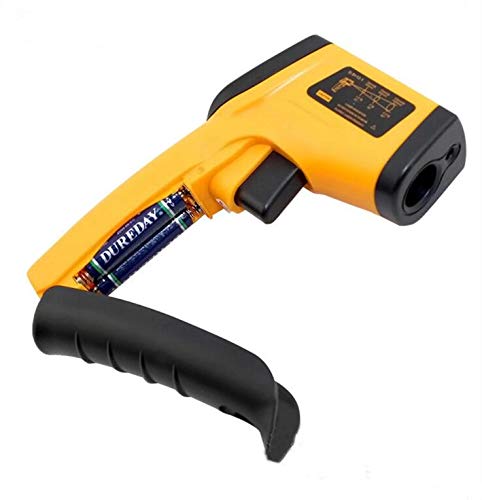
Figure 3.3: View of the Benetech GM320 with the handle cover removed, revealing the battery compartment for two AAA batteries.
Key Components:
- Infrared Sensor: Measures the thermal radiation emitted by objects.
- Laser Pointer: Helps to accurately target the measurement area.
- LCD Display: Shows temperature readings, unit, and other indicators.
- Measurement Trigger: Activates the measurement and laser.
- Function Buttons: For unit conversion (℃/℉), laser on/off, and backlight control.
4. Specifications
| Parameter | Value |
|---|---|
| Temperature Range | -50 ~ 380℃ (-58 ~ 716℉) |
| Accuracy | ±1.5% or ±1.5℃ |
| Resolution | 0.1℃ / 0.1℉ |
| Distance Spot Ratio (D:S) | 12:1 |
| Emissivity | 0.95 (fixed) |
| Red Laser Power | Less than 0.5 MW |
| Power Supply | 2 x AAA battery (Not included) |
| Product Dimension | 140 x 85 x 35mm |
| Net Weight | 110g |
| Display Type | LCD |
| Connectivity Technology | Infrared |
| Outer Material | Plastic |
5. Setup
5.1 Battery Installation
The Benetech GM320 requires two AAA batteries (not included) for operation.
- Locate the battery compartment on the handle of the thermometer. It is typically accessed by gently pulling down or sliding the cover.
- Insert two AAA batteries, ensuring the correct polarity (+ and -) as indicated inside the compartment.
- Close the battery compartment cover securely.
Note: Remove batteries if the device is not used for a long period to prevent battery leakage and damage to the unit.
6. Operating Instructions
6.1 Taking a Measurement
- Hold the thermometer by the handle and point the infrared sensor towards the object you wish to measure.
- Press and hold the measurement trigger. The laser pointer will activate (if enabled) to help you aim.
- The temperature reading will appear on the LCD display instantly.
- Release the trigger to hold the reading on the display. The device will automatically power off after a period of inactivity (auto power off feature).
6.2 Understanding Distance Spot Ratio (D:S)
The GM320 has a Distance Spot Ratio (D:S) of 12:1. This means that at a distance of 12 units from the target, the measurement spot diameter will be 1 unit. For example, if you are 12 inches away from an object, the measurement area will be a 1-inch circle. To ensure accurate readings, make sure the target area is larger than the spot size.
6.3 Emissivity
Emissivity is a measure of an object's ability to emit infrared energy. The Benetech GM320 has a fixed emissivity of 0.95, which is suitable for most organic materials, painted surfaces, and many common materials. For highly reflective surfaces (e.g., polished metals), readings may be less accurate.
6.4 Unit Conversion (℃/℉)
Press the "℃/℉" button (usually located near the display) to switch between Celsius and Fahrenheit temperature units.
6.5 Laser and Backlight Control
The device typically has buttons to toggle the laser pointer and the LCD backlight on or off. Refer to the icons on the buttons for their specific functions.
7. Maintenance
7.1 Cleaning
- Lens Cleaning: The most critical part of the thermometer is the lens. Clean the lens with a soft, damp cloth or cotton swab. Do not use abrasive cleaners or solvents.
- Case Cleaning: Clean the instrument's case with a damp sponge or soft cloth and mild soap. Do not immerse the device in water.
7.2 Storage
Store the thermometer in a cool, dry place, away from direct sunlight and extreme temperatures. If storing for an extended period, remove the batteries.
8. Troubleshooting
| Problem | Possible Cause / Solution |
|---|---|
| No display / Device won't turn on |
|
| Inaccurate readings |
|
| Laser not working |
|
9. Warranty and Support
This product is manufactured by Road Far. For any technical support or warranty inquiries, please contact your original point of purchase or the manufacturer directly. Please retain your purchase receipt as proof of purchase.
Related documents4f004d2d-4bb2-45b6-b43a-533b4d1ae77b


Ask a question about this manual
Ask about setup, troubleshooting, compatibility, parts, safety, or missing instructions. Manuals+ will review the question and use this page’s manual context to help answer it.