
KFD 8541545890
KFD 12V Charger AC Adapter User Manual
Model: 8541545890
Introduction
This user manual provides essential information for the safe and effective use of your KFD 12V Charger AC Adapter. This power supply is designed to provide stable and reliable power to a wide range of compatible devices, including various Linksys, Netgear, Belkin, Motorola, and TP-Link routers and modems. Please read this manual thoroughly before use and retain it for future reference.

Image: The KFD 12V Charger AC Adapter, showing the main power brick and the DC round connector cable.
What's in the Box
- 1 x KFD 12V Charger AC Adapter
- 1 x User Manual (this document)
Specifications
| Input Voltage | 100-240V AC, 50/60Hz |
| Output Voltage | 12V DC |
| Output Amperage | 2A (Compatible with 1.5A - 2A) |
| Power Output | 24W Max |
| Connectivity Technology | DC Round Connector |
| Dimensions (Adapter) | Approximately L68mm*W38mm*H27mm |
| Weight | 5.6 ounces |
| Safety Certifications | CE / FCC / RoHS certified, UL Listed |
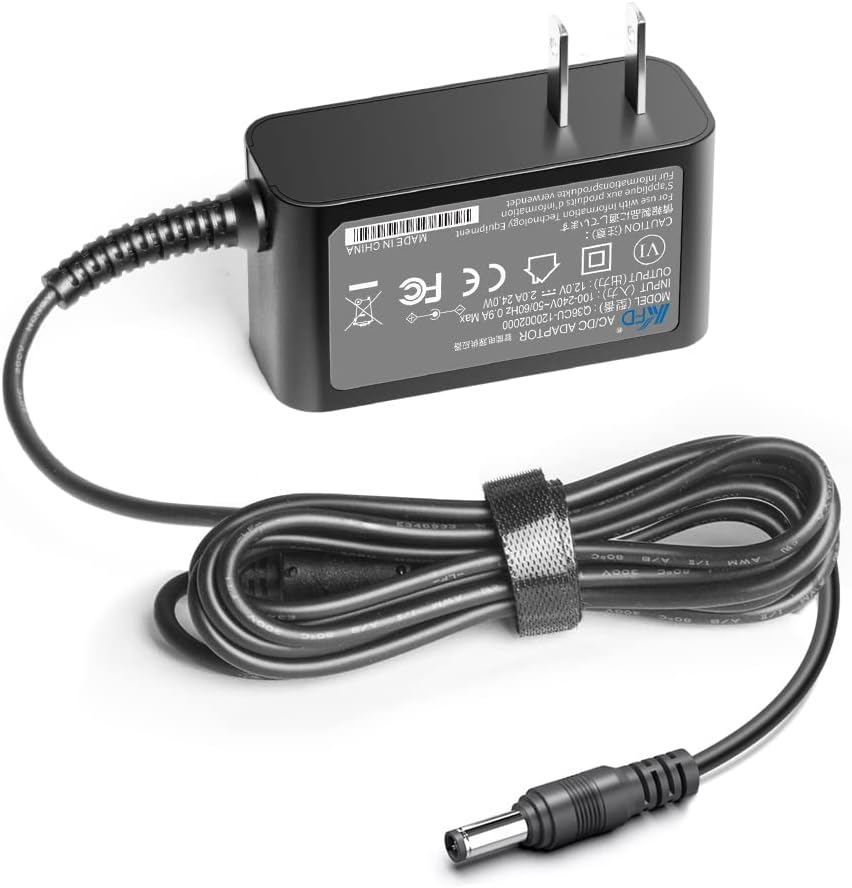
Image: The back label of the KFD 12V Charger AC Adapter, detailing input/output specifications and regulatory marks.
Setup
- Verify Compatibility: Before connecting, ensure your device requires a 12V DC input and that its current draw is within the adapter's 1.5A to 2A range. Check your device's original power adapter or its specifications for voltage and amperage requirements.
- Connect to Device: Insert the DC round connector of the KFD adapter firmly into the power input port of your compatible device (e.g., router, modem).
- Connect to Power Outlet: Plug the AC prongs of the KFD adapter into a standard wall power outlet (100-240V AC).
- Power On Device: Once connected, power on your device if it does not automatically turn on.

Image: An illustration showing the KFD 12V Charger AC Adapter providing power to a router, with a laptop in the background, demonstrating typical usage.
Operating Instructions
The KFD 12V Charger AC Adapter is designed for continuous operation. Once properly connected, it will supply stable power to your device. No user intervention is typically required during operation.
- Ensure the adapter is placed in a well-ventilated area to prevent overheating.
- Avoid covering the adapter during use.
- Do not expose the adapter to water or excessive humidity.
Maintenance
To ensure the longevity and optimal performance of your KFD 12V Charger AC Adapter, follow these simple maintenance guidelines:
- Cleaning: Disconnect the adapter from the power outlet and your device before cleaning. Use a soft, dry cloth to wipe the surface. Do not use liquid cleaners or aerosols.
- Storage: When not in use for extended periods, store the adapter in a cool, dry place, away from direct sunlight and extreme temperatures.
- Cable Care: Avoid sharp bends or kinks in the power cable. Do not place heavy objects on the cable.
Troubleshooting
| Problem | Possible Cause | Solution |
|---|---|---|
| Device not powering on. |
|
|
| Adapter feels hot during use. |
|
|
| Intermittent power supply. |
|
|
Compatibility Information
This KFD 12V Charger AC Adapter is broadly compatible with a range of networking devices. Please refer to the list below for common compatible models. Always verify your device's specific power requirements before use.
Compatible Linksys Models:
BEFCMU10 v3, BEFW11S4 v4, E1200, E1500, E2000, E2000-RM, E2100L, E2500 N600, E3000-RM, E3200, EA3500 N750, E4200, EA4500 N900, EA6200 AC900, EA6350 AC1200+, CM3008, CM3016, CM3024, DPC3008, WRT41P2-AT, WAP610N, WRT120N, WRT120N-RM, WRT310N-RM, WRT320N, WRT320N-RM, WRT610N, 4400N, 54GP, D12-50-A, RT31P2, RV042, SPA9000, WAG200G, WAG300N, WAG54G, WAG54GS, WCG200, WGA54AG, WKPC54G, WPS54GU2 Version 2, WRK54G, WRP200, WRT150N, WRT160N, WRT300N, WRT54G/S, WRT54GL, WRT54GS Dual-Band Wireless Router.
Compatible Belkin Models:
Wireless Router N150, N300, N450, N600, N750; F9K1001, F9K1002, F9K1102, F9K1105, F9K1116, F9K1124.
Compatible Netgear Models:
N150, N300, N600, N450, N450-100NAS; CM600, CM600-100NAS, DM200-100NAS; Orbi WiFi Mesh Systems (RBK12, RBK20, RBK22, RBK40, RBK43, RBK50, RBK50-100NAS, RBK53, RBK53-100NAS, RBK753, RBK753S, RBK852, RBK853, RBK862S, RBK863S, SXS80); Orbi Models (AC750, AC1000, AC1200, AC1600, AC1750, AC1900, AC2200, AC2300, AC3000, AC3200, AX4200, AX6000); Nighthawk X4 R7500, R7000, C3000, EX6200 AC2350, AC1900 N300, FVS318, GS108 Smart Extender Router; CM400, CM500, CM600, CM700 DOCSIS 3.0 Cable Modem; DGN2200 N 300 Router; 8-Port 10,100 Switch (FS108).
Compatible Comcast Xfinity / Motorola Surfboard Models:
Comcast XFINITY; Motorola Surfboard SBG6700AC, SB6183, SBG6782, SBG6782-AC, SB6141, SB6121, SB6120, SBG6580, SBG6580-2, SB5101U, SB5101I, SB5100, SB5120, SB5101, SB6180, SB6182, SBG901; Cable Modem MB7220, MB7420, MG7310, MG7315, MG7540, MG7550, MG7550-10; DTA-100, DCT-700 P/N 503913-007, MT-20-21120-A04F; Motorola 16x4 Cable Modem, Model MB7420, MB7420-10, MB7420-10-W.
Compatible ARRIS SURFboard Models:
SB6190, SBG6400, SBG6700AC AC1600.
Compatible Cisco Models:
DPC3010 DOCSIS 3.0 8x4 Cable Modem.
Compatible TP-Link Models:
Archer A7, C5, C7, C9, C900; Deco Mesh WiFi System Models S4, M3, M4, M5, M9, X20, X55, X60, X68, XE75, X90, X4300 Pro, P9.
Other Compatible Devices:
U.S. Robotics USR3453C Courier 56K Business Modem; USR4000 Call Director; USR5686G Wireless Broadband Router DSL Cable Modem; VILTROX LED Light L116T/L116B/L13T/L132B; VILTROX Monitor DC-70/DC-50.
Safety Information and Protections
The KFD 12V Charger AC Adapter is designed with multiple safety features to protect both the adapter and your connected devices. It adheres to strict quality and safety standards.
- OVP (Over Voltage Output Protection): Prevents damage from excessive voltage output.
- OCP (Over Current Output Protection): Protects against damage from excessive current draw.
- SCP (Short Circuit Output Protection): Safeguards against short circuits.
- Surge Protection: Defends against power surges.
- Current Stabilizer: Ensures stable current delivery.
- Temperature Control: Manages internal temperature to prevent overheating.
- V-0 Grade Flame Retardant Material: Constructed with high-quality, fire-resistant materials.

Image: A diagram illustrating the internal components of the KFD 12V Charger AC Adapter, highlighting features like overcharging prevention and intelligent current matching, along with the UL Listed certification mark.

Image: Graphic displaying icons for built-in safety protections: surge protection, current stabilizer, temperature control, and short circuit prevention.
Warranty and Support
KFD stands behind the quality of its products. This adapter comes with a comprehensive warranty and dedicated customer support.
- Warranty: 36 Months Warranty from the date of purchase.
- Exchange Policy: 30 Days Free Exchange for any issues.
- Customer Service: For any questions, concerns, or support needs, please contact KFD Power Adapter directly through the seller contact options on the purchase platform.
For more information or to explore other KFD products, you may visit the official KFD Store on Amazon: KFD Store.
Ask a question about this manual
Ask about setup, troubleshooting, compatibility, parts, safety, or missing instructions. Manuals+ will review the question and use this page’s manual context to help answer it.