
Rowkin Ascent Charge+
Rowkin Ascent Charge+ True Wireless Earbuds User Manual
Model: Ascent Charge+ (NAAT10AA)
1. Introduction
Welcome to the user manual for your Rowkin Ascent Charge+ True Wireless Earbuds. This guide provides comprehensive instructions for setting up, operating, maintaining, and troubleshooting your new earbuds. Please read this manual thoroughly to ensure optimal performance and longevity of your device.
What's in the Box
- 2 Bluetooth Earbuds
- 1 Portable Charging Case
- 1 Dual-Function Portable Charger (integrated with case)
- 1 USB-C Charging Cable
- 3 Sets of Ear Tips (Small, Medium, Large)
- 1 Qi Wireless Charging Pad
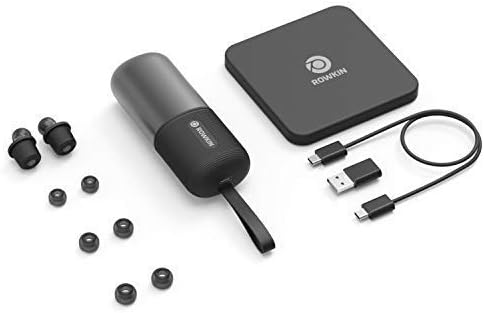
Ensure all items are present before proceeding with setup.
2. Product Overview
The Rowkin Ascent Charge+ system consists of two true wireless earbuds and a versatile charging case that also functions as a power bank and supports Qi wireless charging.

Key Components
- Earbuds: Each earbud features a dynamic driver for premium sound, a microphone for calls, and capacitive touch controls.
- Charging Case: Stores and charges the earbuds. It supports both USB-C and Qi wireless charging. The case also functions as a power bank for other mobile devices.
- Qi Wireless Charging Pad: Provided for convenient wireless charging of the case.
3. Setup
3.1 Initial Charging
Before first use, fully charge the portable charging case and the earbuds.
- Place the earbuds into their respective slots in the charging case. Ensure they are seated correctly to initiate charging.
- To charge the case:
- Via USB-C: Connect the provided USB-C cable to the charging port on the case and to a USB power source.
- Via Qi Wireless Charging: Place the charging case on the included Qi wireless charging pad. Ensure the case is centered on the pad for efficient charging.

The charging case provides over 50 hours of music/play time for the earbuds, allowing for approximately 15 full charges of the earbuds.
3.2 Bluetooth Pairing
The Ascent Charge+ earbuds feature easy auto-on pairing.
- Ensure the earbuds are charged.
- Remove both earbuds from the charging case. They will automatically power on and enter pairing mode.
- On your device (smartphone, tablet, etc.), go to the Bluetooth settings.
- Select "Rowkin Ascent Charge+" from the list of available devices.
- Once connected, you will hear an audible confirmation, and the earbuds' indicator lights will change.

The earbuds will automatically reconnect to the last paired device when removed from the case, if Bluetooth is enabled on the device.
3.3 Achieving the Best Fit
Proper fit is crucial for sound quality and comfort. The Ascent Charge+ comes with three sizes of ear tips (Small, Medium, Large).
- Experiment with different ear tip sizes to find the one that creates a comfortable seal in your ear canal. A good seal enhances bass response and noise isolation.
- Gently insert the earbud into your ear and twist slightly to secure it. The secure retention wheel helps keep the earbud in place.

4. Operation
4.1 Capacitive Touch Controls
The Ascent Charge+ earbuds feature intuitive touch controls for managing audio playback and calls.
- Play/Pause: Single tap on either earbud.
- Next Track: Double tap on the right earbud.
- Previous Track: Double tap on the left earbud.
- Answer/End Call: Single tap on either earbud during an incoming call.
- Reject Call: Press and hold on either earbud during an incoming call.
- Activate Voice Assistant (Siri/Google Assistant): Triple tap on either earbud.
4.2 Rowkin App Features
Enhance your experience with the accompanying Rowkin app, available for iOS and Android devices.

- Battery Percentage: View the current battery level of each earbud.
- Sound Equalizer: Customize your audio experience with various sound profiles or create your own.
- "Find My Earbuds": Use the in-app locator to help find misplaced earbuds. The app records the last known location where the earbuds were connected.
5. Maintenance
To ensure the longevity and optimal performance of your Ascent Charge+ earbuds, follow these maintenance guidelines:
- Cleaning: Regularly clean the earbuds and charging case with a soft, dry, lint-free cloth. Do not use abrasive cleaners or solvents. For ear tips, remove them and clean with mild soap and water, then dry thoroughly before reattaching.
- Water Resistance: The earbuds are IPX5 water resistant, meaning they can withstand splashes and sweat. They are not designed for submersion in water. Do not expose them to running water or wear them while swimming. Ensure earbuds are dry before placing them back in the charging case.
- Storage: When not in use, store the earbuds in their charging case to protect them and keep them charged. Store the case and earbuds in a cool, dry place away from extreme temperatures.
- Battery Care: For best battery health, avoid fully discharging the case or earbuds frequently. Charge them regularly.
6. Troubleshooting
If you encounter issues with your Ascent Charge+ earbuds, refer to the following common solutions:
| Problem | Possible Cause | Solution |
|---|---|---|
| Earbuds not pairing with device | Earbuds not in pairing mode; Bluetooth off on device; previously paired device interfering. | Ensure earbuds are removed from case. Turn Bluetooth off and on again on your device. Forget "Rowkin Ascent Charge+" from your device's Bluetooth list and re-pair. |
| Only one earbud playing audio | One earbud not connected; low battery on one earbud. | Place both earbuds back in the charging case for a few seconds, then remove them. Ensure both are charged. |
| Earbuds not charging in case | Poor contact; case battery low. | Ensure earbuds are correctly seated in the case. Clean charging contacts on earbuds and case. Charge the case. |
| Poor sound quality / low bass | Improper ear tip fit; ear tips dirty. | Try different ear tip sizes to achieve a better seal. Clean ear tips and earbud nozzles. |
| Touch controls unresponsive | Earbuds need reset; dirty touch surface. | Place earbuds in case, close lid, wait 10 seconds, then remove. Clean the touch surface. |
For further assistance, please refer to the Rowkin app or visit the official Rowkin support website.
7. Specifications
Detailed technical specifications for the Rowkin Ascent Charge+ True Wireless Earbuds:
| Feature | Specification |
|---|---|
| Model Name | Ascent Charge+ |
| Item Model Number | NAAT10AA |
| Connectivity Technology | Wireless |
| Wireless Communication Technology | Bluetooth 5.0 |
| Frequency Response | 20Hz - 20kHz |
| Battery Life (Earbuds) | Up to 3.5 Hours (single charge) |
| Total Playtime with Charging Case | 50+ Hours |
| Charging Interface | USB-C, Qi Wireless Charging |
| Water Resistance Level | IPX5 (Water Resistant) |
| Control Type | Capacitive Touch |
| Microphone | Included |
| Material | Mylar |
| Item Weight | 4.9 ounces (total package) |
| Product Dimensions | 4.45 x 1.71 x 1.28 inches |
8. Warranty and Support
Rowkin products are designed for durability and performance. For information regarding warranty coverage and terms, please refer to the warranty card included with your product or visit the official Rowkin website.
For technical support, frequently asked questions, or to contact customer service, please visit the Rowkin Store on Amazon or the manufacturer's official support channels.
Ask a question about this manual
Ask about setup, troubleshooting, compatibility, parts, safety, or missing instructions. Manuals+ will review the question and use this page’s manual context to help answer it.