
Faber FDW BI 6PR 12S
Faber FDW BI 6PR 12S Dishwasher User Manual
Your comprehensive guide to installation, operation, and maintenance.
1. Introduction
Thank you for choosing the Faber FDW BI 6PR 12S Dishwasher. This manual provides essential information for the safe and efficient use of your appliance. Please read it thoroughly before installation and operation, and keep it for future reference.
2. Safety Information
Always follow basic safety precautions when using electrical appliances to reduce the risk of fire, electric shock, and injury.
- Ensure the dishwasher is properly grounded.
- Do not operate the dishwasher if it is damaged.
- Keep children away from the dishwasher, especially when it is operating.
- Use only detergents and rinse aids specifically designed for dishwashers.
- Avoid touching the heating element during or immediately after use.
- Do not overload the dishwasher.
- Disconnect power before performing any maintenance or cleaning.
3. Product Overview
The Faber FDW BI 6PR 12S is a high-capacity dishwasher designed for efficient cleaning. Key features include:
- Capacity: 14 place settings, suitable for larger households.
- Programs: 8 distinct wash programs for various cleaning needs.
- Dual Zone Wash: Allows for washing different types of dishes in separate zones.
- Electronic Control: Intuitive interface for program selection and settings.
- Cutlery Tray: Dedicated tray for organized cleaning of cutlery.
- Height Adjustable Upper Basket: Provides flexibility for loading taller items.
- Additional Top Spray Arm: Enhances cleaning performance.
- Salt & Rinse Indicators: Alerts for low salt and rinse aid levels.
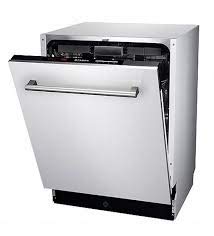
Figure 1: Faber FDW BI 6PR 12S Dishwasher. This image shows the stainless steel dishwasher with its door slightly open, revealing the interior racks.
4. Setup and Installation
The Faber FDW BI 6PR 12S is designed for Built-In installation. Professional installation is recommended.
4.1 Unpacking
Carefully remove all packaging materials. Inspect the dishwasher for any damage incurred during transit. Report any damage to your retailer immediately.
4.2 Placement
Ensure the installation area is level and has access to water supply, drainage, and a grounded electrical outlet. The product dimensions are 598mm (W) x 570mm (D) x 818mm (H).
4.3 Electrical Connection
Connect the dishwasher to a dedicated 240 Volts, 50 Hz, AC supply. Ensure the circuit is properly grounded and protected by a fuse or circuit breaker.
4.4 Water Connection
Connect the water inlet hose to a cold water supply with a minimum pressure of 0.04 MPa and a maximum of 1 MPa. Connect the drain hose to a suitable drain pipe, ensuring it is properly secured to prevent leaks.
5. Operating Instructions
5.1 Loading the Dishwasher
Scrape off large food particles from dishes. Place larger items in the lower basket and smaller, delicate items in the upper basket. Utilize the cutlery tray for forks, spoons, and knives. Ensure spray arms are not obstructed.
5.2 Adding Detergent and Rinse Aid
Fill the detergent dispenser with the appropriate amount of dishwasher detergent. Check the rinse aid indicator and refill the rinse aid dispenser as needed to ensure streak-free drying.
5.3 Program Selection
The dishwasher offers 8 wash programs:
- Pre-wash: For rinsing dishes that will be washed later.
- Mini 30: A quick wash for lightly soiled dishes.
- Delicate 40: Gentle wash for fragile items.
- Eco 50: Energy-efficient program for normally soiled dishes.
- Quick & Clean: Fast wash for everyday dishes.
- Intensive 70: Powerful wash for heavily soiled pots and pans.
- Baby Protect: Hygienic wash for baby bottles and items.
- Auto 40-65: Automatically adjusts wash cycle based on soil level.
Select the desired program using the electronic control panel.
5.4 Starting a Cycle
Close the dishwasher door firmly. Press the Start button. The dishwasher will begin the selected cycle.
6. Maintenance
6.1 Cleaning the Filters
Regularly clean the filter system located at the bottom of the dishwasher tub. Remove food debris and rinse under running water. Reassemble correctly to ensure proper drainage.
6.2 Cleaning the Spray Arms
Check the spray arm nozzles for blockages. If necessary, remove the spray arms and clear any debris with a thin wire.
6.3 Exterior and Interior Cleaning
Wipe the exterior with a damp cloth. For the interior, periodically run an empty cycle with a dishwasher cleaner to remove grease and limescale buildup.
6.4 Salt and Rinse Aid
Monitor the salt and rinse aid indicators. Refill the salt reservoir with dishwasher salt to prevent limescale, especially in hard water areas. Refill rinse aid for optimal drying performance.
7. Troubleshooting
Before contacting service, refer to the following common issues and solutions:
- Dishwasher not starting: Check power supply, ensure door is fully closed, and program is selected.
- Dishes not clean: Check spray arm rotation, clean filters, ensure proper loading, and use adequate detergent.
- Water not draining: Clean the filter system, check for kinks in the drain hose.
- Excessive noise: Ensure dishes are not obstructing spray arms, check for foreign objects in the pump area.
- White film on dishes: Check salt level, adjust rinse aid dosage, or use a dishwasher cleaner.
8. Specifications
| Feature | Specification |
|---|---|
| Brand | Faber |
| Model Number | FDW BI 6PR 12S |
| Installation Type | Built-In |
| Capacity | 14 Place Settings |
| Number of Programs | 8 |
| Voltage | 240 Volts |
| Item Weight | 1 g (Note: This weight appears to be a placeholder. Refer to product packaging for actual weight.) |
| Item Dimensions (LxWxH) | 57 x 60 x 81.8 Centimeters |
| Material | Stainless Steel |
| Special Feature | Adjustable Rack |
9. Warranty and Support
For warranty information and customer support, please refer to the warranty card included with your product or visit the official Faber website. Keep your purchase receipt as proof of purchase.
Manufacturer: FABER
Related documentsFDW BI 6PR 12S


Ask a question about this manual
Ask about setup, troubleshooting, compatibility, parts, safety, or missing instructions. Manuals+ will review the question and use this page’s manual context to help answer it.