
1. Important Safety Information
Please read all instructions carefully before using the appliance. Keep this manual for future reference.
- Ensure the oven is properly installed and grounded by a qualified technician.
- Do not touch hot surfaces. Use oven mitts or pot holders.
- Supervise children when the oven is in use. This appliance features an Electronic Child Lock.
- Never use water to extinguish grease fires. Smother the fire or use a dry chemical or foam-type extinguisher.
- Disconnect the power supply before cleaning or servicing.
- Do not store flammable materials in or near the oven.
2. Product Overview
The Faber FBIO 65L8F is a 65-liter, 3-layer oven designed for modern kitchens. It offers versatile cooking options with 8 functions and an A-class energy efficiency rating.
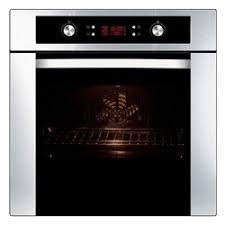
Figure 1: Front view of the Faber FBIO 65L8F 3 Layer Oven, showcasing its sleek design and digital display.
Key Features:
- Capacity: 65 Liters
- Finish: Stainless Steel + Glass
- Energy Efficiency: A Class
- Cooking Functions: 8 (including Rotisserie)
- Control: LED Display with Digital Control
- Safety: Electronic Child Lock
- Door: 3 Layer Oven Door with removable inner glass
- Accessories: 1 wire shelf, 1 drip tray
3. Installation and Setup
Proper installation is crucial for the safe and efficient operation of your oven. It is recommended that a qualified technician performs the installation.
3.1 Unpacking
- Carefully remove all packaging materials.
- Check for any damage during transit. Contact your dealer immediately if damage is found.
- Retain packaging materials for future transport or disposal.
3.2 Electrical Connection
- Ensure the electrical supply matches the voltage and frequency specified on the rating plate.
- The oven must be properly grounded.
- Do not use extension cords or adapters.
3.3 Initial Use
- Before first use, clean the oven interior with a damp cloth.
- Heat the empty oven at maximum temperature for approximately 30 minutes to burn off any manufacturing residues. Ensure good ventilation during this process.
4. Operating Instructions
Your Faber oven features an intuitive LED display with digital controls for easy operation.
4.1 Control Panel
The control panel consists of a digital display and control knobs/buttons. Refer to the diagram below for specific functions.
Figure 2: Detail of the digital control panel and knobs.
4.2 Setting the Time
- Upon first connection, the display will flash.
- Use the '+' and '-' buttons to set the current time.
- Confirm by pressing the 'OK' button or waiting a few seconds.
4.3 Selecting a Cooking Function
Turn the function selector knob to choose one of the 8 available cooking functions. The selected function will be displayed on the LED screen.
4.4 Setting Temperature
After selecting a function, turn the temperature selector knob to set the desired cooking temperature. The digital display will show the set temperature.
4.5 Using the Rotisserie
- Insert the rotisserie spit through the center of the food.
- Secure the food with the forks provided.
- Place the rotisserie assembly into the designated slots inside the oven.
- Select the rotisserie function and set the desired temperature and cooking time.
4.6 Electronic Child Lock
To activate the child lock, press and hold the designated child lock button (refer to control panel diagram) for a few seconds until the lock indicator appears. Repeat the process to deactivate.
5. Cleaning and Maintenance
Regular cleaning and maintenance will ensure the longevity and optimal performance of your oven.
5.1 General Cleaning
- Always ensure the oven is cool and disconnected from the power supply before cleaning.
- Clean the interior with a soft cloth and mild detergent. Avoid abrasive cleaners or scourers.
- Wipe down the exterior with a damp cloth.
- Clean the wire shelf and drip tray with warm soapy water.
5.2 Cleaning the Oven Door
The 3-layer oven door features removable inner glass for thorough cleaning.
- Open the oven door fully.
- Locate the retaining clips or screws on the inner glass panel (consult specific model diagram if available).
- Carefully remove the inner glass panel.
- Clean the glass panels with a glass cleaner or warm soapy water.
- Ensure all parts are dry before reassembling.
6. Troubleshooting Guide
Before contacting customer service, please refer to the following common issues and solutions:
| Problem | Possible Cause | Solution |
|---|---|---|
| Oven does not heat up. | No power supply; incorrect function/temperature setting. | Check power connection and circuit breaker. Verify function and temperature settings. |
| Food not cooking evenly. | Incorrect rack position; oven door not closed properly. | Use recommended rack positions. Ensure door is fully closed. Avoid opening door frequently. |
| Smoke or odor during first use. | Residues from manufacturing process. | This is normal. Ensure good ventilation. It will dissipate after initial use. |
| Child lock is active. | Child lock engaged accidentally. | Press and hold the child lock button to deactivate. |
7. Specifications
- Brand: Faber
- Model Number: FBIO 65L8F
- Capacity: 65 Liters
- Finish Type: Glass
- Heating Method: Convection
- Colour: White
- Energy Efficiency: A Class
- Cooking Functions: 8
- Special Features: Rotisserie, Electronic Child Lock, LED Display with Digital Control, 3 Layer Oven Door
- Accessories Included: 1 wire shelf, 1 drip tray
- Manufacturer: FABER
8. Warranty and Customer Support
For warranty information, service requests, or technical assistance, please contact Faber customer support.
- Refer to your purchase documentation for specific warranty terms and conditions.
- Keep your proof of purchase for warranty claims.
- For support, visit the official Faber website or contact their customer service helpline.


