
Introduction
This manual provides instructions for the safe and efficient operation of your Xech T2S Multifunctional Desk Lamp. The T2S combines an LED desk lamp with a Bluetooth speaker, a pen stand, and a plant pot holder, designed for versatile use in various indoor environments.

Image: Overview of the Xech T2S Multifunctional Desk Lamp highlighting its primary features.
Product Features
- LED Desk Lamp: Energy-efficient LEDs provide flicker-free illumination with adjustable brightness levels.
- Bluetooth Speaker: Integrated wireless speaker for audio playback.
- Multimedia Options: Supports TF Card, USB Drive, and built-in FM Radio for diverse audio sources.
- Pen Stand Holder: Convenient storage for pens and other stationery.
- Plant Pot Holder: Designed to hold small plants or succulents, includes a micro greens starter kit.
- Rechargeable Battery: Provides up to 6 hours of lighting, depending on intensity.
- Flexible Gooseneck: Allows for adjustable light positioning.
- Touch Control: Intuitive touch sensor for power and brightness adjustment.
- Colourful RGB Light: Ambient RGB lighting feature.
Package Contents
Ensure all items are present upon unboxing:
- Xech T2S Table Lamp with Speaker
- Power Cable (USB)
- USB Manual (This document)
Setup
1. Initial Charging
Before first use, fully charge the device. Connect the provided USB power cable to the DC5V port on the lamp and to a compatible USB power adapter (not included) or computer USB port. The charging indicator light will show charging status (specific indicator behavior not detailed in product info, assume standard red/blue or off when full).
2. Placement
Place the lamp on a stable, flat surface. The anti-skid pads on the base help ensure stability. Ensure the flexible gooseneck is positioned as desired for optimal lighting.

Image: Features like flexible gooseneck, anti-skid pads, and RGB light.
3. Plant Pot Usage
The base includes a plant pot holder. If using for plants, ensure proper drainage. The device features a water drainage hole at the bottom. Use the provided micro greens starter kit or your preferred small plant.

Image: Plant pot holder with a plant and the water drainage hole.
Operating Instructions
1. Lamp Operation
- Power On/Off: Locate the touch sensor on the lamp base (often marked with a sun icon). Tap the sensor to turn the lamp on or off.
- Adjust Brightness: With the lamp on, tap the touch sensor repeatedly to cycle through the three adjustable brightness levels (Bright, Brighter, Brightest).
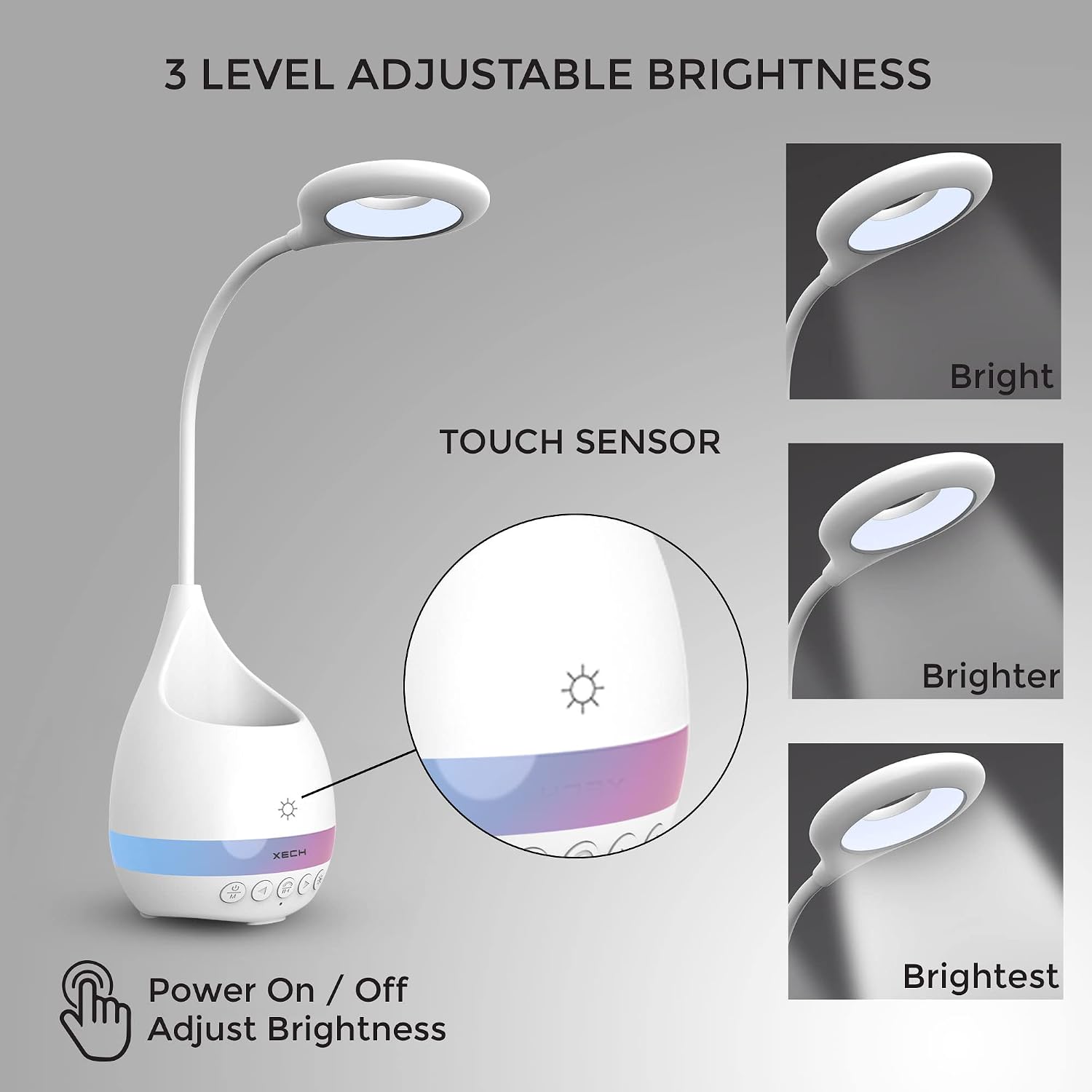
Image: Touch sensor for lamp control and three brightness levels.
2. Speaker Operation
The speaker controls are located on the front of the lamp base.

Image: Multimedia options including TF Card, Wireless, USB, FM Radio, and AUX ports.
- Power On/Off Speaker: Press and hold the Power/Mode button (often marked with a power icon and 'M') to turn the speaker on or off.
- Bluetooth Pairing:
- Turn on the speaker. It will automatically enter Bluetooth pairing mode (indicated by a flashing light or audio prompt).
- On your device (smartphone, tablet, etc.), enable Bluetooth and search for available devices.
- Select "Xech T2S" (or similar name) from the list to pair. A confirmation sound will indicate successful pairing.
- TF Card/USB Drive Playback: Insert a TF card or USB drive into the respective slot. The speaker will automatically detect and play audio files. Use the control buttons for playback (play/pause, next/previous track).
- FM Radio: Press the Mode button to switch to FM Radio mode. Use the next/previous track buttons to scan for stations.
- Volume Control: Use the volume buttons (often marked with +/- or arrow icons) to adjust the audio volume.
- RGB Light Control: The lamp features a colorful RGB light band. Specific controls for this light are typically integrated with the speaker controls. Refer to the physical buttons for a dedicated RGB light button or a long press on the mode button.
Maintenance
- Cleaning: Wipe the lamp with a soft, dry cloth. Do not use abrasive cleaners or solvents.
- Battery Care: To prolong battery life, avoid fully discharging the battery frequently. Recharge the lamp regularly, even if not in constant use.
- Plant Pot: If using for plants, ensure the drainage hole is clear to prevent water accumulation. Clean the pot regularly to prevent mold or residue buildup.
Troubleshooting
| Problem | Possible Cause | Solution |
|---|---|---|
| Lamp does not turn on. | Low battery or not charged. | Connect the lamp to a power source using the USB cable and charge fully. |
| Speaker does not pair via Bluetooth. | Speaker not in pairing mode; Bluetooth disabled on device; device too far. | Ensure speaker is on and in Bluetooth mode. Enable Bluetooth on your device and move closer to the lamp. Restart both devices if necessary. |
| Poor sound quality. | Low battery; interference; source audio quality. | Charge the lamp. Move away from other electronic devices. Check the quality of the audio source. |
| Lamp brightness is inconsistent. | Low battery. | Charge the lamp fully. |
Specifications
| Feature | Detail |
|---|---|
| Model Number | T2S |
| Product Dimensions | 11.5D x 11.5W x 42.5H Centimeters |
| Item Weight | 540 Grams |
| Lamp Type | Table Lamp |
| Light Source Type | LED |
| Wattage | 3 Watts |
| Power Source | Battery Powered (Rechargeable) |
| Voltage | 5 Volts |
| Control Method | Touch Control |
| Connectivity Technology | Bluetooth |
| Material | Acrylonitrile Butadiene Styrene (Plastic) |
| Color | White |
| Indoor/Outdoor Usage | Indoor |
Warranty and Support
The Xech T2S Multifunctional Desk Lamp comes with a one-year warranty from the date of purchase.
For warranty claims, technical support, or any inquiries, please contact Xech customer service:
- Email: support@xech.com
- Website: www.xech.com
Please retain your proof of purchase for warranty validation.
