
1. Introduction
This manual provides detailed instructions for the setup, operation, and maintenance of your Beetel X79N Cordless Landline Phone. Please read this manual thoroughly before using the device to ensure proper functionality and to familiarize yourself with its features.

Image 1.1: The Beetel X79N cordless handset and its base unit.
2. Box Contents
Verify that all the following items are included in your product package:
- Beetel X79N Cordless Handset
- Base Unit
- Coil Cord
- Line Cord
- Power Adapter
- 2 AAA Rechargeable Batteries
- User Manual (this document)
3. Setup
3.1. Battery Installation
- Locate the battery compartment cover on the back of the handset.
- Slide the cover downwards to open it.
- Insert the two AAA rechargeable batteries, observing the correct polarity (+ and -) as indicated inside the compartment.
- Replace the battery compartment cover by sliding it upwards until it clicks into place.

Image 3.1: Back of the handset, indicating the battery compartment.
3.2. Connecting the Base Unit
- Connect one end of the line cord to the LINE port on the base unit.
- Connect the other end of the line cord to your telephone wall jack.
- Connect the power adapter to the DC IN port on the base unit.
- Plug the power adapter into a standard electrical outlet.
- Place the handset on the base unit to charge the batteries. The charging indicator on the base unit should illuminate. Allow at least 12-15 hours for the initial charge.
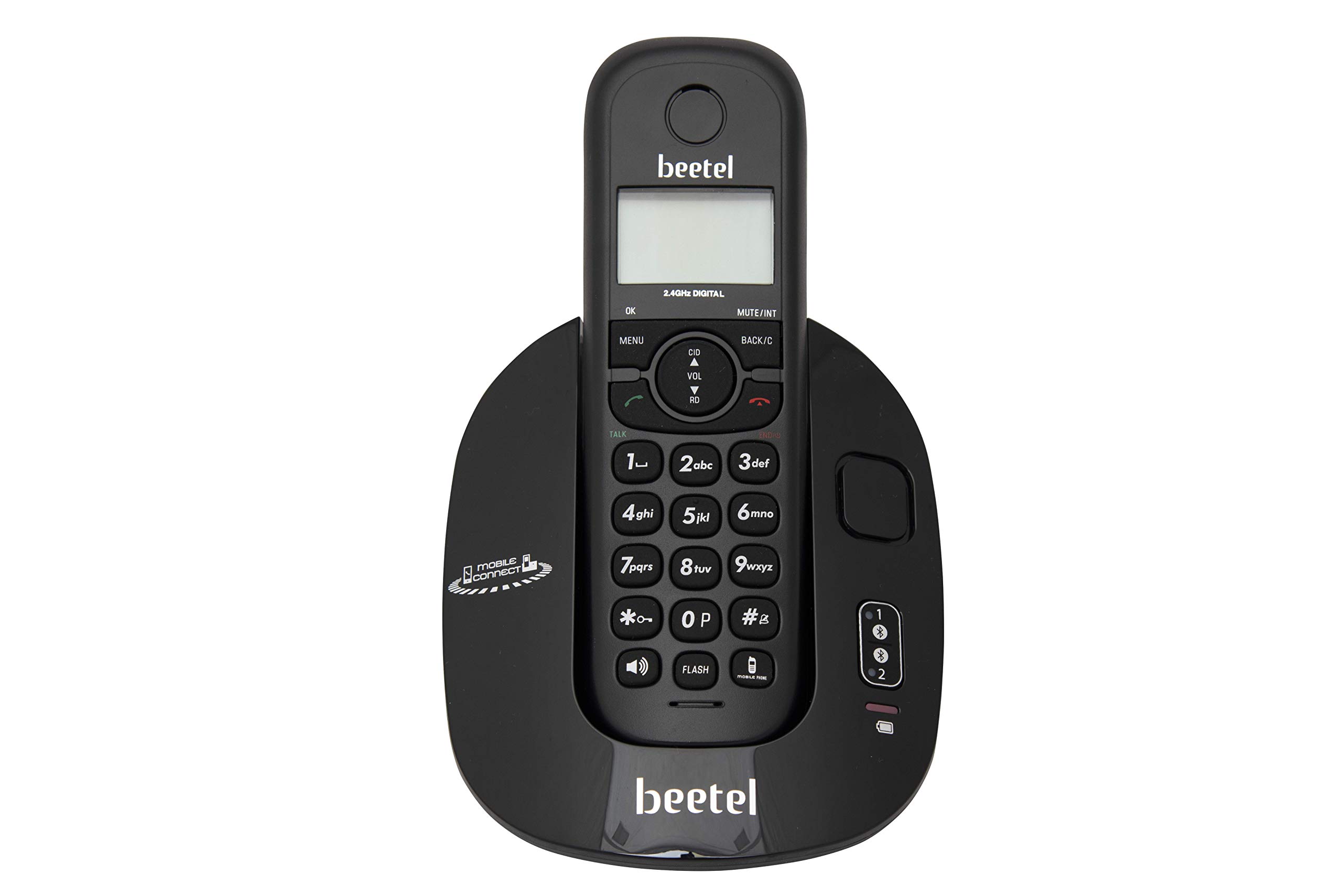
Image 3.2: Top view of the base unit, showing charging indicators and connection ports.
3.3. Pairing Mobile Phones (Bluetooth)
The Beetel X79N supports pairing with up to two mobile phones via Bluetooth.
- On the handset, press the MENU button.
- Navigate to the Bluetooth menu option using the arrow keys. Press OK.
- Select Pair Device.
- On your mobile phone, enable Bluetooth and search for available devices.
- Select 'Beetel X79N' from the list of devices on your mobile phone.
- Enter the PIN (usually '0000') if prompted on your mobile phone.
- Once paired, the Bluetooth indicator on the handset and base unit will confirm the connection. Repeat for a second mobile phone if desired.
4. Operating Instructions
4.1. Making and Receiving Landline Calls
- To Make a Call: Press the TALK button, then dial the number. Alternatively, dial the number first, then press TALK.
- To Receive a Call: When the phone rings, press the TALK button.
- To End a Call: Press the END button or place the handset back on the base unit.
4.2. Making and Receiving Bluetooth Mobile Calls
Ensure your mobile phone(s) are paired and within range of the base unit.
- To Make a Mobile Call: Press the TALK button, then press the MOBILE CONNECT button (usually indicated by a phone icon). Select the desired paired mobile phone (1 or 2) and dial the number.
- To Receive a Mobile Call: When a paired mobile phone receives a call, the handset will ring. Press the TALK button to answer the call through the cordless phone.
4.3. Speakerphone Function
During a call, press the SPEAKER button to activate the two-way speakerphone. Press it again to switch back to the handset earpiece.
4.4. Volume Control
During a call, use the VOL UP and VOL DOWN buttons on the handset to adjust the earpiece or speakerphone volume (5 steps). Ringer volume can be adjusted in 6 steps via the menu settings.
4.5. Phonebook
The phonebook can store up to 100 numbers with names.
- To Add a Contact: Press MENU, navigate to Phonebook, select Add New, enter the name and number, then press OK.
- To Dial from Phonebook: Press the PHONEBOOK button (or navigate via MENU), select the desired contact, then press TALK.
4.6. Caller ID
The phone supports DTMF/FSK caller ID. Incoming call information (number and name if stored in phonebook) will be displayed on the amber backlit LCD. The phone stores up to 30 incoming call records.
4.7. Mute Function
During a call, press the MUTE button to temporarily disable your microphone. The other party will not hear you. Press MUTE again to resume conversation.
4.8. Alarm with Snooze
Set an alarm through the handset menu. When the alarm sounds, you can press any key to snooze or press the END button to turn it off.

Image 4.1: Close-up view of the handset keypad and base unit buttons for reference during operation.
5. Maintenance
5.1. Cleaning
Wipe the phone and base unit with a soft, damp cloth. Do not use abrasive cleaners or solvents. Ensure the phone is disconnected from power before cleaning.
5.2. Battery Care
Use only the recommended rechargeable AAA batteries. If the phone will not be used for an extended period, remove the batteries from the handset to prevent leakage.
6. Troubleshooting
- No Dial Tone:
- Check if the line cord is securely connected to both the base unit and the wall jack.
- Ensure the power adapter is properly connected and plugged into a working outlet.
- Handset Not Charging:
- Ensure the handset is correctly seated on the base unit.
- Verify the power adapter is connected.
- Check if the batteries are inserted with correct polarity.
- Poor Call Quality/Static:
- Move the handset closer to the base unit.
- Ensure the base unit is not placed near other electronic devices that may cause interference (e.g., Wi-Fi routers, microwaves).
- Bluetooth Connection Issues:
- Ensure Bluetooth is enabled on your mobile phone.
- Verify the mobile phone is within range of the base unit.
- Try unpairing and re-pairing the mobile phone.
- Automatic Answering of Mobile Calls (as reported by some users):
- Check the handset's Bluetooth settings for any auto-answer options.
- Review your mobile phone's Bluetooth settings for connected devices, as some phones may have auto-answer features that interact with connected accessories.
7. Specifications
- Model: X79N
- Brand: Beetel
- Telephone Type: Cordless
- Frequency: 2.4 GHz Digital
- Color: Black
- Material: Plastic
- Power Source: Battery Powered (2 AAA rechargeable batteries included)
- Caller ID: Yes (DTMF/FSK)
- Incoming Call Memory: 30 numbers
- Phonebook Memory: 100 numbers with names
- Speakerphone: Two-way
- Ringer Volume Control: 6 steps
- Receive Volume Control: 5 steps
- Bluetooth: Compatible with 2 mobile phones
- Alarm: With Snooze function
- Mute Function: Yes
- Item Dimensions: 17.2 x 11.5 x 11.6 Centimeters
- Item Weight: 290 Grams
8. Warranty and Support
8.1. Warranty Information
The Beetel X79N Cordless Landline Phone comes with a 1-year manufacturer warranty for the device from the date of purchase. In-box accessories, including batteries, are covered by a 6-month manufacturer warranty from the date of purchase.
Please retain your purchase receipt as proof of purchase for warranty claims.
8.2. Customer Support
For further assistance, technical support, or warranty claims, please contact Beetel customer service. Refer to the packaging or the official Beetel website for the most current contact information.