
BOBLOV LF600G/AG
BOBLOV LF600AG Golf Rangefinder User Manual
Model: LF600G/AG
Introduction
The BOBLOV LF600AG Rangefinder is a precision optical instrument designed for accurate distance measurement in golfing and hunting. It features advanced flag-lock technology with vibration feedback, slope compensation, and multiple measurement modes to enhance your outdoor experience. This manual provides detailed instructions for setup, operation, and maintenance to ensure optimal performance and longevity of your device.

Image: The BOBLOV LF600AG Golf Rangefinder, a compact black device with optical lenses.
Product Overview
The LF600AG offers versatile functionality with distinct operating modes tailored for different measurement needs. Understanding these modes is key to utilizing the rangefinder effectively.

Image: Visual representation of the three main operating modes: M1 (Range Mode), M2 (Slope Flag-Locking Mode), and M3 (Speed Mode).
The device is designed for ease of use, featuring a clear optical display and intuitive button controls. Its robust construction ensures durability in various outdoor conditions.
Setup
Unboxing and Initial Inspection
Upon opening the package, verify that all components are present and undamaged. The standard package contents include:
- BOBLOV LF600AG Rangefinder
- Carrying Case
- USB Charging Cable
- Wrist Strap
- Cleaning Cloth
- User Manual (this document)
- Carabiner
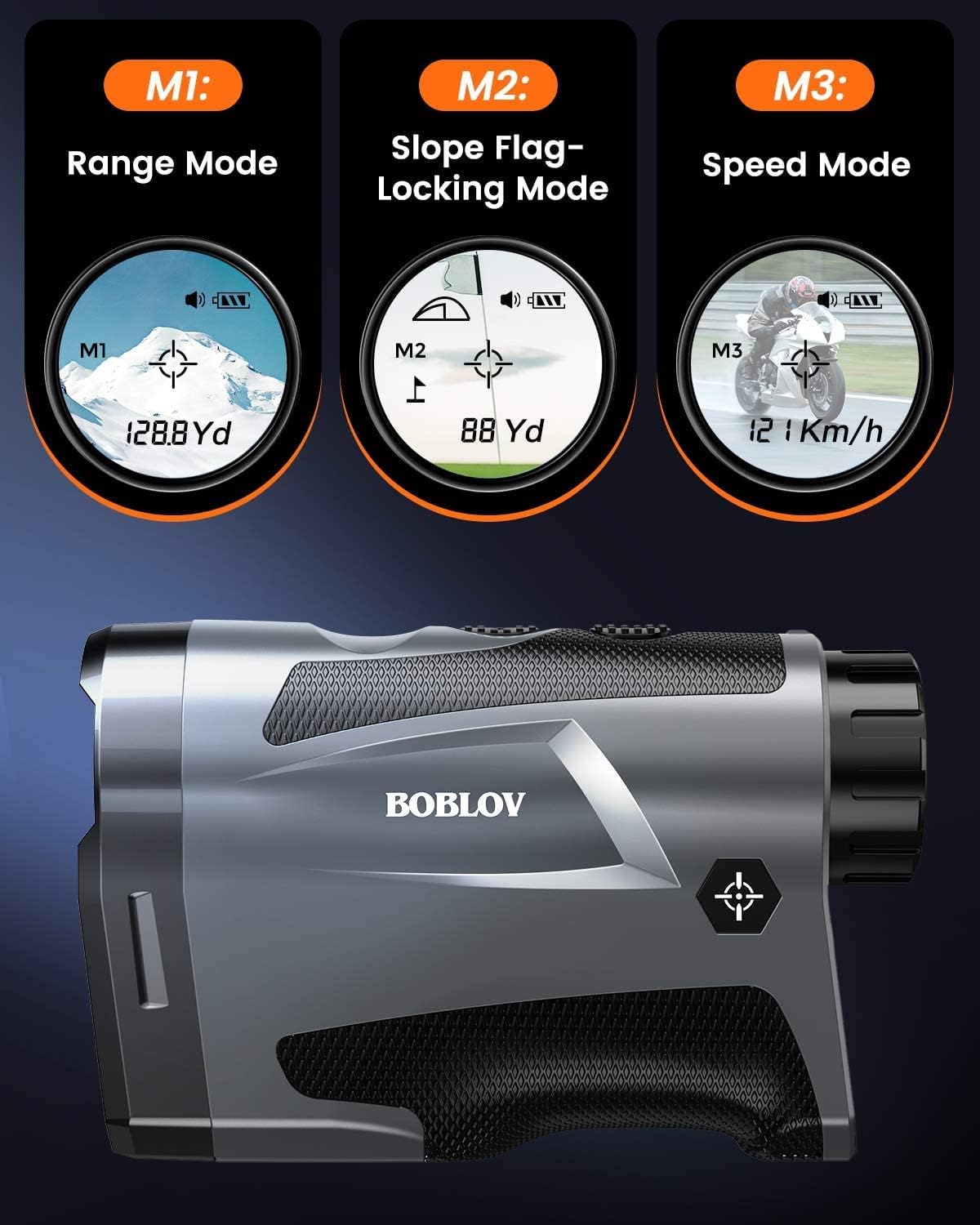
Image: All items included in the BOBLOV LF600AG package, laid out on a white surface.
Charging the Device
The LF600AG is equipped with a built-in rechargeable lithium battery. Before first use, fully charge the device. Connect the provided USB charging cable to the rangefinder's charging port and plug the other end into a compatible USB power source (e.g., computer USB port, wall adapter). The charging indicator will show the charging status.

Image: The BOBLOV LF600AG connected via USB cable to a laptop for charging, with indicators for charging and fully charged states.
Adjusting the Eyepiece
To ensure a clear view through the eyepiece, rotate the diopter adjustment ring until the display and target appear sharp and in focus. This adjustment is crucial for users with varying eyesight.

Image: A close-up of the rangefinder's eyepiece, showing the rotational arrows for diopter adjustment to achieve clear images.
Operating Instructions
Power On/Off
Press the Power button (usually marked with a power symbol) once to turn on the device. The display will activate. The device will automatically power off after a period of inactivity to conserve battery.
Mode Selection
Press the Mode button (usually marked 'MODE' or 'M') to cycle through the available measurement modes: Range Mode (M1), Slope Flag-Locking Mode (M2), and Speed Mode (M3).
M1: Range Mode (Normal/Continuous Measurement)
In Range Mode, the device measures the straight-line distance to a target. Press and hold the Power button to activate continuous scanning, which is useful for measuring distances to multiple targets or moving objects. Release the button to stop scanning and display the last measured distance.
Video: Demonstration of the LF600 Series Rangefinder's various modes, including single and continuous measurement in Range Mode.
M2: Slope Flag-Locking Mode with Vibration
This mode is ideal for golf. Aim the crosshairs at the flagstick. The device will quickly lock onto the flag, providing the accurate distance and vibrating to confirm target acquisition. This mode also calculates slope-adjusted distance, which can be toggled on or off.

Image: Illustrates the 650-yard slope and flag-locking compensation mode, showing how the device accurately locks onto a target and provides adjusted distances.

Image: Depicts the 1-second fast locking and pin acquisition mode with vibration feedback, showing a golfer using the rangefinder to target a flag.
Slope Function On/Off Switch
The LF600AG features a physical switch to enable or disable the slope compensation function. Turn slope 'ON' to get compensated distances for uphill or downhill shots, which is beneficial for practice. Turn slope 'OFF' to comply with tournament rules, providing only line-of-sight distance.

Image: The rangefinder shown with a clear indication of the physical switch to toggle the slope function between ON and OFF positions.

Image: A close-up of the rangefinder's side, highlighting the physical switch for turning the slope function on or off.
M3: Speed Mode
In Speed Mode, the rangefinder can measure the speed of a moving object. Aim at the object and press the Power button. The device will display the speed in kilometers per hour (Km/h).
Specifications
| Feature | Detail |
|---|---|
| Brand | BOBLOV |
| Model Name | BOBLOV LF600G/AG |
| Part Number | LF600 |
| Color | Z#Black with Slope Switch |
| Material | Plastic |
| Sport | Golf |
| Item Weight | 5.9 Ounces |
| Battery Type | Lithium (Rechargeable) |
| Magnification Maximum | 6 x |
| International Protection Rating | IP54 |
| Item Dimensions (LxWxH) | 5.12 x 2.36 x 3.15 inches |
| Range (Yards) | Up to 650 Yards |
| Included Components | Rangefinder, Carrying Case, USB Cable, Wrist Strap, Cleaning Cloth, Carabiner |
Maintenance
- Cleaning: Use the provided cleaning cloth to gently wipe the lenses and body of the rangefinder. Do not use abrasive materials or chemical cleaners.
- Storage: Store the device in its carrying case in a cool, dry place when not in use. Avoid extreme temperatures and direct sunlight.
- Battery Care: Recharge the battery regularly, even if the device is not used frequently, to maintain battery health. Avoid fully discharging the battery for extended periods.
- Water Resistance: The device has an IP54 rating, meaning it is protected from dust and splashing water. Do not submerge the device in water.
Troubleshooting
| Problem | Possible Cause | Solution |
|---|---|---|
| Device does not power on. | Low or depleted battery. | Charge the device fully using the provided USB cable. |
| Inaccurate distance readings. | Unstable aiming, environmental factors (fog, heavy rain), or targeting wrong object. | Ensure stable aiming. Re-measure in clearer conditions. Confirm target is correctly acquired, especially in Flag-Locking Mode. |
| Display is blurry. | Eyepiece not adjusted, or lenses are dirty. | Rotate the diopter adjustment ring until the display is clear. Clean the lenses with the provided cloth. |
| Flag-lock not working consistently. | Multiple objects in view, or flag is too far/small. | Ensure the flag is the primary target. Try scanning slowly across the flag. |
Warranty and Support
The BOBLOV LF600AG Golf Rangefinder comes with a 2-year warranty from the date of purchase. This warranty covers manufacturing defects and ensures the product is free from defects in material and workmanship under normal use.
For warranty claims, technical support, or any inquiries regarding your product, please contact BOBLOV customer service through the retailer where you purchased the device or visit the official BOBLOV website for contact information.
Please retain your proof of purchase for warranty validation.
Ask a question about this manual
Ask about setup, troubleshooting, compatibility, parts, safety, or missing instructions. Manuals+ will review the question and use this page’s manual context to help answer it.