
1. Product Overview
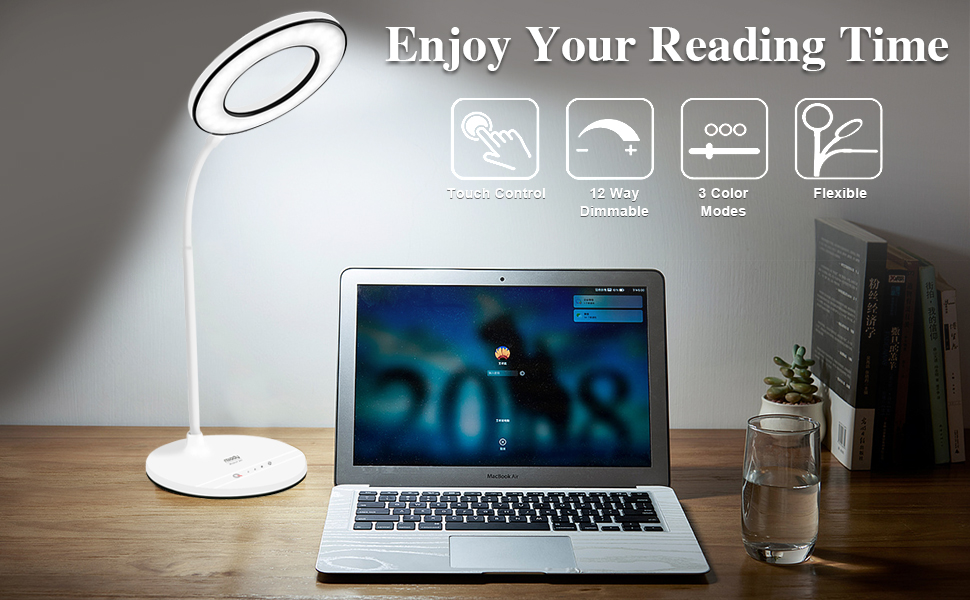
The Miady LED Desk Lamp is designed to provide comfortable and adjustable illumination for various tasks such as working, studying, reading, drawing, knitting, sewing, and handicrafts. It features advanced eye-caring technology, multiple brightness levels, and color modes to suit your preferences.
- Eye-Caring Illumination: Equipped with 48 LED bulbs, providing natural, non-flickering light to reduce eye strain.
- Adjustable Brightness: Offers 4 levels of brightness, easily controlled via touch.
- 3 Color Modes: Choose between different light temperatures for optimal comfort.
- High Color Rendering Index (CRI): A CRI rating of up to 95 ensures vivid and vibrant color appearance of objects.
- Flexible Design: Features a soft, durable, and 360-degree rotatable goose neck for precise light positioning.
- Touch Control: Sensitive touch controls integrated into the base for effortless operation.

2. Setup Instructions
- Unpack the Lamp: Carefully remove the desk lamp and all accessories from the packaging.
- Connect Power: Insert the power cord into the DC input port located at the back of the lamp base. Plug the adapter into a standard electrical outlet.
- Position the Lamp: Place the lamp on a stable, flat surface. Adjust the flexible goose neck to direct the light as desired.

3. Operating Instructions
The Miady LED Desk Lamp features intuitive touch controls on its base for easy operation.
- Power On/Off: Tap the power button (usually indicated by a power symbol) on the lamp base to turn the lamp on or off.
- Adjust Brightness: With the lamp on, repeatedly tap the brightness control button (often indicated by '+' or '-' symbols, or a series of dots) to cycle through the 4 available brightness levels.
- Change Color Mode: With the lamp on, tap the color mode button (often indicated by a 'M' or sun symbol) to switch between the 3 different color temperatures (e.g., warm white, cool white, natural light).
- Flexible Positioning: Gently bend and twist the silicone goose neck to position the light head at your desired angle and height. The flexible design allows for 360-degree rotation.

4. Maintenance
- Cleaning: To clean the lamp, ensure it is unplugged from the power source. Use a soft, dry cloth to wipe down the surfaces. Avoid using abrasive cleaners, solvents, or harsh chemicals, as these may damage the finish or electronic components.
- Storage: When not in use for extended periods, store the lamp in a cool, dry place away from direct sunlight and moisture.
5. Troubleshooting
- Lamp Not Turning On:
- Ensure the power adapter is securely plugged into both the lamp and a working electrical outlet.
- Check if the power outlet is functional by plugging in another device.
- Verify that the power button on the lamp base has been pressed.
- Light Flickers or Turns Off Intermittently:
- A loose connection between the power cord and the lamp base can cause flickering. Ensure the connection is firm.
- Avoid placing undue pressure on the power connector or socket, as this can lead to intermittent contact.
- Touch Controls Unresponsive:
- Ensure your fingers are clean and dry when operating the touch controls.
- Wipe the touch control area with a soft, dry cloth to remove any dust or debris.
6. Specifications
| Model Number | MI-LDL05 |
| Brand | Miady |
| Light Source Type | LED (48 bulbs) |
| Color Modes | 3 |
| Brightness Levels | 4 |
| Control Method | Touch |
| Flexible Arm | 360° Flexible Silicone Goose Neck |
| Power Source | Corded Electric |
| Wattage | 7.50 Watts |
| Voltage | 5 Volts |
| Material Type | Plastic, Silicone |
| Item Weight | 2.1 Pounds |
| Approximate Dimensions (Max Height x Base Diameter) | 22.8 inches x 6.9 inches |
| Water Resistance Level | Not Water Resistant |

7. Warranty and Support
The Miady LED Desk Lamp comes with a 12-month manufacturer warranty.
For any questions, technical assistance, or warranty claims, please contact Miady customer support. You can typically find contact information on the product packaging or by visiting the official Miady storefront online and looking for the 'Ask a question' option.