
1. Introduction
This manual provides essential instructions for the safe and efficient use of your Kobalt 24V MAX Lithium-Ion Battery Charger. Please read this manual thoroughly before operating the charger to ensure proper function and to prevent injury or damage. Keep this manual for future reference.
2. Important Safety Information
WARNING: Read all safety warnings and instructions. Failure to follow the warnings and instructions may result in electric shock, fire, and/or serious injury.
- Indoor Use Only: This charger is designed for indoor use in dry conditions. Do not expose to rain or wet conditions.
- Proper Voltage: Ensure the power supply voltage matches the voltage specified on the charger's rating plate.
- Charger Compatibility: Only charge Kobalt 24V MAX Lithium-Ion batteries with this charger. Attempting to charge other battery types may cause personal injury and damage.
- Damaged Cords: Do not operate the charger with a damaged cord or plug. Replace immediately if damaged.
- Ventilation: Ensure adequate ventilation during charging. Do not block ventilation openings.
- Avoid Short Circuits: Do not short-circuit the battery terminals.
- Supervision: Do not leave the charger unattended while in use.
- Children: Keep the charger and batteries out of reach of children.
- Disassembly: Do not attempt to disassemble the charger. Refer all servicing to qualified service personnel.
- Extreme Conditions: Do not charge batteries in extremely hot or cold environments. Optimal charging temperature is between 40°F (4°C) and 104°F (40°C).
3. Package Contents
Verify that all items are present upon opening the package:
- Kobalt 24V MAX Lithium-Ion Battery Charger (Model 65334124068)
- Instruction Manual
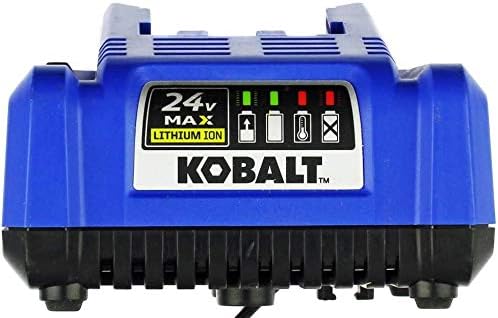
Image 1: Kobalt 24V MAX Lithium-Ion Battery Charger with its instruction manual and attached power cord.
4. Product Overview
Familiarize yourself with the components of your Kobalt 24V MAX Lithium-Ion Battery Charger.

Image 2: Front view of the Kobalt 24V MAX Lithium-Ion Battery Charger. The charger features a blue housing with a black base. A label on the front indicates "24V MAX LITHIUM ION" and the "KOBALT" brand logo. Above the logo, there are four indicator lights: two green for charge status, and two red for error conditions (temperature and faulty battery).
Indicator Lights:
| Indicator | Status | Description |
|---|---|---|
| Green (Solid) | Charging Complete | Battery is fully charged. |
| Green (Flashing) | Charging | Battery is currently charging. |
| Red (Solid) | Faulty Battery | The inserted battery is defective and cannot be charged. |
| Red (Flashing) | Temperature Error | Battery temperature is too high or too low for charging. Allow battery to reach optimal temperature. |
5. Setup
- Placement: Place the charger on a stable, flat surface in a well-ventilated area, away from direct sunlight, heat sources, and moisture.
- Power Connection: Plug the charger's power cord into a standard 120V AC electrical outlet. The charger's indicator lights may briefly illuminate.
- Battery Insertion: Align the battery pack with the charger's slot and slide it in until it clicks securely into place.
6. Operating Instructions
Charging a Battery:
- Ensure the charger is plugged into a working power outlet.
- Insert a Kobalt 24V MAX Lithium-Ion battery into the charger.
- Observe the indicator lights:
- A flashing green light indicates the battery is charging.
- A solid green light indicates charging is complete.
- A flashing red light indicates a temperature error. Remove the battery and allow it to cool or warm to room temperature before reattempting to charge.
- A solid red light indicates a faulty battery. The battery cannot be charged and should be replaced.
- Once charging is complete (solid green light), remove the battery from the charger.
- Unplug the charger from the power outlet when not in use.
Note: A completely discharged battery may take longer to charge. The charger is designed to prevent overcharging, but it is recommended to remove the battery once fully charged.
7. Maintenance
- Cleaning: Disconnect the charger from the power supply before cleaning. Use a soft, dry cloth to wipe the exterior of the charger. Do not use water or chemical cleaners.
- Storage: Store the charger in a dry, indoor location when not in use. Avoid storing in areas with extreme temperatures or high humidity.
- Inspection: Regularly inspect the charger's cord and plug for any signs of damage. If damage is found, discontinue use and have it repaired by qualified personnel.
8. Troubleshooting
| Problem | Possible Cause | Solution |
|---|---|---|
| Charger not working / No indicator lights. | No power to the charger. | Check if the charger is securely plugged into a working outlet. Test the outlet with another device. |
| Battery not charging (no green flashing light). | Battery not properly inserted. | Remove and re-insert the battery, ensuring it clicks into place. |
| Red flashing light. | Battery temperature is too high or too low. | Remove the battery from the charger and allow it to reach room temperature (40°F - 104°F / 4°C - 40°C) before attempting to charge again. |
| Red solid light. | Faulty battery. | The battery is defective and cannot be charged. Replace the battery. |
9. Specifications
- Model: 65334124068
- Input Voltage: 120V AC, 60Hz (Assumed, as typical for US market. Note: Provided data indicated 240V, which is unusual for this product type.)
- Output Voltage: 24V DC (Corrected from provided 240V, based on product name "24 volt charger")
- Battery Type: Kobalt 24V MAX Lithium-Ion
- Item Weight: 1.9 pounds (0.86 kg)
- Color: Black, Blue
- Manufacturer: Kobalt
- Part Number: 65334124068
10. Warranty and Support
For warranty information, technical support, or to order replacement parts, please refer to the official Kobalt website or contact Kobalt customer service directly. Keep your purchase receipt as proof of purchase for warranty claims.
Contact Information: Please visit www.kobalttools.com for the most up-to-date support information and contact details.


