
1. Introduction
This manual provides essential instructions for the safe and efficient use of your Sonim XP8 XP8800 rugged smartphone. The Sonim XP8 is designed for durability and performance in challenging environments, featuring IP68/IP69 water and dust resistance and MIL-STD-810G compliance.

Image 1.1: The Sonim XP8 rugged smartphone displayed with its packaging box.
2. Setup
2.1 Package Contents
Before beginning, ensure all items are present in your Sonim XP8 package:
- Sonim XP8 Smartphone
- Wall Charger
- USB-C Cable
- Quick Start Guide

Image 2.1: The Sonim XP8 package contents, including the device, charger, USB-C cable, and documentation.
2.2 SIM Card and Battery Installation
The Sonim XP8 supports dual SIM cards. Follow these steps to install your SIM cards and battery:
- Remove the back cover of the phone.
- Locate the SIM card slots (SIM 1 and SIM 2).
- Unlock the SIM card tray by sliding it as indicated.
- Carefully insert your SIM card(s) into the designated slots.
- Lock the SIM card tray back into place.
- Insert the battery into its compartment.
- Replace the back cover, ensuring it is securely fastened to maintain water and dust resistance.

Image 2.2: Detailed instructions for SIM card insertion into the Sonim XP8, showing unlock, insert, and lock steps.
2.3 Initial Charging and Power On
Before first use, fully charge your Sonim XP8. Connect the USB-C cable to the phone's charging port and the wall charger to a power outlet. Once charged, press and hold the power button located on the side of the device until the Sonim logo appears.
3. Operating Instructions
3.1 Basic Navigation
The Sonim XP8 operates on Android 7.0. Navigate the device using the touchscreen for gestures like tap, swipe, and pinch. Physical buttons are also available for common functions:
- Power Button: Turns the device on/off, locks/unlocks the screen.
- Volume Buttons: Adjusts media and call volume.
- Programmable Buttons: Customizable for quick access to specific applications or functions.

Image 3.1: Front view of the Sonim XP8, showing the display and physical navigation buttons.
3.2 Making Calls and Sending Messages
To make a call, open the Phone app, enter the number, and tap the call icon. To send a message, open the Messages app, select a contact or enter a number, type your message, and tap send.
3.3 Connectivity
The Sonim XP8 supports GSM networks for cellular communication and Wi-Fi for internet access. To connect to Wi-Fi, go to Settings > Wi-Fi, select your desired network, and enter the password if required. The device also features GPS for location services.
4. Maintenance
4.1 Cleaning Your Device
Due to its rugged design, the Sonim XP8 can be cleaned with mild soap and water. Ensure all port covers are securely closed before cleaning. Rinse thoroughly with fresh water and dry completely with a soft cloth.
4.2 Battery Care
The Sonim XP8 uses a Lithium Ion battery. To maximize battery life, avoid extreme temperatures and do not allow the battery to fully discharge frequently. For optimal performance, use only Sonim-approved charging accessories.
5. Troubleshooting
If you encounter issues with your Sonim XP8, consider the following common solutions:
- Device not powering on: Ensure the battery is charged. Connect to the charger for at least 15 minutes before attempting to power on again.
- No network signal: Verify that your SIM card is correctly inserted and activated. Check network settings and ensure you are within a GSM service area.
- Apps freezing or slow performance: Restart the device. Clear cache for problematic apps via Settings > Apps.
- Water or dust ingress: Ensure all port covers and the back cover are properly sealed. If water has entered, power off the device immediately and contact support.
For persistent issues, refer to the Sonim support website or contact customer service.
6. Specifications
The following table details the technical specifications of the Sonim XP8 XP8800 smartphone:
| Feature | Specification |
|---|---|
| Model Number | XP8800 |
| Operating System | Android 7.0 |
| RAM | 4 GB |
| Internal Storage | 64 GB |
| Wireless Technologies | Cellular (GSM Only), Wi-Fi |
| GPS | Yes |
| Special Features | Rugged Body, IP68/IP69, MIL-STD-810G |
| Display Technology | LCD |
| Display Resolution | 1920 x 1080 |
| Human Interface Input | Buttons |
| Camera Features | Front Camera |
| Form Factor | Smartphone |
| Color | Black |
| Phone Talk Time | 720 Hours |
| Manufacturer | Sonim |
| Item Weight | 8 ounces |
| Product Dimensions | 4 x 4 x 4 inches |
| Batteries | 1 Lithium Ion battery (included) |
7. Warranty and Support
7.1 Warranty Information
The Sonim XP8 XP8800 comes with an unmatched 3-year Comprehensive Warranty. This warranty covers manufacturing defects and ensures your device performs as expected under normal use conditions. Please retain your proof of purchase for warranty claims.
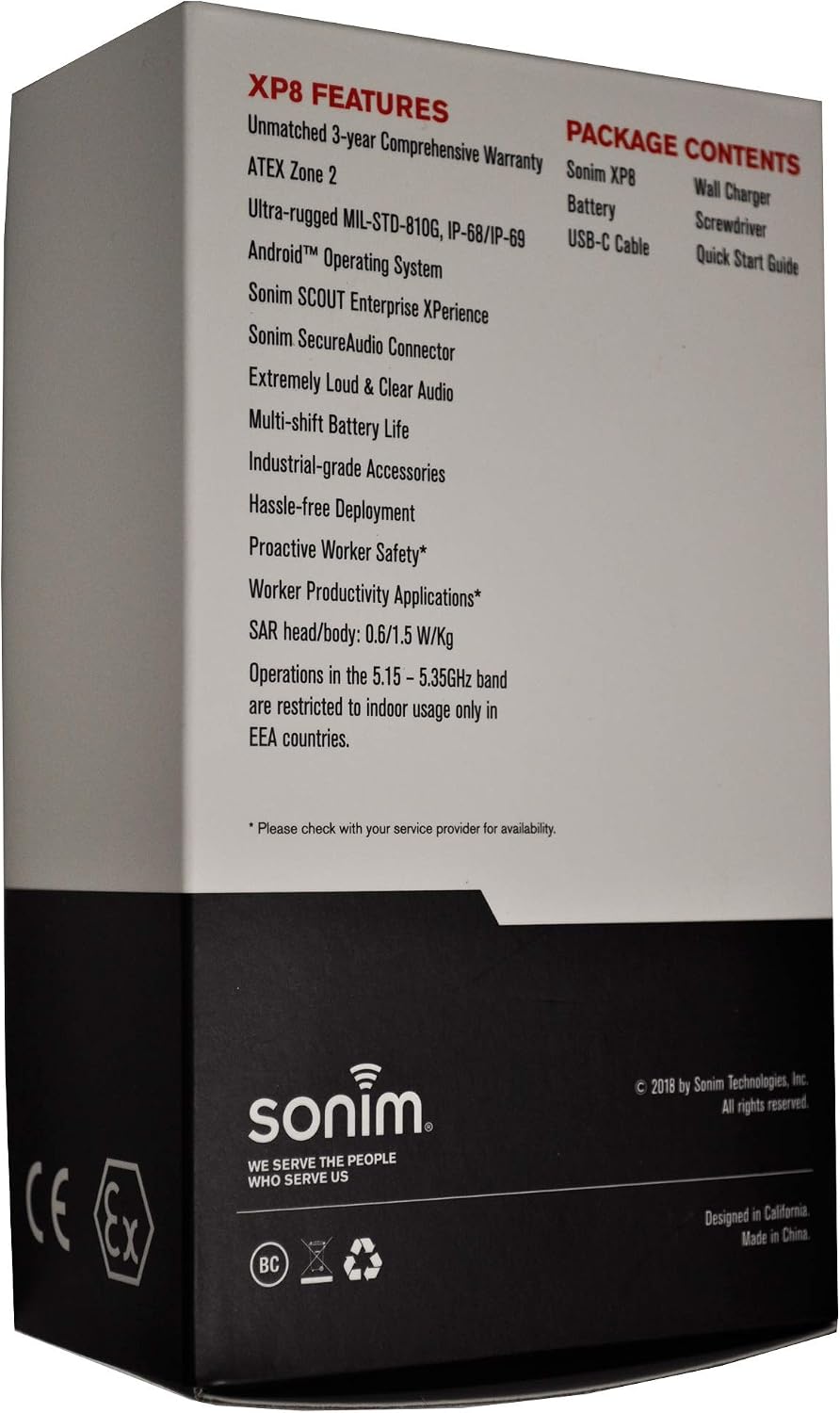
Image 7.1: The back of the Sonim XP8 packaging, highlighting key features and the 3-year comprehensive warranty.
7.2 Customer Support
For further assistance, technical support, or warranty claims, please visit the official Sonim website or contact their customer service department. Contact details can typically be found in the Quick Start Guide included with your device or on the Sonim corporate website.


