
Tefal FV5605
Tefal FV5605 TurboPro Airglide Steam Iron
User Manual
1. Introduction and Overview
The Tefal FV5605 TurboPro Airglide Steam Iron is engineered for efficient and effective garment care. It features advanced steam technology designed to penetrate deep into fabrics, facilitating the removal of stubborn creases. With a powerful 2400W heating element, the iron ensures rapid heat-up and consistent performance for daily ironing tasks.
Key features include:
- Steam Boost Technology: Delivers 190g/min of steam for tackling difficult creases.
- High Power Output: 2400W for quick heating and strong steam delivery.
- Active Steam Holes: Soleplate designed for maximum steam distribution.
- Anti-Drip System: Prevents water stains on garments during ironing.
- Smart Auto-Off Function: Enhances safety by automatically shutting off the iron when left unattended.
- Vertical Steaming Capability: Allows for steaming hanging garments and curtains.

Figure 1: Front view of the Tefal FV5605 TurboPro Airglide Steam Iron, showcasing its design and cord.
2. Important Safety Instructions
To ensure safe operation and prevent injury or damage, please adhere to the following safety guidelines:
- Always unplug the iron from the electrical outlet immediately after use and before cleaning or filling with water.
- Do not leave the iron unattended while it is plugged in or while it is on an ironing board.
- Keep the iron and its cord out of reach of children and individuals with reduced physical, sensory, or mental capabilities.
- Never immerse the iron, power cord, or plug in water or any other liquid.
- Use the iron only for its intended household purpose as described in this manual.
- Place the iron on a stable, heat-resistant surface when not in use or when filling the water tank.
- Do not touch the hot soleplate. Always use the handle.
- If the supply cord is damaged, it must be replaced by the manufacturer, its service agent, or similarly qualified persons to avoid a hazard.
- Do not operate the iron if it has been dropped, if there are visible signs of damage, or if it is leaking.
3. Product Components
Familiarize yourself with the different parts of your Tefal FV5605 iron:
- Water Tank: Reservoir for water used in steam generation.
- Filling Inlet: Opening for adding water to the tank.
- Spray Nozzle: Emits a fine mist of water.
- Steam Trigger/Button: Activates steam boost.
- Temperature Control Dial: Adjusts heat setting for different fabric types.
- Soleplate: The heated surface that glides over fabric. This model features a Durilium Airglide Autoclean soleplate.
- Power Cord: Connects the iron to the electrical outlet.
- Self-Clean Button (if applicable): For maintenance of the steam chamber.

Figure 2: Top view of the iron, highlighting the water tank, temperature dial, and steam controls.
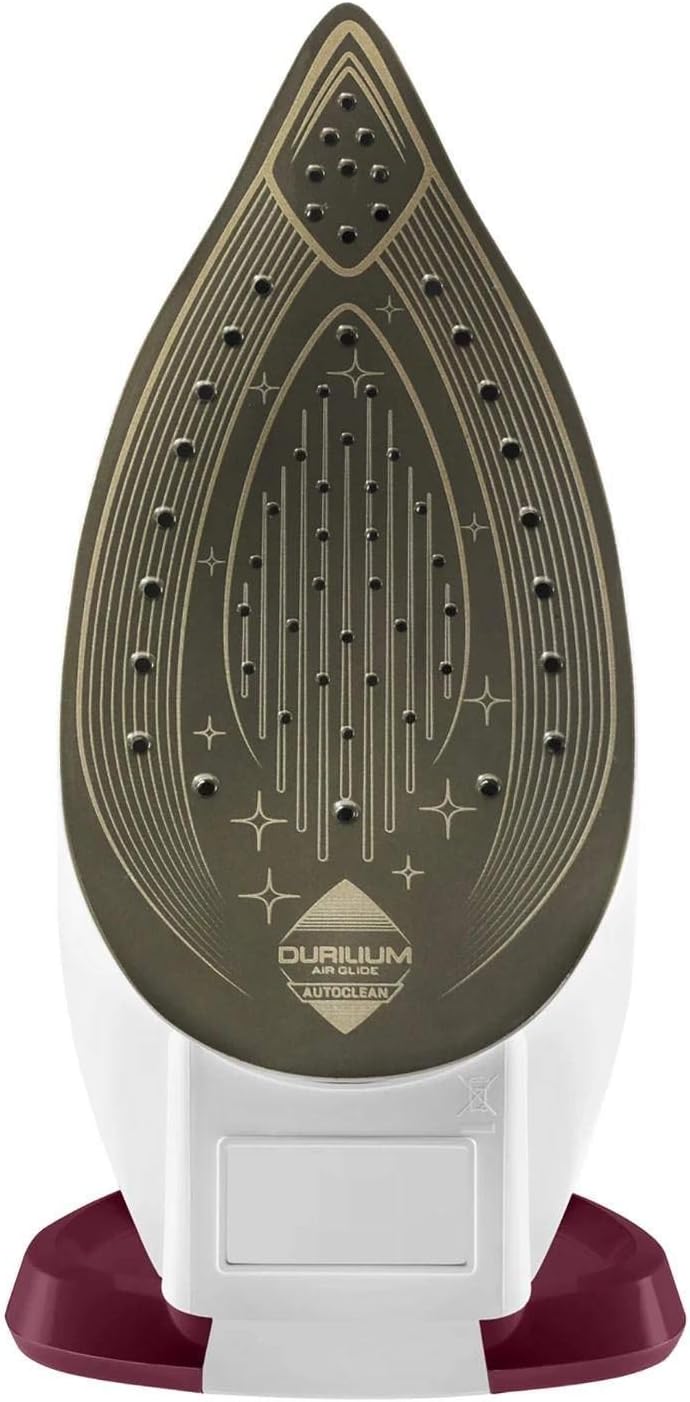
Figure 3: Underside view of the Durilium Airglide Autoclean soleplate, showing steam holes and glide technology.
4. Setup
Before using your iron for the first time, please follow these steps:
- Unpacking: Carefully remove the iron and all accessories from the packaging. Retain the packaging for future storage or transport if needed.
- Initial Use: During the first few uses, a slight odor or small amount of smoke may be emitted. This is normal and will dissipate quickly. It is recommended to iron an old piece of fabric first to remove any manufacturing residues.
- Filling the Water Tank:
- Ensure the iron is unplugged from the power outlet.
- Open the filling inlet cover.
- Fill the water tank with clean tap water up to the "MAX" indicator line. Do not overfill.
- Close the filling inlet cover securely.
Note: For optimal performance and to prolong the life of your iron, it is recommended to use untreated tap water. If your tap water is very hard, you may use a mixture of 50% tap water and 50% distilled water.
5. Operating Instructions
Follow these steps for effective ironing:

Figure 4: A user preparing to iron, demonstrating the typical setup for ironing tasks.
- Prepare Garments: Sort laundry according to fabric type and recommended ironing temperature.
- Plug In: Plug the iron into a suitable electrical outlet.
- Set Temperature: Turn the temperature control dial to the desired setting based on the fabric type. The indicator light will illuminate, indicating the iron is heating up. It will turn off when the set temperature is reached.
- Low temperature: Synthetics, Silk
- Medium temperature: Wool, Cotton
- High temperature: Linen
- Steam Ironing:
- Ensure the water tank is filled.
- Set the temperature dial to the steam zone (usually indicated by a steam symbol or higher settings). Steam will only be produced when the iron is hot enough.
- Press the steam trigger/button to release steam as you iron.
- For stubborn creases, press the Turbo Boost button for an extra burst of steam (190g/min).

Figure 5: Demonstrating the steam function of the iron during use.
- Dry Ironing:
- Ensure the water tank is empty or the steam function is turned off (if applicable).
- Set the temperature dial to the desired setting.
- Iron garments without steam.
- Vertical Steaming:
- Hang the garment on a hanger.
- Hold the iron vertically, close to the fabric (but not touching).
- Press the steam trigger/button to release steam. This is ideal for refreshing hanging clothes, drapes, or delicate fabrics.
- Spray Function:
- Press the spray button to emit a fine mist of water onto the fabric, which helps to dampen and smooth out stubborn wrinkles.
- Auto-Off Function: For safety, the iron will automatically turn off if left motionless for a certain period (e.g., 30 seconds horizontally, 8 minutes vertically). The indicator light will flash. To restart, simply move the iron.
6. Maintenance and Cleaning
Regular maintenance ensures optimal performance and extends the life of your iron:
- After Each Use:
- Unplug the iron and allow it to cool completely.
- Empty any remaining water from the tank.
- Cleaning the Soleplate:
- The Durilium Airglide Autoclean soleplate is designed for easy maintenance.
- Once the iron is cool, wipe the soleplate with a damp cloth and a non-abrasive cleaner if necessary.
- Do not use abrasive scouring pads, metal objects, or harsh chemicals, as these can damage the soleplate.

Figure 6: Detailed view of the iron's soleplate, highlighting its self-cleaning coating.
- Descaling (Anti-Calc System):
- While the iron features an anti-drip design, regular descaling is important, especially in hard water areas.
- Refer to the specific instructions for the self-clean function (if present, usually a dedicated button or procedure) in your iron's full manual, or consult the Tefal website for descaling procedures for this model.
- Storage: Store the iron upright on its heel rest in a safe, dry place, with the cord neatly wrapped.
7. Troubleshooting
If you encounter issues with your iron, refer to the following common problems and solutions:
| Problem | Possible Cause | Solution |
|---|---|---|
| Iron does not heat up. | Not plugged in; power outage; auto-off activated. | Check power connection; verify power supply; move the iron to reactivate auto-off. |
| No steam or insufficient steam. | Water tank empty; temperature too low; steam holes blocked. | Fill water tank; set temperature to steam zone; perform self-clean or clean soleplate. |
| Water leaking from soleplate. | Temperature too low for steam; overfilled water tank; anti-drip system issue. | Allow iron to reach full temperature before steaming; do not overfill; ensure anti-drip is functioning (if applicable). |
| White flakes coming from soleplate. | Mineral deposits (limescale) in the water tank. | Perform a descaling procedure as per manufacturer's instructions. Use distilled water if tap water is very hard. |
8. Specifications
| Attribute | Detail |
|---|---|
| Brand | Tefal |
| Model Number | FV5605 |
| Colour | Dove and white |
| Power/Wattage | 2400 watts |
| Special Features | Auto Shutoff, Anti-drip design |
| Item Weight | 1.72 kg |
| Package Dimensions | 32.79 x 19.9 x 16.9 cm |
| Soleplate Type | Durilium Airglide Autoclean |
| Steam Boost | 190g/min |
9. Warranty and Support
For information regarding warranty coverage, product registration, or technical support, please refer to the official Tefal website or contact their customer service department. Keep your proof of purchase for warranty claims.
Tefal Official Website: www.tefal.com
For specific regional support, please visit the Tefal website for your country.
Related documentsFV5605


Ask a question about this manual
Ask about setup, troubleshooting, compatibility, parts, safety, or missing instructions. Manuals+ will review the question and use this page’s manual context to help answer it.