
Trust ACM-250-LD
Trust Smart Home ACM-250-LD Built-in LED Dimmer User Manual
Model: ACM-250-LD | Brand: Trust
1. Introduction
The Trust Smart Home ACM-250-LD is a compact, built-in LED dimmer designed for wireless control of your lighting. It allows you to dim LED lamps up to 50W and also supports traditional incandescent and halogen lamps up to 250W. Its discreet design allows for easy installation in a ceiling or junction box, maintaining the aesthetics of your living space while providing convenient wireless dimming capabilities.
Key Features:
- Optimal solution for wireless dimming of LED lamps (up to 50W).
- Supports incandescent and halogen lamps (up to 250W).
- Features two distinct dimming functions (leading/trailing edge) for precise LED dimming performance.
- Compact design for easy installation in standard ceiling or junction boxes.
- Allows connection of up to two existing wall switches, ideal for multi-point control (e.g., staircase lighting).
- Ensures existing wall switches remain fully functional.

Figure 1: Front view of the Trust Smart Home ACM-250-LD Built-in LED Dimmer, showing its compact white casing and connection terminals.
2. Setup and Installation
Safety Warning: Installation should only be performed by a qualified electrician. Always disconnect the main power supply before commencing any electrical work to prevent electric shock.
2.1 Before Installation
- Ensure the lamps you intend to dim are compatible with dimmers. For LED lamps, verify they are specifically labeled as "dimmable."
- Check the total wattage of the lamps connected does not exceed the dimmer's maximum capacity (50W for LED, 250W for incandescent/halogen).
- Confirm you have the necessary tools (screwdriver, wire strippers, voltage tester).
2.2 Wiring Diagram
The ACM-250-LD dimmer features terminals for neutral (N), live (L), and switched live (S) connections, along with additional neutral (N) and live (L) terminals for loop-through or connecting multiple devices. Refer to the diagram below for proper wiring. Ensure all connections are secure.

Figure 2: Bottom view of the dimmer, illustrating the clearly labeled N, N, L, S, L terminals for electrical connections.
Connect the mains supply to the appropriate L (Live) and N (Neutral) terminals. Connect the lamp's live wire to the S (Switched Live) terminal and its neutral wire to an N terminal. If connecting existing wall switches, refer to the specific wiring instructions provided in the full product manual or consult a qualified electrician.
2.3 Mounting
Due to its compact dimensions, the ACM-250-LD can be easily installed inside a standard wall box, ceiling rose, or junction box. Ensure there is sufficient space for proper ventilation and to avoid overheating.

Figure 3: The dimmer shown with its dimensions: 4.5 cm (length), 4 cm (width), and 1.52 cm (height), highlighting its compact size for discreet installation.
3. Operation
3.1 Basic Dimming
Once installed and paired with a Trust Smart Home wireless transmitter (e.g., a remote control or wall switch), you can wirelessly switch your lights on/off and dim them. Press the 'ON' button on your transmitter to turn lights on, and the 'OFF' button to turn them off. To dim, press and hold the 'ON' or 'OFF' button (depending on transmitter model) or use the dedicated dimming buttons if available.
3.2 Dimming Functions (Leading/Trailing Edge)
The ACM-250-LD offers two dimming modes to optimize performance for different types of LED lamps: leading edge (R,L,C) and trailing edge (RC). Use the small rotary switch on the dimmer unit to select the appropriate mode for your LED lamps. Experiment with both settings to find the one that provides the smoothest dimming and prevents flickering for your specific LED bulbs.

Figure 4: Close-up view of the dimmer's top surface, showing the rotary switch for selecting between R,L,C (leading edge) and RC (trailing edge) dimming modes.
3.3 Pairing with Wireless Switches
To enable wireless control, the dimmer must be paired with a Trust Smart Home transmitter. The pairing process typically involves putting the dimmer into learning mode (often by pressing a small button on the unit) and then activating the desired channel on your transmitter. Refer to your specific Trust Smart Home transmitter's manual for detailed pairing instructions.
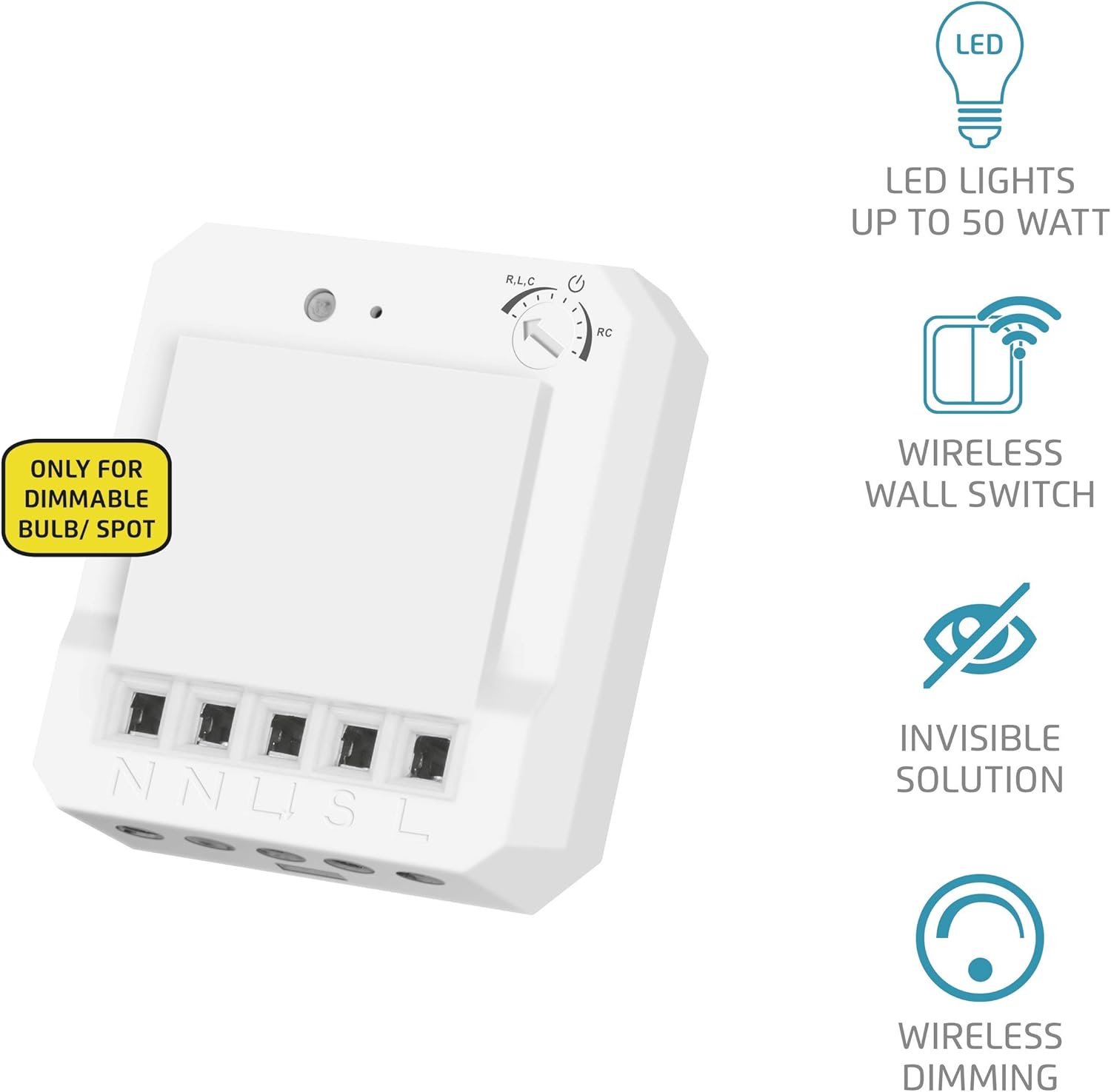
Figure 5: The dimmer displayed alongside icons representing its key features: compatibility with LED lights up to 50W, wireless wall switch functionality, invisible installation solution, and wireless dimming capability.
4. Maintenance
The Trust Smart Home ACM-250-LD dimmer requires minimal maintenance. Ensure the unit remains free from dust and debris. If cleaning is necessary, always disconnect power to the circuit first. Use a dry, soft cloth to wipe the exterior. Do not use liquid cleaners or abrasive materials, as these can damage the unit.
5. Troubleshooting
If you encounter issues with your ACM-250-LD dimmer, refer to the following common problems and solutions:
- Light does not dim or flickers:
- Ensure your LED lamps are explicitly labeled as "dimmable." Non-dimmable LEDs will not function correctly with a dimmer.
- Check the dimming function setting (R,L,C or RC) on the dimmer unit. Try switching to the other mode to see if it resolves the issue, as different LED lamps may require different dimming technologies.
- Verify the total wattage of connected lamps does not exceed the dimmer's maximum capacity.
- Dimmer does not respond to wireless commands:
- Confirm the dimmer is properly powered and wired.
- Re-check the pairing process between the dimmer and your Trust Smart Home transmitter. Ensure both devices are in learning mode during pairing.
- Ensure the transmitter's battery (if applicable) is not depleted.
- Check for potential radio interference from other 433 MHz devices.
- Existing wall switch does not work:
- Verify the wall switch is correctly wired to the dimmer according to the installation instructions.
- Ensure the wall switch itself is functional.
If problems persist after following these steps, please contact Trust customer support or consult a qualified electrician.
6. Technical Specifications
| Feature | Detail |
|---|---|
| Manufacturer | Trust |
| Model Number | 71213 (ACM-250-LD) |
| Product Dimensions | 4.5 x 4 x 1.52 cm |
| Item Weight | 27 g |
| Color | White |
| Material | Plastic |
| Switch Type | Dimmer |
| Plug Profile | Wall Mount (Built-in) |
| Max. LED Load | 50W |
| Max. Incandescent/Halogen Load | 250W |
| Dimming Functions | Leading Edge (R,L,C) / Trailing Edge (RC) |
| Wireless Frequency | 433 MHz |
| Batteries Included | No |
| Batteries Required | No |
| GTIN | 08713439712131 |
7. Warranty and Support
Trust products are designed and manufactured to the highest quality standards. For information regarding warranty terms and conditions, please refer to the warranty card included with your product or visit the official Trust website. For technical support, frequently asked questions, or to download the full product manual, please visit the Trust support page.
You can also visit the official Trust store on Amazon for more product information and accessories: Trust Store on Amazon
Ask a question about this manual
Ask about setup, troubleshooting, compatibility, parts, safety, or missing instructions. Manuals+ will review the question and use this page’s manual context to help answer it.