
1. Introduction
This manual provides essential information for the proper installation, operation, and maintenance of your Sharp MX-B45NT Black Toner Cartridge. Please read this manual thoroughly before use to ensure optimal performance and longevity of the product.
1.1 Product Overview
The Sharp MX-B45NT is a genuine black toner cartridge designed for Sharp printers. It is engineered to deliver consistent, high-quality black and white prints, ensuring sharp text and clear images.
- Genuine Sharp Item: Ensures compatibility and reliable performance with Sharp printers.
- High Page Yield: Designed to produce approximately 12,000 pages, offering efficiency for high-volume printing environments.
- Consistent Quality: Delivers sharp, clear black text and graphics.
1.2 Package Contents
Verify that all items are present and undamaged upon opening the package:
- 1 x Sharp MX-B45NT Black Toner Cartridge

Image: Sharp MX-B45NT Black Toner Cartridge in its retail packaging, showing the cartridge resting on top of its cardboard box.
2. Setup
Follow these steps to properly install the toner cartridge into your compatible Sharp printer.
2.1 Unpacking the Cartridge
- Carefully open the toner cartridge box.
- Remove the toner cartridge from its protective packaging. Avoid touching the drum or electrical contacts.
- Gently shake the cartridge horizontally 5-6 times to distribute the toner evenly inside.
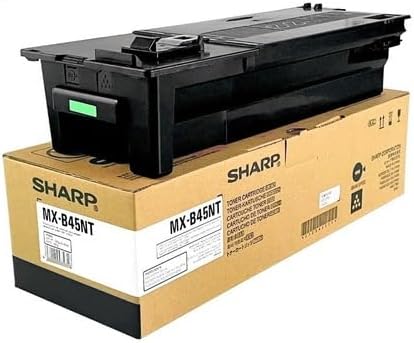
Image: Front view of the Sharp MX-B45NT Black Toner Cartridge, showing its black casing and green release tab.
2.2 Installation Procedure
- Ensure your printer is powered on.
- Open the front cover or toner access door of your Sharp printer. Refer to your printer's specific manual for exact location.
- If replacing an old cartridge, carefully remove it by pulling it straight out. Place the old cartridge in a sealed bag for proper disposal.
- Remove any orange protective caps or sealing tapes from the new toner cartridge.
- Align the new Sharp MX-B45NT toner cartridge with the guides inside the printer and slide it in until it clicks firmly into place.
- Close the printer's front cover or toner access door.
- The printer may perform a calibration cycle. Wait for the printer to return to a ready state.
3. Operating Guidelines
Once installed, the toner cartridge is ready for use. Here are some general operating guidelines.
3.1 First Use and Test Print
After installation, it is recommended to perform a test print to confirm proper installation and print quality. Consult your printer's manual for instructions on how to print a test page or configuration report.
3.2 Printing Best Practices
- Use recommended paper types for optimal print quality.
- Avoid exposing the toner cartridge to direct sunlight or strong artificial light for extended periods.
- Do not attempt to refill the cartridge, as this can damage the printer and void the warranty.
4. Maintenance
Proper maintenance helps extend the life of your toner cartridge and ensures consistent print quality.
4.1 Storage
- Store new toner cartridges in their original, unopened packaging until ready for use.
- Keep cartridges in a cool, dry place, away from direct sunlight and extreme temperatures.
- Store horizontally to prevent toner clumping.
4.2 Cleaning
The toner cartridge itself generally does not require cleaning. If toner spills occur during installation or removal, use a dry cloth to wipe it away. Do not use water or cleaning solvents, as they can damage the cartridge or printer components.
5. Troubleshooting
If you encounter issues with your Sharp MX-B45NT toner cartridge, refer to the table below for common problems and solutions.
| Problem | Possible Cause | Solution |
|---|---|---|
| Light or Faded Prints | Low toner level; uneven toner distribution. | Gently shake the cartridge to redistribute toner. If problem persists, replace cartridge. |
| Streaks or Spots on Prints | Damaged drum; foreign object inside printer. | Inspect cartridge for damage. Clean printer's internal components if necessary (refer to printer manual). |
| Printer Not Recognizing Cartridge | Improper installation; dirty electrical contacts. | Reinstall the cartridge, ensuring it clicks into place. Clean electrical contacts on cartridge and printer with a dry, lint-free cloth. |
| Toner Leakage | Damaged cartridge; improper handling. | Remove cartridge carefully. Clean spilled toner. Replace cartridge if damaged. |
6. Specifications
Key technical specifications for the Sharp MX-B45NT Black Toner Cartridge:
| Attribute | Detail |
|---|---|
| Brand | Sharp |
| Model Number | MX-B45NT (MXB45NT) |
| Color | Black |
| Page Yield | Up to 12,000 pages (based on ISO/IEC 19752) |
| Item Weight | 1.19 pounds (0.54 kg) |
| Product Dimensions | 1 x 1 x 1 inches (approximate, as per listing) |
| Compatible Devices | Sharp Printers compatible with MX-B45NT series toner |
7. Warranty and Support
Sharp provides a limited warranty for its genuine toner cartridges. Please retain your proof of purchase for warranty claims.
7.1 Warranty Information
Genuine Sharp toner cartridges are typically covered against defects in materials and workmanship under normal use during the warranty period. The specific terms and duration of the warranty may vary by region and retailer. For detailed warranty information, please refer to the documentation included with your printer or visit the official Sharp website.
7.2 Customer Support
If you experience any issues that cannot be resolved using the troubleshooting guide, or if you require further assistance, please contact Sharp customer support or your authorized Sharp dealer. Have your printer model and toner cartridge details ready when contacting support.
For general inquiries or to find local support contacts, visit the official Sharp website: www.sharp-world.com