
AMIR AMIR KA25 Digital Scale
AMIR Digital Pocket Scale User Manual
Model: AMIR KA25 Digital Scale
1. Product Overview
Thank you for choosing the AMIR Digital Pocket Scale. This precision instrument is designed for accurate weighing of various items, from food ingredients to jewelry and medicinal herbs. Its compact size and multiple features make it an ideal tool for both professional and personal use.

This image shows the AMIR Digital Pocket Scale in its open clamshell design, revealing the stainless steel weighing platform, the LCD display, and control buttons. A 50-gram calibration weight is placed on the platform, and the inside of the lid displays printed operating instructions. Two AAA batteries are also visible next to the scale.
2. Safety Information
Please read and understand all safety instructions before using the scale to ensure proper operation and prevent damage.
- Always place the scale on a hard, flat, and stable surface to ensure accurate readings.
- Avoid exposing the scale to extreme temperatures, humidity, or direct sunlight.
- Do not overload the scale beyond its maximum capacity of 200 grams, as this can cause permanent damage.
- Keep the scale away from strong electromagnetic fields.
- Do not immerse the scale in water or other liquids. Clean with a soft, damp cloth.
- Handle the scale with care; avoid dropping or subjecting it to strong impacts.
- Remove batteries if the scale will not be used for an extended period to prevent leakage.
3. Package Contents
- AMIR Digital Pocket Scale
- 50g Calibration Weight
- 2 x AAA Batteries (may be included)
- User Manual
4. Product Features
- High Accuracy: Equipped with a high-precision sensor system, providing instant and accurate results from 0.03 g to 200 g with 0.01g readability.
- Multiple Unit Conversions: Easily switch between 6 different units: grams (g), ounces (oz), troy ounces (ozt), pennyweights (dwt), carats (ct), and grains (gn).
- Tare Function: Allows you to zero out the weight of a container, providing the net weight of the contents.
- Calibration Function: Comes with a 50g calibration weight for easy and accurate recalibration.
- LCD Backlit Display: Large, easy-to-read LCD with orange backlight for clear visibility in various lighting conditions.
- Intelligent Indications: Alerts for low battery power, overload, and uneven surface placement.
- Auto-Off Feature: Automatically turns off after 180 seconds of inactivity to conserve battery life.
- Compact and Portable Design: Clamshell design protects the weighing surface and makes it easy to carry (Product Dimensions: 3" x 5" x 3/4").

This close-up image focuses on the scale's LCD display and control buttons (TARE, ON/OFF, MODE). An arrow points from the MODE button to a list of six different units: grams (g), ounces (oz), troy ounces (ozt), pennyweights (dwt), carats (ct), and grains (gn), indicating the scale's versatility in measurement.

The image shows the compact AMIR Digital Pocket Scale being easily slipped into a pant pocket, demonstrating its small size and portability. Dimensions are overlaid on the image, indicating a length of 5.59 inches (142mm) and a width of 3.35 inches (85mm) when closed.
5. Setup
5.1 Battery Installation
The scale requires 2 x AAA batteries. Ensure correct polarity when inserting the batteries.
- Open the battery compartment cover located on the underside of the scale.
- Insert 2 AAA batteries, matching the positive (+) and negative (-) terminals as indicated inside the compartment.
- Close the battery compartment cover securely.

This image displays proper battery installation (two AAA batteries) with correct polarity, and warnings against mixing battery types or exposing the scale to high temperatures (like near a fireplace). It also specifies the optimal operating environment temperature range of 10°C-30°C.
6. Operation
6.1 Power On/Off
- Place the scale on a horizontal, flat surface.
- Press the ON/OFF key to turn on the scale.
- Wait until the LCD display shows "0.0" or "0.00".
- To turn off the scale, press the ON/OFF key again or wait for the auto-off feature to activate.
6.2 Unit Conversion
To change the weighing unit:
- With the scale turned on, press the MODE button repeatedly to cycle through the available units: g (grams), oz (ounces), ozt (troy ounces), dwt (pennyweights), ct (carats), and gn (grains).
- The selected unit will be displayed on the LCD.
6.3 Tare Function
The Tare function allows you to subtract the weight of a container or previous items to get the net weight of new items.
- Place the empty container on the center of the weighing platform.
- Press the TARE button. The display will reset to "0.0" or "0.00".
- Add the items you wish to weigh into the container. The display will show the net weight of the items.
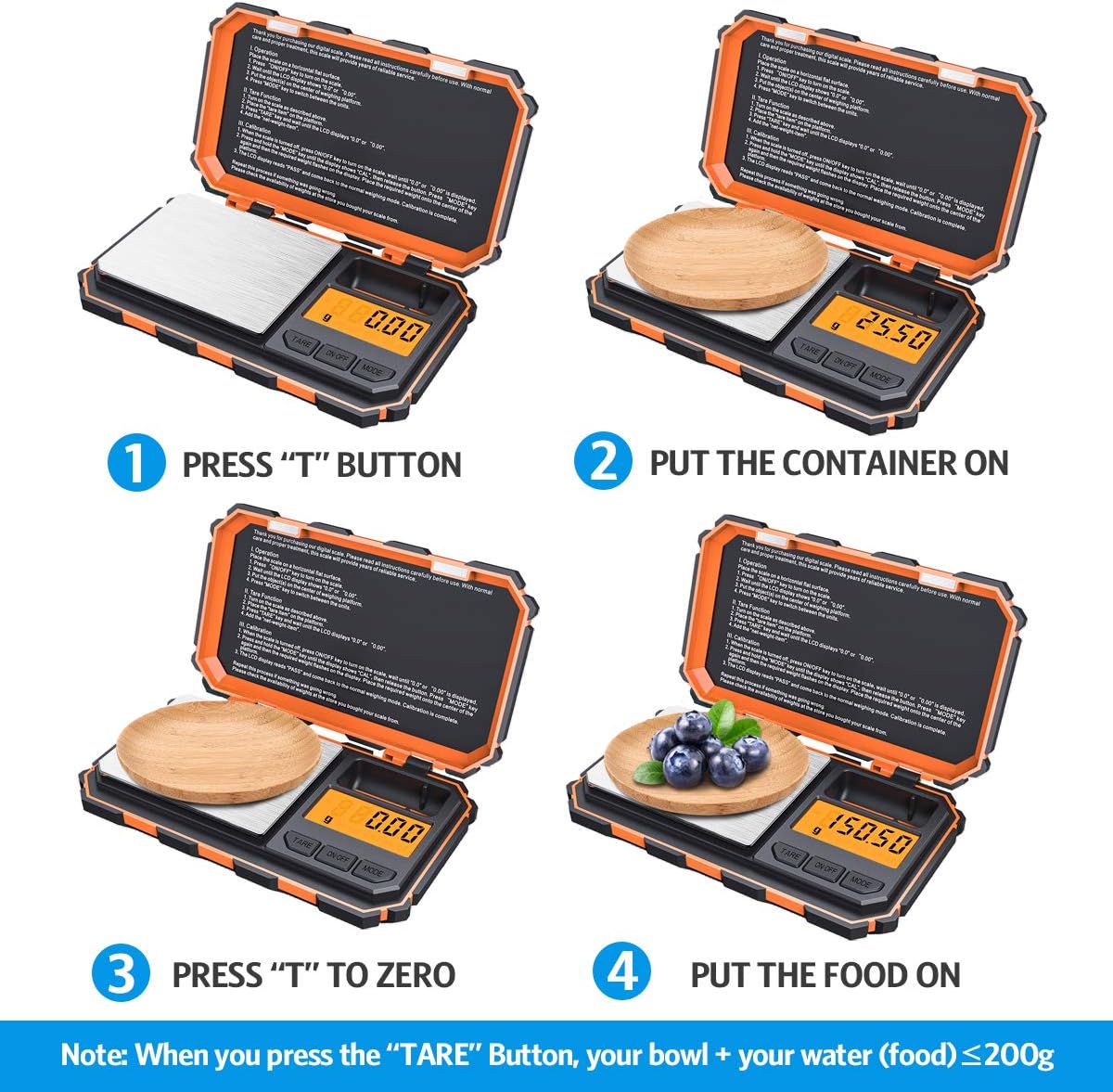
This composite image provides a step-by-step visual guide for the Tare function. It shows placing a container on the scale, pressing the 'TARE' button to zero the display, adding items to the container, and finally, the scale displaying the net weight of the items.
6.4 Calibration
Calibration ensures the accuracy of your scale. It is recommended to calibrate the scale regularly or if you suspect inaccurate readings.
- Turn the scale ON by pressing the ON/OFF button. Ensure the display shows "0.0" or "0.00".
- Press and hold the MODE key until the display shows "CAL", then release the button.
- The display will then flash the required calibration weight (e.g., "50.00").
- Place the included 50g calibration weight on the center of the weighing platform.
- The display will show "PASS" and then return to normal weighing mode, indicating successful calibration.

This image illustrates the calibration process in four steps: turning on the scale, pressing and holding the 'MODE' key until 'CAL' appears, waiting for '50.00' to flash, and placing the 50g calibration weight on the platform until 'PASS' is displayed, confirming successful calibration.
7. Maintenance
- Cleaning: Wipe the scale with a soft, slightly damp cloth. Do not use abrasive cleaners or immerse the scale in water.
- Storage: Store the scale in a clean, dry place at room temperature. The clamshell design helps protect the weighing surface and display.
- Battery Replacement: Replace batteries when the low battery indicator ('LO') appears on the display.
8. Troubleshooting
| Problem | Possible Cause | Solution |
|---|---|---|
| Scale does not turn on | Low or dead batteries; Incorrect battery installation | Replace batteries; Check battery polarity |
| Inaccurate readings | Scale not on a flat surface; Needs calibration; Overloaded; Drafts/vibrations | Place on a stable, flat surface; Perform calibration; Do not exceed 200g; Avoid windy areas |
| "LO" displayed | Low battery | Replace batteries |
| "O-Ld" displayed | Overload | Remove excess weight immediately; Do not exceed 200g |
| "UNSt" displayed | Uneven surface | Place the scale on a stable, flat, and level surface |

The image shows the scale's LCD displaying various error messages: 'LO' for low battery, 'O-Ld' for overload, and 'UNSt' for uneven surface, providing visual cues for common operational issues.
9. Specifications
| Feature | Detail |
|---|---|
| Brand | AMIR |
| Model Number | AMIR KA25 Digital Scale |
| Weight Limit | 200 Grams |
| Readout Accuracy | 0.01 Grams |
| Units of Measurement | g, oz, ozt, dwt, ct, gn |
| Display Type | LCD with Backlight |
| Power Source | 2 x AAA Batteries |
| Product Dimensions | 3 x 3 x 5 inches (approx. 7.6 x 7.6 x 12.7 cm) |
| Item Weight | 7.1 ounces (approx. 201 grams) |
| Material | Plastic (body), Stainless Steel (platform) |
| Special Features | Auto Shut Off, Backlit Display, Smart Indications |
| Date First Available | July 13, 2018 |
10. Warranty and Support
AMIR is committed to providing high-quality products and excellent customer service.
- Quality Protection: This product comes with a 12-month quality protection period from the date of purchase.
- Free Replacement: Enjoy a 60-day free replacement policy for any manufacturing defects.
- Customer Service: For any questions, concerns, or support needs, please contact our customer service team. We offer 7*24h customer service to assist you.
Please retain your proof of purchase for warranty claims.
Related documentsAMIR KA25 Digital Scale

Ask a question about this manual
Ask about setup, troubleshooting, compatibility, parts, safety, or missing instructions. Manuals+ will review the question and use this page’s manual context to help answer it.