
JBL Charge 4
JBL Charge 4 Portable Bluetooth Speaker User Manual
Model: Charge 4
Introduction
This manual provides essential instructions for the safe and efficient operation of your JBL Charge 4 portable Bluetooth speaker. Please read this manual thoroughly before using the product to ensure optimal performance and longevity.
What's in the Box
The JBL Charge 4 package includes the following items:
- 1x JBL Charge 4 Portable Bluetooth Speaker
- 1x USB Type-C Cable
- 1x Safety Sheet
- 1x Quick Start Guide
- 1x Warranty Card
Product Overview
Familiarize yourself with the physical components and controls of your JBL Charge 4 speaker.
Front View

Image: Front view of the JBL Charge 4 speaker, showcasing the fabric grille and the JBL logo. The LED indicator lights are visible at the bottom.
Top Panel Controls

Image: Top panel of the JBL Charge 4 speaker, displaying the control buttons for Bluetooth pairing, volume adjustment, power on/off, and JBL Connect+.
- Bluetooth Button: Press to enter Bluetooth pairing mode.
- Volume Down Button: Press to decrease volume.
- Power Button: Press to turn the speaker on or off.
- JBL Connect+ Button: Press to link with other JBL Connect+ compatible speakers.
- Volume Up Button: Press to increase volume.
- Play/Pause Button: Press to play or pause audio.
Rear Panel and Ports
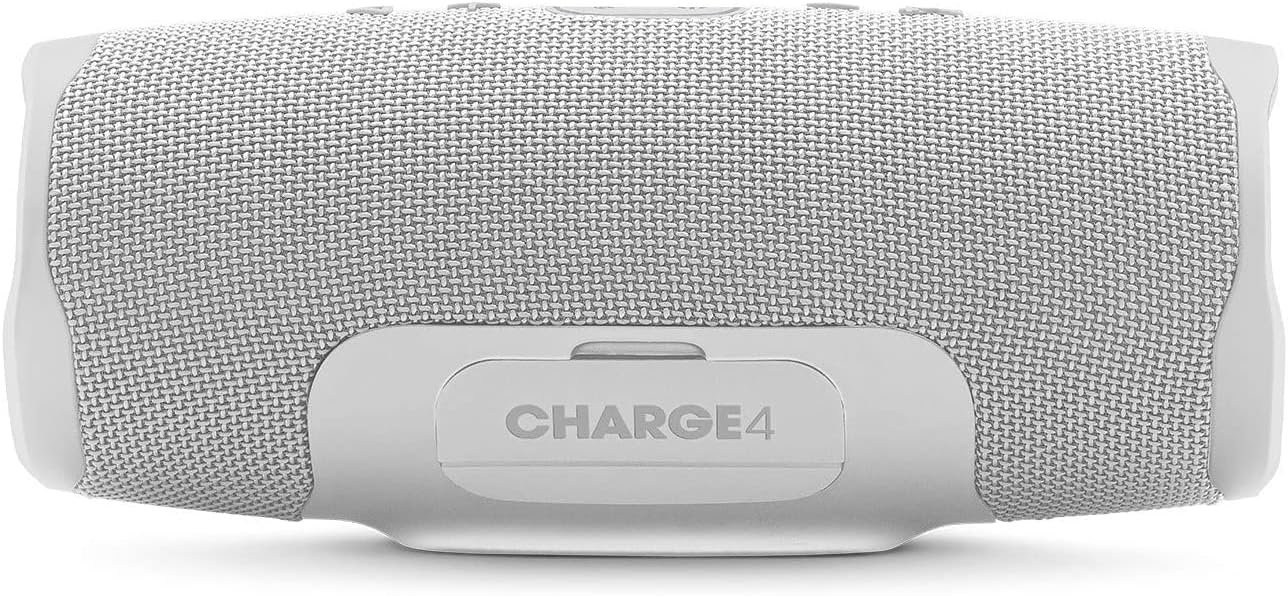
Image: Rear view of the JBL Charge 4 speaker, showing the sealed port cover which protects the charging and auxiliary ports from water.

Image: Rear view of the JBL Charge 4 speaker with the port cover open, illustrating the USB-C input for charging the speaker, the USB-A output for charging external devices, and the 3.5mm auxiliary input. A smartphone is shown connected to the USB-A port.
- USB-C Charging Port: For charging the JBL Charge 4 speaker.
- USB-A Output Port: For charging external devices (power bank function).
- 3.5mm Auxiliary Input: For connecting audio devices via a 3.5mm audio cable.
Side Passive Radiators

Image: Side view of the JBL Charge 4 speaker, highlighting one of the passive radiators with an exclamation mark design, contributing to enhanced bass.

Image: Side view of the JBL Charge 4 speaker, showing the other passive radiator with the JBL logo, which also enhances bass performance.
Setup
Charging the Speaker
Before initial use, fully charge your JBL Charge 4 speaker. Connect the provided USB Type-C cable to the speaker's USB-C port and to a compatible USB power adapter (not included). The LED indicator lights will show the charging status. All five LEDs will illuminate when the speaker is fully charged.
Powering On/Off
Press the Power Button on the top panel to turn the speaker on or off.
Operating Instructions
Bluetooth Pairing
- Turn on the JBL Charge 4 speaker.
- Press the Bluetooth Button on the top panel. The Bluetooth indicator will flash, indicating it is in pairing mode.
- On your smartphone or tablet, navigate to Bluetooth settings and select "JBL Charge 4" from the list of available devices.
- Once connected, the Bluetooth indicator will remain solid.
- To pair a new device, press the Bluetooth button again to re-enter pairing mode.
JBL Connect+
JBL Connect+ allows you to wirelessly link multiple JBL Connect+ compatible speakers together to amplify the listening experience.
- Ensure all JBL Connect+ compatible speakers are powered on.
- Play music on one speaker (the primary speaker).
- Press the JBL Connect+ Button on the primary speaker.
- Press the JBL Connect+ Button on all other speakers you wish to connect.
- The speakers will link automatically, playing the same audio.
Using as a Power Bank
The JBL Charge 4 can charge external devices using its built-in power bank function.
- Open the protective cover on the rear of the speaker.
- Connect your device's charging cable to the USB-A output port on the JBL Charge 4.
- Your device will begin charging.
Auxiliary Input
To play audio from a device without Bluetooth, use a 3.5mm audio cable (not included).
- Open the protective cover on the rear of the speaker.
- Connect one end of the 3.5mm audio cable to the auxiliary input port on the JBL Charge 4.
- Connect the other end to your audio device's headphone jack.
- The speaker will automatically switch to auxiliary input mode.
Maintenance
Cleaning
Wipe the speaker with a soft, damp cloth. Do not use harsh chemicals or abrasive materials. Ensure the port cover is securely closed before cleaning or exposing to water.
Water Resistance (IPX7)
The JBL Charge 4 is IPX7 waterproof, meaning it can be submerged in water up to 1 meter for up to 30 minutes. Ensure the protective port cover is completely sealed before exposing the speaker to water. Do not expose to salt water or other liquids besides fresh water.
Storage
Store the speaker in a cool, dry place away from direct sunlight and extreme temperatures.
Troubleshooting
| Problem | Possible Cause | Solution |
|---|---|---|
| Speaker does not turn on. | Battery is depleted. | Charge the speaker using the provided USB-C cable. |
| Cannot pair via Bluetooth. | Speaker is not in pairing mode or device is too far. | Press the Bluetooth button to enter pairing mode. Ensure your device's Bluetooth is on and within range (10 meters). Try forgetting the device on your phone and re-pairing. |
| No sound. | Volume is too low or audio source is paused. | Increase speaker and device volume. Check if the audio source is playing. |
| Sound distortion. | Volume is too high or audio source quality is poor. | Decrease volume on both speaker and device. Try a different audio source. |
| Device not charging from speaker. | Speaker battery is low or cable is faulty. | Ensure the speaker has sufficient charge. Try a different USB cable. |
Specifications
- Brand: JBL
- Model Name: Charge 4
- Output Power: 30 Watts
- Connectivity Technology: Bluetooth
- Audio Output Mode: Stereo
- Mounting Type: Tabletop
- Material: Fabric, Rubber
- Speaker Type: Outdoor
- Special Features: Bluetooth, Waterproof (IPX7), Portable
- Recommended Uses: Music, Beach
- Battery Type: 7800mAh Lithium-ion Polymer
- Battery Playtime: Up to 20 hours (varies by volume level and audio content)
- Dimensions: 220 x 95 x 93 mm (approximate)
Safety Information
- Do not expose the speaker to extreme temperatures or direct sunlight for extended periods.
- Ensure the port cover is securely closed before exposing the speaker to water.
- Do not attempt to disassemble or modify the speaker.
- Use only the provided USB-C cable for charging.
- Keep out of reach of children.
- Dispose of the battery according to local regulations.
Warranty and Support
Your JBL Charge 4 speaker comes with a limited warranty. Please refer to the warranty card included in your package for details on coverage and duration. For technical support or service inquiries, please visit the official JBL website or contact their customer service.
Official JBL Store: JBL Store on Amazon
Related documentsCharge 4


Ask a question about this manual
Ask about setup, troubleshooting, compatibility, parts, safety, or missing instructions. Manuals+ will review the question and use this page’s manual context to help answer it.