
BLACK+DECKER EM925AB9
BLACK+DECKER 0.9 Cu.Ft. Digital Microwave Oven
Model: EM925AB9
Introduction
This instruction manual provides important information for the safe and efficient operation of your new BLACK+DECKER 0.9 Cu.Ft. Digital Microwave Oven. Please read this manual thoroughly before use and retain it for future reference.
This professional-style 900W Black+Decker stainless steel microwave features 10 power levels, a removable glass turntable, and a spacious interior. Advanced technology provides even heating and defrosting for excellent results without overcooking. Cook or reheat six of the most popular foods optimally at the touch of a button. Choose power levels up to 900 watts. The large digital LED display has a clock function and can also show a countdown timer, as well as the remaining cooking time.
Important Safety Information
Always follow basic safety precautions when using electrical appliances to reduce the risk of fire, electric shock, injury to persons, or exposure to excessive microwave energy.
- Do not attempt to operate this oven with the door open as this can result in harmful exposure to microwave energy.
- Do not place any object between the oven front face and the door or allow soil or cleaner residue to accumulate on sealing surfaces.
- Do not operate the oven if it is damaged. It is particularly important that the oven door closes properly and that there is no damage to the: (1) door (bent), (2) hinges and latches (broken or loosened), (3) door seals and sealing surfaces.
- The oven should not be adjusted or repaired by anyone except properly qualified service personnel.
- This appliance is UL Approved.
Product Overview

Image: Front view of the BLACK+DECKER 0.9 Cu.Ft. Digital Microwave Oven, showcasing its stainless steel finish and digital control panel.
- Control Panel: Digital LED display with touch controls for various functions.
- Oven Door: Features a push-button release for easy opening.
- Turntable: A 10.6-inch removable glass turntable ensures even cooking.
- Interior Light: Illuminates the oven cavity during operation.
- Child Safety Lock: Prevents unintended operation.

Image: Interior view of the microwave oven, highlighting the 10.6-inch diameter glass turntable designed for even heating.
Setup
- Unpacking: Carefully remove the microwave oven and all packing materials from the carton.
- Placement: Place the oven on a flat, stable surface, such as a kitchen countertop. Ensure there is adequate ventilation space around the oven (at least 4 inches on top, sides, and back).
- Power Connection: Plug the power cord into a grounded electrical outlet. Ensure the voltage matches the rating label on the oven.
- Turntable Installation: Place the turntable ring inside the oven cavity, then place the glass turntable plate securely on top of the ring.

Image: The microwave oven with its door open, positioned on a kitchen counter, demonstrating its compact size and readiness for use.
Operating Instructions
Setting the Clock
To set the clock, press the "Timer/Clock" button once. Use the number pad to enter the current time. Press "Timer/Clock" again to confirm.
Basic Microwave Cooking
- Place food in a microwave-safe container on the turntable.
- Close the oven door.
- Enter the desired cooking time using the number pad.
- Press "Power" to select a power level (default is 100% power). Use the number pad to select a power level from 1 to 10.
- Press "START" to begin cooking.
Express Cook (30 Seconds)
For quick heating, simply press the "START +30SEC" button. Each press adds 30 seconds of cooking time at 100% power.
Auto Cook Presets
This microwave features 6 pre-programmed settings for common foods:
- Popcorn
- Potato
- Pizza
- Frozen Vegetable
- Beverage
- Dinner Plate
To use a preset, simply press the corresponding button (e.g., "Popcorn"). The oven will automatically set the optimal cooking time and power level. Press "START" to begin.
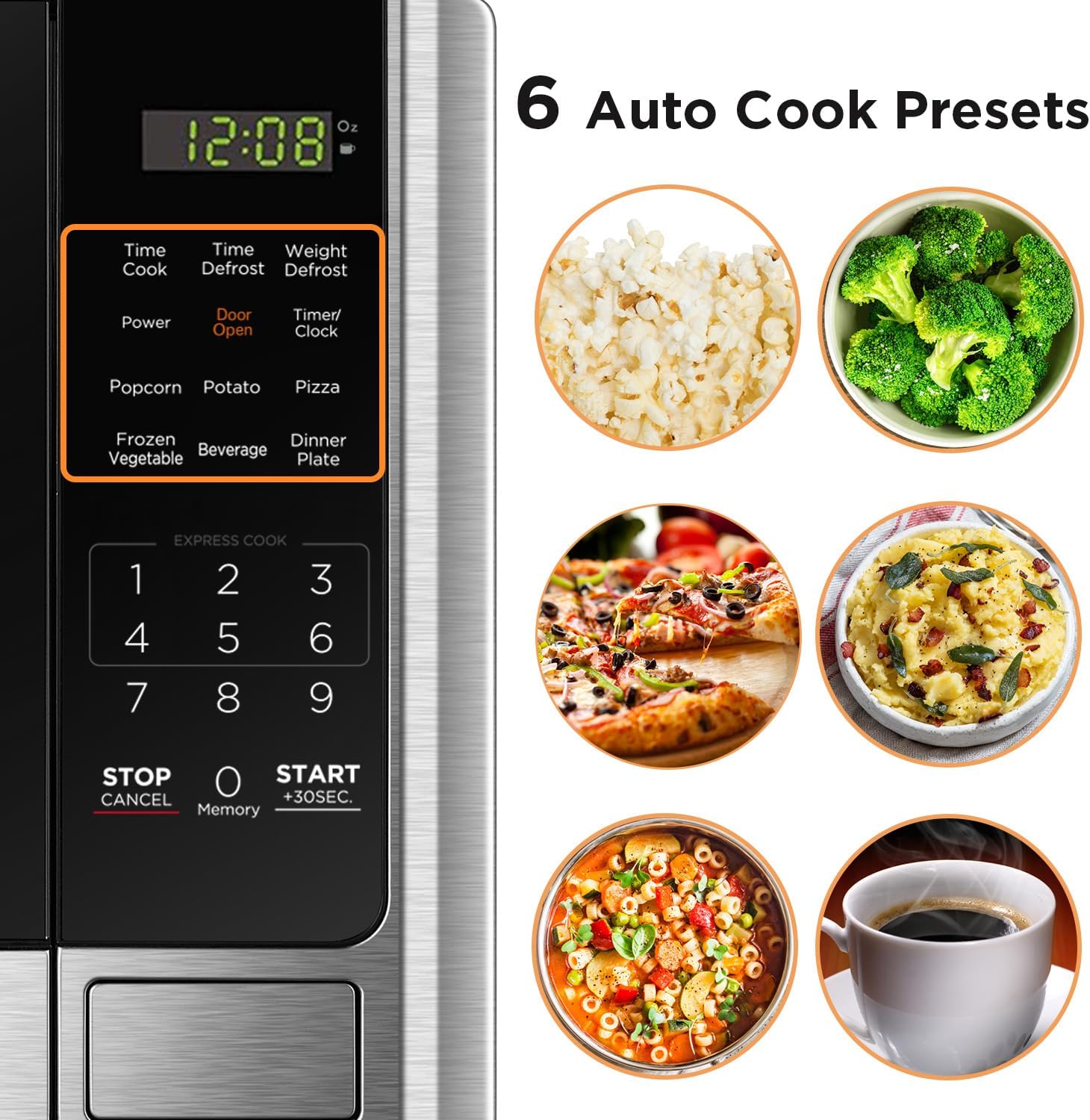
Image: Close-up of the microwave's control panel, showing the dedicated buttons for the 6 auto cook presets: Popcorn, Potato, Pizza, Frozen Vegetable, Beverage, and Dinner Plate.
Defrosting
The microwave offers both Time Defrost and Weight Defrost options.
- Time Defrost: Press "Time Defrost", enter the desired defrosting time, then press "START".
- Weight Defrost: Press "Weight Defrost", enter the weight of the food in ounces, then press "START".
Child Lock Function
The child safety lock prevents unauthorized use of the microwave oven. This model features a new two-step child lock feature.
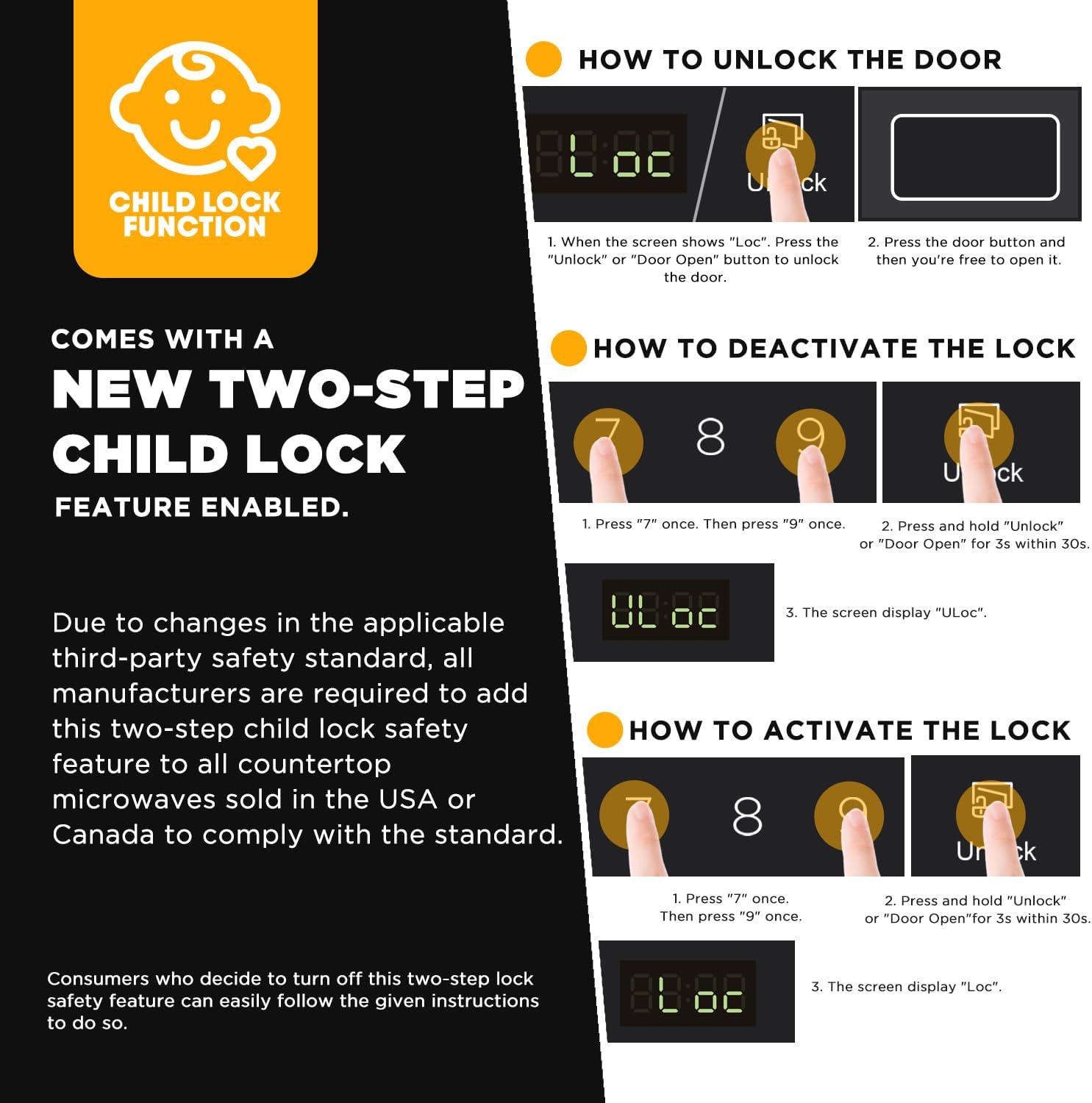
Image: Visual instructions detailing how to activate, deactivate, and unlock the microwave's child safety lock feature.
- To Activate Lock: Press "7" once, then "9" once. Press and hold "Unlock" or "Door Open" for 3 seconds. The screen will display "Loc".
- To Deactivate Lock: Press "7" once, then "9" once. Press and hold "Unlock" or "Door Open" for 3 seconds. The screen will display "ULoc".
- To Unlock Door (when locked): When the screen shows "Loc", press the "Unlock" or "Door Open" button to unlock the door. Then press the door button and you're free to open it.
Maintenance
Proper care and cleaning will ensure the longevity and optimal performance of your microwave oven.
- Cleaning the Interior: Wipe the inside of the oven with a damp cloth after each use. For stubborn stains, use a mild detergent.
- Cleaning the Turntable: The glass turntable and turntable ring can be removed and washed in warm, soapy water or in a dishwasher.
- Cleaning the Exterior: Wipe the exterior surfaces with a soft, damp cloth. Avoid abrasive cleaners.
- Odor Removal: To remove odors, combine a cup of water with the juice of one lemon in a microwave-safe bowl. Microwave on high for 5-7 minutes.
Troubleshooting
| Problem | Possible Cause | Solution |
|---|---|---|
| Oven will not start | Power cord not plugged in; Fuse blown or circuit breaker tripped; Door not closed properly. | Ensure power cord is securely plugged in; Check household fuse or reset circuit breaker; Ensure door is firmly closed and latched. |
| Uneven cooking | Food not stirred or turned; Insufficient cooking time; Food placed incorrectly on turntable. | Stir or turn food halfway through cooking; Increase cooking time; Ensure food is centered on the turntable. |
| Oven light not working | Bulb needs replacement. | Contact qualified service personnel for bulb replacement. |
| Child lock activated | Child lock feature is engaged. | Follow instructions in the "Child Lock Function" section to deactivate or unlock. |
Specifications
- Brand: BLACK+DECKER
- Model Number: EM925AB9
- Capacity: 0.9 Cu.Ft.
- Wattage: 900 Watts
- Power Levels: 10
- Control Type: Touch
- Material: Stainless Steel
- Installation Type: Countertop
- External Dimensions (W x D x H): 48.51 cm x 37.59 cm x 29.21 cm (19.1 in x 14.8 in x 11.5 in)
- Internal Dimensions (W x D x H): 31.4 cm x 34.7 cm x 22.1 cm (12.4 in x 13.7 in x 8.7 in)
- Turntable Diameter: 10.6 inches
- Weight: 12.6 kg (27.8 lbs)
- Special Feature: Child Safety Lock
- Certifications: UL Approved

Image: The microwave oven with its external dimensions clearly marked: 19.1 inches width, 14.8 inches depth, and 11.5 inches height.
Warranty and Support
This BLACK+DECKER microwave oven comes with a one-year limited warranty from the date of purchase. This warranty covers defects in material and workmanship under normal use.
For warranty claims, technical support, or service inquiries, please contact BLACK+DECKER customer service. Please have your model number (EM925AB9) and proof of purchase ready when contacting support.
For more information, visit the official BLACK+DECKER website or refer to the contact information provided with your product packaging.
Related documentsEM925AB9


Ask a question about this manual
Ask about setup, troubleshooting, compatibility, parts, safety, or missing instructions. Manuals+ will review the question and use this page’s manual context to help answer it.