
1. Introduction
The Goal Zero Crush Light Chroma is a versatile, collapsible solar-powered LED lantern designed for portability and multi-functional lighting. It features both white light and a spectrum of colors, making it ideal for camping, outdoor adventures, or creating ambiance. Its compact design allows for easy storage and transport, while integrated solar and USB charging options ensure it's always ready for use.

Image: The Goal Zero Crush Light Chroma Lantern, fully expanded and emitting a vibrant blue light.
2. Features
- Six Different Light Colors: Offers a wide range of color options for various moods and settings.
- Collapsible and Compact Design: Easily collapses for convenient storage and transport, making it highly portable.
- Four Different Light Modes: Includes multiple white light settings (high, medium, low, flicker) and color modes.
- High Brightness: Provides up to 60 lumens of light output.
- Color Temperature: Features a 3000K white light setting.
- IPX4 Certified: Water-resistant, protecting against splashing water from any direction.
- Dual Charging Options: Equipped with a built-in solar panel and a micro-USB port for flexible charging.
- Integrated Battery: Powered by a Lithium-Ion Polymer battery (included).
3. Setup
- Unpack the Lantern: Remove the Crush Light Chroma from its packaging.
- Expand the Lantern: Gently pull the top and bottom sections of the lantern apart until it is fully extended. The flexible silicone body will expand to its full height.
- Initial Charge: For optimal performance, it is recommended to fully charge the lantern before first use. You can charge it via the built-in solar panel or the micro-USB port.

Image: A top-down view of the Goal Zero Crush Light Chroma in its collapsed state, highlighting the integrated solar panel and the micro-USB charging port with a cable connected.
4. Operating
The Crush Light Chroma features a single power button located on the top of the lantern for all operations.
- Power On/Off: Press the power button once to turn the lantern on. Press and hold the power button for 2 seconds to turn it off.
- Cycle Through White Light Modes: With the lantern on, press the power button repeatedly to cycle through the white light modes: High > Medium > Low > Flicker.
- Activate Color Modes: After cycling through the white light modes, continue pressing the power button to enter the color modes. The lantern will cycle through a rainbow fade, followed by individual static colors.
- Collapsing the Lantern: To collapse the lantern for storage or transport, gently push down on the top section until it flattens into a disc shape.
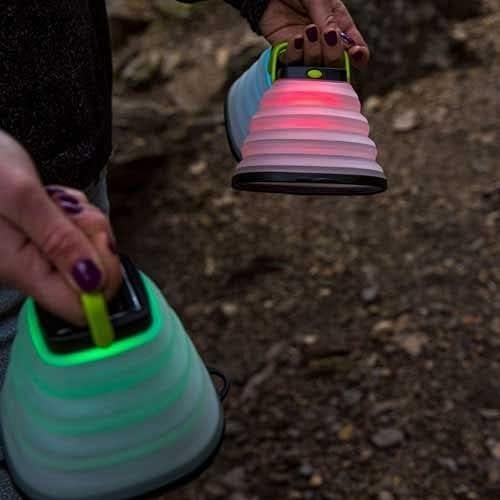
Image: A person's hands holding two Goal Zero Crush Light Chroma lanterns, one emitting a red light and the other a green light, demonstrating their portability.
5. Charging
The Crush Light Chroma offers two convenient ways to recharge its internal battery:
- Solar Charging: Place the lantern with its solar panel facing direct sunlight. The solar panel is located on the top of the lantern. Charging time will vary depending on sunlight intensity.
- USB Charging: Connect the included micro-USB cable to the micro-USB port on the top of the lantern and plug the other end into any powered USB port (e.g., computer, wall adapter, power bank).
A small LED indicator near the power button will illuminate during charging. It typically turns green when fully charged.
6. Light Modes
The Crush Light Chroma offers a variety of lighting options:
- White Light Modes:
- High: Maximum brightness for general illumination.
- Medium: Balanced brightness for extended runtimes.
- Low: Dim light for night vision preservation or minimal light needs.
- Flicker: Simulates a candle flame, ideal for ambiance.
- Color Modes:
- Rainbow Fade: Smoothly transitions through all available colors.
- Static Colors: Six distinct static color options (e.g., red, green, blue, purple, yellow, cyan) to choose from.

Image: A composite image showing several Goal Zero Crush Light Chroma lanterns, some expanded and illuminated in different colors (white, orange, red, purple, blue, light blue, green), and one collapsed, demonstrating the range of light and form options.
7. Maintenance
- Cleaning: Wipe the lantern with a damp cloth to remove dirt or debris. Do not use harsh chemicals or abrasive cleaners.
- Storage: When not in use for extended periods, store the lantern in a cool, dry place. It is recommended to fully charge the battery every 3-6 months to maintain battery health.
- Water Resistance: The IPX4 rating means the lantern is resistant to splashing water. Do not submerge the lantern in water.

Image: Three Goal Zero Crush Light Chroma lanterns, illuminated in red, blue, and green, nestled among the exposed roots of a tree, showcasing their outdoor durability and versatility.
8. Troubleshooting
- Lantern Not Turning On:
- Ensure the battery is charged. Connect to a USB power source or place in direct sunlight for several hours.
- Press and hold the power button for a few seconds to ensure it's not just a quick press.
- Lantern Not Charging:
- USB Charging: Check the USB cable and power source. Try a different cable or USB port.
- Solar Charging: Ensure the solar panel is clean and exposed to direct, unobstructed sunlight. Charging will be slower in cloudy conditions or indirect light.
- Lights Not Changing Modes/Colors:
- Ensure the lantern is fully charged. Low battery can affect functionality.
- Press the power button firmly and repeatedly to cycle through all modes.
9. Specifications
| Attribute | Value |
|---|---|
| Model Number | GZ32013 |
| Brightness | 60 Lumens |
| Color Temperature | 3000K |
| Wattage | 1.48 watts |
| Voltage | 3.7 Volts |
| Battery Type | Lithium-Ion Polymer |
| Dimensions (Expanded) | 7.01"L x 0.98"W x 7.99"H |
| Item Weight | 0.282 ounces (8 Grams) |
| Water Resistance | IPX4 (Water Resistant) |
| UPC | 847974006122 |
10. Warranty and Support
For detailed warranty information and customer support, please refer to the official Goal Zero website or contact their customer service directly. Product registration may be available to ensure you receive updates and support.
You can visit the official Goal Zero store for more information: Goal Zero Amazon Store
Note: Official product videos were not available in the provided data for embedding. Please check the manufacturer's website for any available video resources.


