
1. Introduction and Overview
This manual provides essential information for the proper installation, operation, and maintenance of your Walfront ADE-1, ADE-6, or ADE-25 Passive Mixer Module. These modules are designed for efficient frequency conversion in various RF applications, particularly in VHF/UHF ranges.
The passive mixers feature a compact and lightweight design, making them suitable for integration into various electronic systems. They are characterized by low conversion loss and excellent L-R isolation, ensuring reliable performance in signal processing.
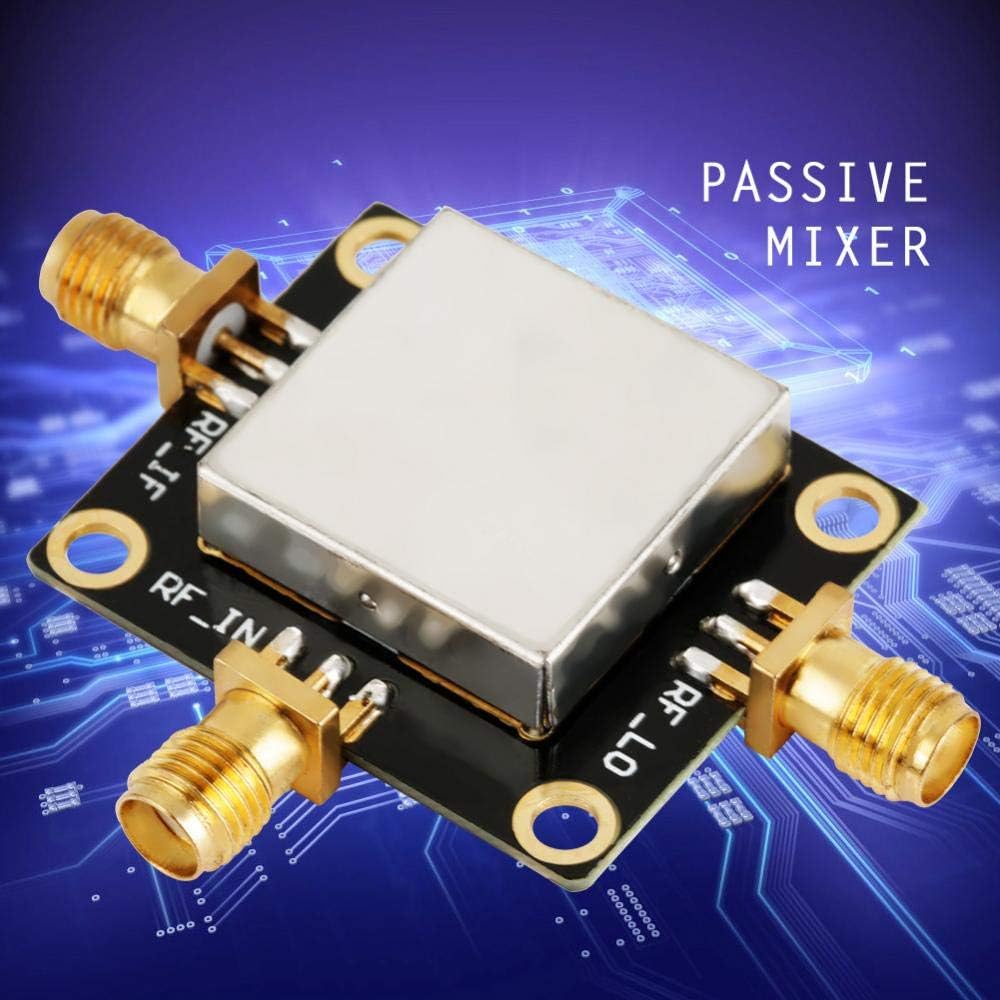
Figure 1: Walfront Passive Mixer Module with gold SMA connectors.
The mixer is typically positioned after a low noise amplifier (LNA) to directly process the amplified RF signal, facilitating efficient frequency mixing.
2. Setup and Connections
The Walfront Passive Mixer Module requires careful connection to ensure optimal performance. The module features three primary ports: RF_IN (Radio Frequency Input), RF_LO (Local Oscillator Input), and RF_IF (Intermediate Frequency Output).
- Identify Ports: Locate the RF_IN, RF_LO, and RF_IF labels on the module's PCB.
- Connect RF Input: Connect your RF signal source to the RF_IN port.
- Connect Local Oscillator: Connect your Local Oscillator signal to the RF_LO port.
- Connect IF Output: Connect your desired load or subsequent processing stage to the RF_IF port.

Figure 2: Top view of the mixer module, indicating RF_IF, RF_LO, and RF_IN ports.
Ensure all connections are secure and use appropriate coaxial cables and connectors (e.g., SMA) to minimize signal loss and interference.
3. Operating Instructions
The passive mixer module operates by combining two input signals (RF_IN and RF_LO) to produce an output signal (RF_IF) at a new frequency. This process is fundamental in various communication and measurement systems.
3.1 Frequency Ranges and Conversion Loss
The specific operating characteristics vary by model:
- ADE-1: RF/LO frequency range 0.5-500MHz, Conversion loss approximately 5.0dB.
- ADE-6: RF/LO frequency range 0.05-250MHz, Conversion loss approximately 4.6dB.
- ADE-25: RF/LO frequency range 5MHz-2500MHz, Conversion loss approximately 7.0dB.
The maximum RF power handling for these modules is 50mW, and the IF current is 40mA. Always ensure that input power levels do not exceed these specifications to prevent damage to the module.

Figure 3: Close-up view of an SMA connector on the mixer module.
3.2 Environmental Conditions
The module is designed to operate within a temperature range of -40°C to 85°C and can be stored between -55°C to 100°C. Avoid exposing the module to extreme temperatures or humidity outside these ranges.
4. Maintenance
The Walfront Passive Mixer Module is a robust electronic component designed for long-term reliability. Minimal maintenance is required.
- Cleaning: If necessary, gently clean the exterior of the module with a dry, soft cloth. Avoid using liquid cleaners or solvents, which could damage the components.
- Inspection: Periodically inspect the connectors for any signs of wear, corrosion, or damage. Ensure all connections remain tight.
- Storage: When not in use, store the module in a dry, static-free environment, ideally in its original packaging or an anti-static bag.
Do not attempt to open the sealed metal casing of the module, as this may compromise its performance and void any potential warranty.
5. Troubleshooting
If you encounter issues with your passive mixer module, consider the following troubleshooting steps:
- No Output Signal:
- Verify that both RF_IN and RF_LO signals are present and within the specified frequency and power ranges.
- Check all cable connections for tightness and continuity.
- Ensure the power levels of the input signals are sufficient but do not exceed the 50mW maximum.
- Incorrect Output Frequency or Amplitude:
- Confirm the frequencies of your RF_IN and RF_LO signals are correct for the desired IF output.
- Check for impedance mismatches at the input or output ports.
- Ensure the module is operating within its specified frequency range (e.g., ADE-1 for 0.5-500MHz).
- Module Overheating:
- Reduce input power levels if they are close to or exceeding the 50mW maximum.
- Ensure adequate ventilation around the module, although passive mixers typically generate minimal heat.
If problems persist after performing these checks, contact your supplier or a qualified electronics technician for further assistance.
6. Specifications
Detailed specifications for the Walfront Passive Mixer Modules:
| Specification | Value |
|---|---|
| RF Power (Max) | 50mW |
| IF Current (Max) | 40mA |
| Operating Temperature | -40°C to 85°C |
| Storage Temperature | -55°C to 100°C |
| Weight | 9g (approx. 0.02 Kilograms / 0.704 ounces) |
| Product Dimensions | 3.15 x 2.76 x 2.36 inches |
| Number of Channels | 1 |
| Power Source | Passive (no external power required for mixing function) |
6.1 Model-Specific Frequency and Conversion Loss
| Model | RF/LO Frequency Range | Conversion Loss (Typical) |
|---|---|---|
| ADE-1 | 0.5-500MHz | 5.0dB |
| ADE-6 | 0.05-250MHz | 4.6dB |
| ADE-25 | 5MHz-2500MHz | 7.0dB |
7. Warranty and Support
For warranty information and customer support, please refer to the documentation provided at the time of purchase or contact the seller directly. Walfront products are designed for quality and reliability.
You can visit the official Walfront store for more information and product inquiries: Walfront Store on Amazon.