
Introduction
This manual provides essential information for the safe and efficient use of your Acer Aspire 3 A315-33 laptop. Please read these instructions carefully before operating your device. Keep this manual for future reference.
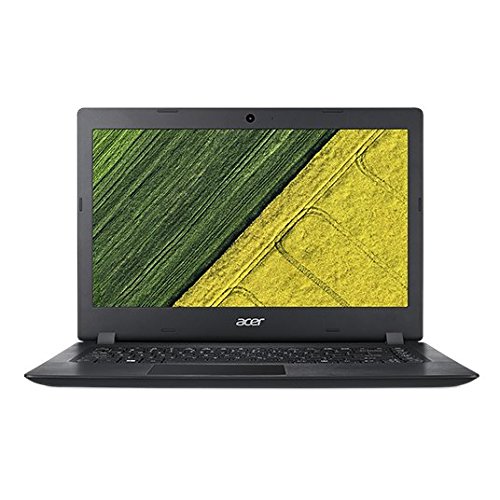
Image: Front view of the Acer Aspire 3 A315-33 laptop with the screen displaying a desktop interface.
Setup
1. Unpacking the Laptop
Carefully remove all components from the packaging. Ensure the following items are present:
- Acer Aspire 3 A315-33 Laptop
- AC Adapter
- Power Cord
- Battery (may be pre-installed)
- User Guide and Manuals
2. Connecting to Power
- Connect the AC adapter to the power jack on the side of the laptop.
- Plug the power cord into the AC adapter.
- Plug the other end of the power cord into a grounded electrical outlet.
- Allow the laptop to charge for at least 30 minutes before initial use, especially if the battery is completely drained.
3. Initial Boot and Operating System Installation
This laptop comes with a Linux-based operating system. To install a different operating system, such as Windows, you will need to purchase and install it separately. Refer to the Acer website for compatible drivers.
- Open the laptop lid.
- Press the power button to turn on the laptop.
- Follow the on-screen instructions to complete the initial setup of the pre-installed Linux system or to proceed with your chosen operating system installation.
Operating Instructions
1. Power On/Off and Sleep Mode
- Power On: Press the power button located on the keyboard deck.
- Power Off: Access the operating system's power menu and select "Shut Down."
- Sleep Mode: Close the laptop lid or select "Sleep" from the operating system's power menu.
2. Using the Keyboard and Touchpad
- The keyboard provides standard alphanumeric keys and function keys (Fn) for special features like volume control, brightness adjustment, and wireless toggling.
- The touchpad functions as a mouse. Tap once for a left-click, tap with two fingers for a right-click. Use two fingers to scroll.
3. Connecting Peripherals
The Acer Aspire 3 A315-33 features various ports for connecting external devices:

Image: Left side view of the Acer Aspire 3 A315-33 laptop, highlighting the various ports including USB, HDMI, and Ethernet.
- USB Ports: Connect USB devices such as external hard drives, mice, or keyboards. (2x USB 2.0, 1x USB 3.0)
- HDMI Port: Connect to an external monitor or TV for video and audio output.
- 4-in-1 Card Reader: Insert SD, SDHC, SDXC, or MMC memory cards.
- Combo Audio/Microphone Jack: Connect headphones or an external microphone.
- Gigabyte LAN Port: Connect an Ethernet cable for a wired network connection.
4. Network Connectivity
- Wi-Fi: Enable Wi-Fi through your operating system settings and connect to an available wireless network.
- Wired LAN: Connect an Ethernet cable to the LAN port for a stable wired internet connection.
Maintenance
1. Cleaning Your Laptop
- Use a soft, lint-free cloth slightly dampened with water or a specialized screen cleaner to clean the display.
- For the keyboard and chassis, use a soft cloth. Avoid harsh chemicals or abrasive materials.
- Periodically use compressed air to clear dust from the cooling vents.
2. Battery Care
- To maximize battery life, avoid fully discharging the battery frequently.
- Store the laptop in a cool, dry place when not in use for extended periods.
- If the laptop will not be used for several weeks, charge the battery to approximately 50% before storing.
3. Storage and RAM Upgrades
The laptop's RAM is upgradeable up to 12GB. The 500GB HDD can also be replaced or upgraded. Consult a qualified technician or Acer's official support resources before attempting any internal upgrades to avoid voiding your warranty or damaging the device.
Troubleshooting
This section addresses common issues you might encounter with your Acer Aspire 3 A315-33 laptop.
1. Laptop Does Not Power On
- Ensure the AC adapter is securely connected to both the laptop and a working power outlet.
- Verify the power outlet is functional by plugging in another device.
- If the battery is completely drained, allow it to charge for at least 30 minutes before attempting to power on.
2. Display Issues (No Image, Flickering)
- Adjust the screen brightness using the function keys (Fn + brightness keys).
- If connected to an external monitor, ensure the display output is correctly configured in your operating system.
- Restart the laptop.
3. Wi-Fi or Network Connectivity Problems
- Ensure Wi-Fi is enabled in your operating system settings.
- Check if the wireless function key (Fn + F3, or similar, depending on model) has been pressed.
- Restart your router and modem.
- For wired connections, ensure the Ethernet cable is securely plugged into both the laptop and the router/modem.
4. Operating System Installation Issues
- Ensure your installation media (USB drive or DVD) is bootable and correctly prepared.
- Check the BIOS/UEFI settings to ensure the boot order prioritizes your installation media.
- Verify that the operating system version you are attempting to install is compatible with the laptop's hardware.
Specifications
| Feature | Detail |
|---|---|
| Model | Acer Aspire 3 A315-33 |
| Processor | Intel Celeron N3060 (1.60GHz, Turbo Boost up to 2.48GHz) |
| Operating System | Linux (requires separate OS purchase for Windows) |
| Display | 15.6" HD (1366 x 768) Acer ComfyView LED-backlit TFT LCD |
| Memory (RAM) | 4GB DDR3 (Upgradeable up to 12GB) |
| Storage | 500GB HDD 5400 RPM |
| Graphics | Intel Integrated Graphics |
| Ports | 2x USB 2.0, 1x USB 3.0, 1x HDMI, 4-in-1 Card Reader, Combo Audio/Mic Jack, Gigabyte LAN Port |
| Wireless Connectivity | Wi-Fi (801.11ac) |
| Battery | Lithium Ion, up to 7 hours average life |
| Dimensions (LxWxH) | 25.9 x 38.1 x 2.1 cm |
| Weight | 2.2 kg |
Warranty Information
Your Acer Aspire 3 A315-33 laptop comes with a 1-Year Domestic Onsite Warranty and an International Traveler Warranty (ITW) from Acer. This warranty covers manufacturing defects. It does not cover physical damage or damage caused by misuse.
For detailed terms and conditions, please refer to the warranty card included with your product or visit the official Acer support website.
Support
For further assistance, technical support, or service inquiries, please contact Acer customer support through their official website or the contact information provided in your warranty documentation.
- Visit the official Acer support website for drivers, FAQs, and service center locations.
- Have your laptop's serial number ready when contacting support.


