
Product Overview
The VOYAGER Neutrino Compact Electric Cruiser Skateboard is designed for efficient and enjoyable personal transportation. This lightweight and portable electric skateboard features a 350W brushless hub motor, offering a maximum speed of 12.5 mph and a range of up to 7 miles. It is equipped with a Bluetooth wireless remote for intuitive control and is built with IP55 water resistance for durability in various conditions.
Key Features:
- 350W Brushless Motor: Provides ample power and torque for smooth acceleration.
- 12.5 MPH Max Speed: Offers a balanced speed for commuting and leisure.
- Up to 7 Mile Range: Suitable for short to medium distance travel.
- Bluetooth Wireless Remote: Enables easy control of speed modes and monitors power levels.
- IP55 Water Resistance: Ensures functionality in wet conditions.
- Compact and Lightweight: Weighs approximately 9.5 lbs for portability.
- Adjustable Speed Modes: Caters to various skill levels, from beginners to experienced riders.
- 200lb Weight Capacity: Accommodates both teenagers and adults.
Setup
1. Unboxing and Initial Inspection
Carefully remove all components from the packaging. Inspect the skateboard and accessories for any signs of damage. Ensure all listed items are present.

Image: The Voyager Neutrino Electric Skateboard with its remote control, as received in the package.
Video: A seller demonstrating the unboxing process of a similar electric skateboard, showing the main components including the board, remote, and charger.
2. Charging the Skateboard and Remote
Before first use, fully charge both the skateboard and the remote control. The skateboard's charging port is located on the underside of the deck. The remote control charges via a Type-C cable.
- Skateboard Charging: Connect the provided charger to the skateboard's charging port. A full charge typically takes approximately 2 hours.
- Remote Control Charging: Use the provided Type-C cable to charge the remote control. It also takes approximately 2 hours for a full charge.

Image: The underside of the Voyager Neutrino skateboard, highlighting the integrated battery and the charging port.
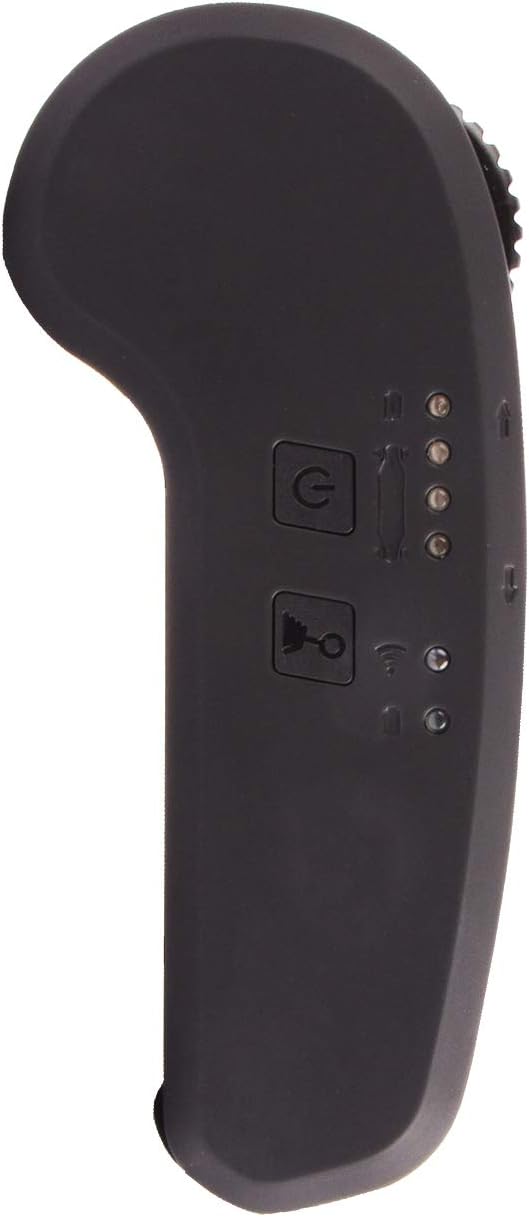
Image: The Bluetooth remote control, showing its buttons and indicators.
Video: A seller demonstrating how to charge the electric skateboard and its remote control.
3. Remote Pairing
The remote control and skateboard should automatically sync when both are powered on and fully charged. Ensure both devices have sufficient power for successful pairing.
Video: A seller demonstrating how to power on the skateboard and remote, and how they sync together.
Operating Instructions
1. Powering On/Off
- Skateboard: The skateboard can be powered on by simply rolling it or by manually pressing the power button located on the underside of the deck.
- Remote Control: Long-press the power button on the remote control to turn it on. To power off, long-press the power button again.
Video: A seller demonstrating how to power on the skateboard and remote, and how they sync together.
2. Speed Modes and Control
The remote control features four power modes, allowing you to adjust the speed according to your preference and skill level. These modes progressively increase in speed.
- Changing Modes: Short-press the power button on the remote to cycle through the four speed modes. Indicator lights on the remote will show the currently selected mode.
- Acceleration: Push the accelerator lever forward to increase speed.
- Braking: Pull the accelerator lever backward to engage the brake.
- Reverse: Long-press the reverse button on the remote. The indicator light will change to red, allowing you to move the skateboard backward using the accelerator lever.
Video: A seller demonstrating the remote control's functions, including power modes, acceleration, braking, and reverse.
3. Safety Guidelines
- Always wear appropriate safety gear, including a helmet, knee pads, and elbow pads.
- Ride in safe, open areas away from traffic and pedestrians.
- Familiarize yourself with the controls and different speed modes before attempting higher speeds.
- Be aware of your surroundings and potential obstacles.
- Avoid riding on wet or uneven surfaces, despite the IP55 rating, to prevent accidents.
- Do not exceed the maximum weight capacity of 200 lbs.
Video: A user demonstrating the skateboard, with a caption emphasizing the importance of wearing a helmet before use.
Maintenance
1. General Care
- Keep the skateboard clean and dry. Wipe down the deck and components with a damp cloth after use.
- Store the skateboard in a cool, dry place away from direct sunlight and extreme temperatures.
- Avoid exposing the skateboard to prolonged periods of moisture, despite its water resistance.
2. Battery Care
- Do not overcharge or completely drain the battery.
- If storing for an extended period, charge the battery to approximately 50-60% and recharge every 2-3 months.
- Use only the original charger provided with the skateboard.
3. Wheel and Truck Adjustment
The package includes an adjustable spanner for the wheels. Use this tool to ensure the wheels and trucks are properly tightened for optimal performance and safety. Adjust tightness to your preference for turning responsiveness.

Image: A detailed view of the skateboard's wheels and trucks, which can be adjusted for ride preference.
Troubleshooting
- Skateboard Not Powering On: Ensure the battery is fully charged. Try rolling the skateboard to activate it, or manually press the power button.
- Remote Not Pairing: Make sure both the skateboard and remote are fully charged and powered on. Bring them close together to facilitate pairing.
- Reduced Performance/Range: This may indicate a low battery charge. Ensure the battery is fully charged before use. Performance can also be affected by rider weight, terrain, and speed mode.
- Unusual Noises: Check wheels and trucks for any loose components or debris. Tighten as necessary using the provided spanner.
Specifications
| Feature | Specification |
|---|---|
| Brand | VOYAGER |
| Model Name | Neutrino Compact Electric Cruiser Skateboard with Bluetooth |
| Model Number | BOARD-3010P |
| Motor Power | 350W Brushless |
| Max Speed | 12.5 MPH |
| Max Range | Up to 7 Miles |
| Item Weight | 9.5 Pounds |
| Max Load Capacity | 200 lbs |
| Water Resistance | IP55 Rated |
| Wheel Size | 75 Millimeters |
| Wheel Material | Urethane (80A-85A Durometer Hardness) |
| Dimensions (LxWxH) | 30.2 x 7.1 x 12 inches |
| Power Source | Electric Battery |
| Age Range | Adult (suitable for teens) |
Warranty and Support
For warranty information, product support, or to purchase replacement parts, please refer to the official VOYAGER website or contact their customer service directly. Keep your purchase receipt as proof of purchase for any warranty claims.
Additional protection plans may be available for purchase from third-party providers. Please review their terms and conditions for coverage details.