
Zerone GSM 900/1800 MHz Fixed Wireless Terminal (FWT) User Manual
Model: Zeroner6sgbtuz4w-03
Brand: Zerone
1. Introduction
This manual provides detailed instructions for the installation, operation, and maintenance of your Zerone GSM 900/1800 MHz Fixed Wireless Terminal (FWT), Model Zeroner6sgbtuz4w-03. This device allows you to connect standard telephones or alarm systems to a GSM mobile network, effectively replacing a traditional landline. Please read this manual carefully before using the product to ensure proper functionality and safety.
2. Product Features
- LED Indicators: Equipped with 9 LED indicators to display signal strength and call status, providing clear visual feedback.
- Enhanced SIM Card Slot: Features an updated card slot design for easy visualization of the contact between the SIM card and chip, facilitating simple insertion and removal.
- Automatic Step-Down Circuit: Allows direct power supply from a 12V security alarm system, simplifying integration.
- Standard DTMF Recognition: Supports standard DTMF input recognition and display, which helps prevent dialing errors and missed numbers.
- Anti-Noise Design: Incorporates an anti-noise and anti-jamming circuit design for clear and stable communication.
- 24-Hour Operation: Built-in watchdog automatic detection ensures continuous 24-hour operation, preventing system crashes and missed calls.
- Strong Signal & Clear Voice: Utilizes an industrial wireless communication module with a high-quality signal enhancement antenna for robust signal reception and clear, stable voice quality.
3. Package Contents
Please verify that all the following items are included in your product package:
- Zerone GSM Fixed Wireless Terminal Unit
- Power Adapter
- Antenna
- Telephone Line Cable (RJ-11)
- User Manual
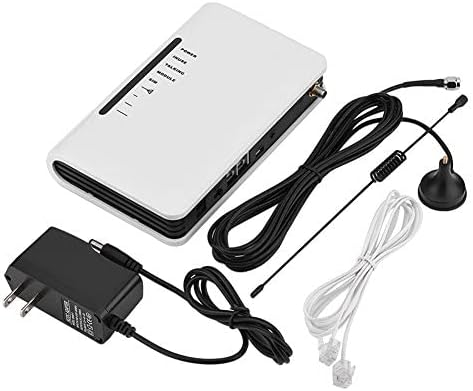
Image 3.1: Contents of the Zerone GSM Fixed Wireless Terminal package, including the main unit, power adapter, antenna, and telephone cables.
4. Setup Instructions
Follow these steps to set up your Zerone FWT:
- Prepare SIM Card: Before inserting, ensure your SIM card's PIN code is disabled. This can typically be done using a mobile phone. The device supports standard-sized SIM cards.
- Insert SIM Card: Locate the SIM card slot, usually on the underside or side of the unit. Carefully insert the prepared SIM card until it clicks into place. Ensure proper orientation.
- Connect Antenna: Screw the provided antenna into the SMA connector on the unit. Position the antenna vertically for optimal signal reception.
- Connect Telephones/Alarm System: Use standard RJ-11 telephone cables to connect your landline telephones or alarm system to the RJ-11 ports on the FWT. The device typically has two RJ-11 ports.

Image 4.1: Rear view of the Zerone FWT showing labeled ports including power interface, power button, USB upgrade interface, RJ-11 telephone ports, and reset button.

Image 4.2: Illustration of the Zerone FWT's RJ-11 ports connected to various communication devices such as corded and cordless telephones, and other communication products.
- Connect Power: Plug the power adapter into the DC IN port on the FWT, then connect the adapter to a suitable power outlet. The unit will power on automatically or via the power button.
5. Operating Instructions
Once the FWT is set up, it operates largely like a standard landline. The LED indicators provide important status information:
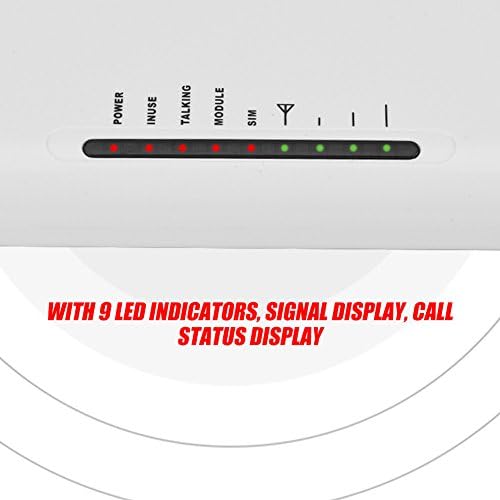
Image 5.1: Close-up view of the Zerone FWT's LED indicators, showing Power, In Use, Talking, Module, SIM, and signal strength lights.
- Power LED: Indicates if the device is powered on.
- Signal Strength LEDs: Multiple LEDs typically indicate the strength of the GSM signal. More lit LEDs mean a stronger signal.
- SIM LED: Indicates SIM card detection and registration status.
- Talking/In Use LED: Illuminates when a call is active.
To make a call, simply pick up the connected telephone handset and dial the number as you would with a regular landline. Incoming calls will ring on the connected telephones.
6. Maintenance
To ensure the longevity and optimal performance of your Zerone FWT, follow these maintenance guidelines:
- Keep the device in a dry, well-ventilated area, away from direct sunlight and extreme temperatures.
- Clean the exterior with a soft, dry cloth. Do not use liquid cleaners or abrasive materials.
- Ensure the antenna is securely connected and positioned for best signal reception.
- Avoid placing heavy objects on the unit.
- Periodically check all cable connections (power, telephone, antenna) to ensure they are secure.
7. Troubleshooting
If you encounter issues with your Zerone FWT, refer to the following common problems and solutions:
- No Dial Tone or Cannot Make Calls:
- Ensure the SIM card is correctly inserted and its PIN code is disabled.
- Check the signal strength LEDs. If the signal is weak or absent, try repositioning the antenna or the FWT unit.
- Verify that the telephone cable connecting your phone to the FWT is functional and securely plugged in. A faulty cable can prevent service.
- Confirm that your SIM card is active and has sufficient credit/plan for calls.
- Poor Call Quality or Dropped Calls:
- This often indicates a weak GSM signal. Try moving the FWT to a location with better reception or adjusting the antenna.
- Ensure there are no strong sources of electromagnetic interference nearby.
- Device Not Powering On:
- Check the power adapter connection to both the FWT and the wall outlet.
- Verify that the power outlet is functional.
- SIM Card Not Recognized:
- Ensure the SIM card is a standard size and inserted correctly.
- Confirm the SIM card is unlocked (not SIM-locked to a specific carrier) and its PIN is disabled.
- Regional Compatibility: This device operates on GSM 900/1800 MHz frequencies. Ensure these frequencies are supported by your local mobile network provider. Some regions or specific network configurations may not be fully compatible.
If problems persist after following these troubleshooting steps, please contact customer support.
8. Specifications
| Feature | Specification |
|---|---|
| Brand | Zerone |
| Model Number | Zeroner6sgbtuz4w-03 |
| ASIN | B07H96B26J |
| UPC / GTIN | 798382989982 |
| Color | White |
| Power Source | Wireless (via adapter) |
| Voltage | 12 Volts (DC) |
| Battery Composition | Lithium-ion (for backup) |
| Connectivity Technology | RJ-11 |
| Compatible Devices | Personal Computer, Tablet, Smartphone (for management, if applicable), Telephones, Alarm Systems |
| Installation Type | No professional installation required |
| Alert Type | Audio and motion (when connected to alarm systems) |
| Control Method | Application (if applicable) |
| Smart Home Compatibility | Not smart home compatible |
| Recommended Uses | Secure wireless access to telephone networks, such as in homes or small businesses. |
9. Warranty and Support
For warranty information and customer support, please refer to the documentation included with your purchase or contact the retailer where the product was acquired. Keep your proof of purchase for warranty claims.