
Harman Kardon Onyx5
Harman Kardon Onyx Studio 5 Bluetooth Wireless Speaker
User Manual
1. Introduction
Thank you for choosing the Harman Kardon Onyx Studio 5 Bluetooth Wireless Speaker. This manual provides essential information for setting up, operating, and maintaining your speaker. Please read it thoroughly before use to ensure optimal performance and longevity of your device.
The Onyx Studio 5 combines a distinctive design with superior acoustic performance, featuring a signature round silhouette, premium fabric cover, and an integrated aluminum handle for portability. It offers up to 8 hours of playtime and supports wireless dual sound for an enhanced listening experience.
2. Package Contents
Ensure all items are present in the box:
- 1x Harman Kardon Onyx Studio 5 Speaker
- 1x Power Adapter
- 1x Quick Start Guide (This manual provides more detail)
- 1x Safety Sheet
- 1x Warranty Card
3. Product Overview
3.1 Front View and Controls
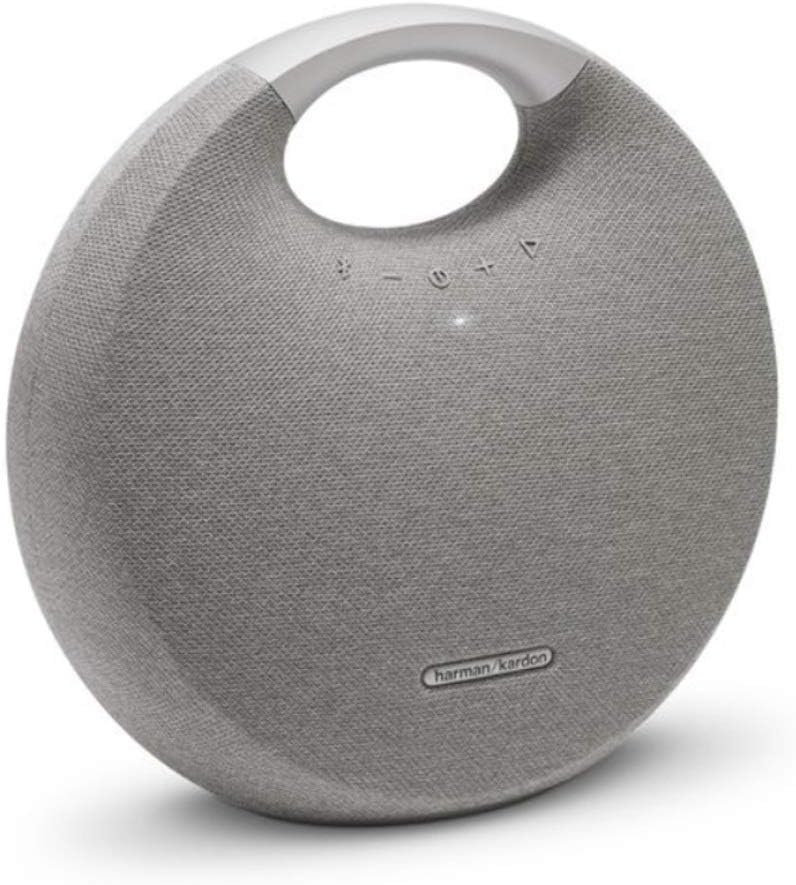
Image 1: Front view of the Harman Kardon Onyx Studio 5 speaker, showcasing the fabric-covered spherical design, integrated aluminum handle, and touch-sensitive control buttons on the top surface. The buttons include Bluetooth pairing, volume down, power, volume up, and wireless dual sound pairing.
- Bluetooth Button: Press to enter Bluetooth pairing mode.
- Volume Down Button: Decreases the volume.
- Power Button: Press to turn the speaker On/Off.
- Volume Up Button: Increases the volume.
- Wireless Dual Sound Button: Press to initiate wireless dual sound pairing with another Onyx Studio 5 speaker.
3.2 Rear View and Connections

Image 2: Rear view of the Harman Kardon Onyx Studio 5 speaker, showing the power input port and the 3.5mm auxiliary input port located at the bottom center of the speaker's back panel.
- Power Input: Connect the supplied power adapter here for charging and continuous power.
- AUX Input (3.5mm): Connect external audio devices using a 3.5mm audio cable (not supplied).
4. Setup
4.1 Charging the Battery
Before first use, fully charge the speaker's battery. The rechargeable battery supports up to 8 hours of playtime on a full charge.
- Connect the supplied power adapter to the Power Input port on the rear of the speaker.
- Plug the power adapter into a wall outlet.
- The LED indicator around the power button will show charging status. It will turn solid white when fully charged.
Note: The speaker can be used while charging.
4.2 Powering On/Off
- To turn on: Press the Power Button. The LED indicator will light up.
- To turn off: Press and hold the Power Button until the LED indicator turns off.
5. Operating Instructions
5.1 Bluetooth Pairing
The Onyx Studio 5 can connect wirelessly to up to two smart devices simultaneously.
- Turn on the Harman Kardon Onyx Studio 5 speaker. The Bluetooth indicator will blink blue, indicating it's in pairing mode.
- On your smart device (smartphone, tablet, computer), enable Bluetooth and search for available devices.
- Select "Harman Kardon Onyx Studio 5" from the list of devices.
- Once connected, the Bluetooth indicator on the speaker will turn solid blue. You can now stream audio wirelessly.
To pair a second device: Press the Bluetooth Button on the speaker to re-enter pairing mode. The first connected device will remain connected while the second device pairs.
5.2 Wireless Dual Sound (WDS)
Wirelessly connect two Harman Kardon Onyx Studio 5 speakers for an elevated stereo sound experience.
- Ensure both Onyx Studio 5 speakers are powered on and not currently connected to any Bluetooth device.
- On one speaker, press the Wireless Dual Sound Button. The button's LED will start blinking.
- Within 30 seconds, press the Wireless Dual Sound Button on the second speaker.
- Once connected, the WDS button LEDs on both speakers will turn solid white.
- Now, connect your smart device to either of the two speakers via Bluetooth (refer to 5.1 Bluetooth Pairing). Audio will play through both speakers.
Note: WDS is designed for two Onyx Studio 5 speakers only. It does not create a true stereo separation (left/right channel), but rather plays the same audio from both speakers for a fuller sound.
5.3 Using the AUX Input
For devices without Bluetooth, you can use a 3.5mm audio cable (not included).
- Connect one end of a 3.5mm audio cable to the AUX Input port on the rear of the Onyx Studio 5.
- Connect the other end of the cable to the headphone jack or audio output of your external device.
- The speaker will automatically switch to AUX mode when a cable is detected.
5.4 Speakerphone Function
The Onyx Studio 5 features an integrated microphone for hands-free calls when connected via Bluetooth.
- Answer Call: Press the Bluetooth Button once.
- End Call: Press the Bluetooth Button once.
- Reject Call: Press and hold the Bluetooth Button for 2 seconds.
6. Maintenance
- Cleaning: Use a soft, dry cloth to clean the speaker's surface. Do not use abrasive cleaners or solvents.
- Storage: If storing for an extended period, fully charge the battery every 3 months to maintain battery health. Store in a cool, dry place away from direct sunlight and extreme temperatures.
- Water Resistance: The Onyx Studio 5 is NOT waterproof. Avoid exposure to water or excessive moisture.
- Handle with Care: The integrated aluminum handle is designed for portability. Avoid dropping the speaker or subjecting it to strong impacts.
7. Troubleshooting
| Problem | Possible Cause | Solution |
|---|---|---|
| No power | Battery is depleted; Power adapter not connected properly. | Charge the speaker using the supplied power adapter. Ensure the adapter is securely plugged into both the speaker and a working wall outlet. |
| No sound | Volume is too low; Device not paired; AUX cable not connected; Speaker is muted. | Increase volume on both the speaker and the connected device. Re-pair Bluetooth device. Ensure AUX cable is fully inserted. Check if the device is muted. |
| Bluetooth pairing fails | Speaker not in pairing mode; Device too far; Interference; Previous connection issue. | Press the Bluetooth button on the speaker to enter pairing mode. Move device closer to speaker (within 10 meters). Turn off other Bluetooth devices. Forget "Harman Kardon Onyx Studio 5" from your device's Bluetooth list and try pairing again. |
| Wireless Dual Sound fails | Speakers not in WDS pairing mode; Speakers too far apart. | Ensure both speakers are not connected to any Bluetooth device. Press the WDS button on both speakers within 30 seconds. Keep speakers within close proximity during pairing. |
| Poor audio quality via Bluetooth | Interference; Device too far; Low battery. | Move speaker closer to the source device. Avoid obstacles between speaker and device. Ensure speaker battery is sufficiently charged. |
If the problem persists, please contact Harman Kardon customer support.
8. Specifications
| Feature | Detail |
|---|---|
| Model Name | Onyx5 |
| Speaker Type | Regular, Portable Bluetooth Speaker |
| Connectivity Technology | Bluetooth 4.2 |
| Audio Output Mode | Stereo |
| Speaker Maximum Output Power | 50 Watts |
| Frequency Response | 50Hz – 20kHz |
| Battery Life | Up to 8 hours (varies with volume and content) |
| Dimensions (W x D x H) | 11.2 x 11.5 x 5 inches (28.4 x 29.2 x 12.7 cm approx.) |
| Item Weight | 9 pounds (4.08 kg approx.) |
| Power Source | Battery Powered (1 Lithium Ion battery required) |
| Color | Gray |
| Material | Aluminum, Fabric |
| Wireless Dual Sound | Yes (connects two Onyx Studio 5 speakers) |
| Speakerphone | Yes |
| Waterproof | No |
9. Warranty and Support
9.1 Warranty Information
The Harman Kardon Onyx Studio 5 comes with a Limited Warranty. Please refer to the included Warranty Card in your package for specific terms, conditions, and duration of coverage. Keep your proof of purchase for warranty claims.
Warranty Type: Limited Warranty
9.2 Customer Support
For technical assistance, troubleshooting beyond this manual, or warranty inquiries, please contact Harman Kardon customer support. Visit the official Harman Kardon website for the most up-to-date contact information and support resources.
Manufacturer: Harman Kardon
Website: www.harmankardon.com
Related documentsOnyx5


Ask a question about this manual
Ask about setup, troubleshooting, compatibility, parts, safety, or missing instructions. Manuals+ will review the question and use this page’s manual context to help answer it.